I have an elderly relative that I’m thinking of installing some of the spotlight cams for and I just have a few questions. I read thru the documentation but it wasn’t entirely clear to me. So for the professionally monitored camera where there is a human looking at the feed and that person can take action if they think there is a break in - in progress, like call the police, how does the work flow work? Do the cameras have to be “armed” for them to be professionally monitored or are they professionally monitored all the time? I have one of the spotlight cams and get the AI deterrence part. Thanks!
Cameras utilizing Surety Cam Pro will only send over a signal when the recording rule is armed. Users need to ensure that Cam Pro rules are set up to be active during a specific time of day and/or based on the arming status of your alarm system. When the rule is active and for how long is determined by the user and can vary depending on your specific needs.
When the Cam Pro recording rule is armed, and a person is detected by Alarm.com’s video analytics, the video is run through a secondary person-detection check, and a signal is then sent to the monitoring center. Monitoring center operators will review recorded clips and/or live view to determine whether criminal activity is occurring. If they observe suspicious or criminal activity on site, operators can activate the camera’s siren and use two-way talkdown through the speaker on compatible cameras to deter any criminal activity. They will also dispatch the authorities, advising them of the activity seen, and call the contact list to notify them of what’s going on.
More about Surety Cam Pro can be found below:
Please let us know if you have any other questions.
Ok - that makes sense. As far as arming goes, she would just arm them through the app like you would with a traditional alarm panel? Thanks for the speedy response?
Yes, an arming card is available in the Alarm.com app where you can see the status and disarm or re-arm camera monitoring rules. An example can be viewed below:
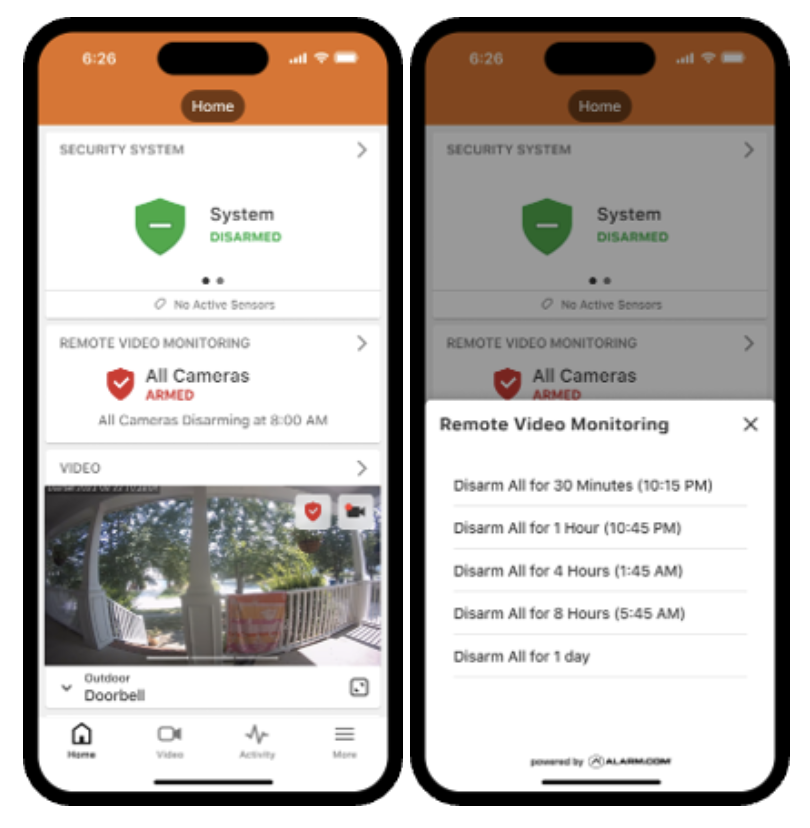
Lastly (hopefully) is it hard for us to control her account / cameras thru our alarm.com account ? Can I install cameras at another site / home and add them to my account and apply policy to them or is it easier to have a separate alarm.com account for them. The challenge here is my mother in law is very non tech savoy and will need help arming and disarming along with other things.
And really lastly, what is the easiest way to display the camera fees thru a display like on the kitchen counter. She can’t really use and app so it would just have to be a display she can walk by etc and look at. I saw some posts about android tv, fire stick, nvr hdmi display etc. she also really can’t log into a web browser
Thanks !
As a monitored video plan you would need a new Alarm.com account for them, so that it has its own monitroing account, call list, monitored address. This would need to be its own account.
You could set it up so that you have login access as well to the account. This could be done by either linking your existing login credentials to the new account so that they can access both, via the steps in the guide below, or you could create multiple logins on the new account. Either would allow you to help with arming, and you could purchase and manage it via your Suretyhome.com login.
I saw some posts about android tv, fire stick, nvr hdmi display etc. she also really can’t log into a web browser
I am linking a guide below on displaying video continuously. The SVR option would give you 24/7 recording as well as an easier method of viewing the video stream through HDMI.
Thanks for all the info. Very helpful.