An Ecolink GDZW7-LR and a compatible Garadget Dry Contact Adapter let you control a LiftMaster or Chamberlain MyQ garage door opener through Alarm.com. The Ecolink connects to your alarm panel by Z-Wave, and the Garadget adapter connects the Ecolink’s relay output to the garage door opener.
This guide covers the overall setup. Follow the Ecolink GDZW7-LR installation manual and the installation instructions on your Garadget adapter’s product page for mounting, pairing, and detailed procedures.
Why Is the Garadget Adapter Needed?
The Ecolink has built-in wireless control that works with older Security+ 2.0 garage door openers. However, Ecolink has reported inconsistent compatibility with openers manufactured in 2023 and later. A change to the Security+ 2.0 wireless protocol appears to be responsible, although that explanation has not been confirmed by Chamberlain.
If the Ecolink’s built-in wireless control works reliably with your Security+ 2.0 opener, you do not need an adapter. If it does not, a compatible Garadget adapter provides another way to control the opener. See the Security+ 2.0 compatibility notes and related support discussion.
The Ecolink’s built-in wireless control is not compatible with Security+ 3.0. For these openers, use a compatible Garadget Security+ 3.0 adapter.
Security+ openers expect commands from a compatible wall control or remote, so simply connecting the Ecolink’s dry-contact relay to their wall-control terminals is not a substitute. Garadget adapters use a native LiftMaster wall control or remote with added dry-contact input wires. The Ecolink momentarily closes its relay, effectively pressing the adapter’s button, and the adapter sends the command the opener understands. Garadget adapter details
Choose the Correct Garadget Adapter
Match the adapter to your opener’s Security+ version, then choose a wired or wireless connection to the opener. Confirm compatibility in the opener’s manual and the linked Garadget instructions before ordering.
Customers have reported issues using the GDZW7-LR relay with the wired Garadget adapters. Currently, we only recommend using the wireless Garadget adapters. We’re working through the problem and will update when a solution is found for the wired adapters.
| Opener protocol | Learn button | Wired adapter | Wireless adapter |
|---|---|---|---|
| Security+ 2.0 | Yellow | Security+ 2.0 Wired Dry Contact Adapter | Security+ 2.0 Wireless Dry Contact Adapter |
| Security+ 3.0 | White | Security+ 3.0 Wired Dry Contact Adapter | Security+ 3.0 Wireless Dry Contact Adapter |
Both adapter types wire to the Ecolink. “Wired” and “wireless” describe how the Garadget adapter communicates with the garage door opener.
A wireless adapter avoids running a cable to the opener and it works reliably as is with the GDZW7-LR. A wired adapter avoids having to change the batteries (it’s powered by the opener), works when lock mode is enabled, but doesn’t work reliably out of the box with the GDZW7-LR.
What You Need
- An Ecolink GDZW7-LR, its power supply, and its included door-position tilt sensor.
- A Garadget Dry Contact Adapter matched to your opener.
- An Alarm.com-compatible alarm panel that supports the Ecolink controller, with garage door control enabled on your service plan.
Confirm panel and service compatibility with your provider before purchasing. The Ecolink is not compatible with the 2GIG GC2 or GC2e. See compatibility notes.
Set Up the Ecolink Controller
Add the Ecolink to your alarm panel’s Z-Wave network using Z-Wave Long Range (LR) if possible. Activate and mount the included tilt sensor, then mount the controller as instructed. The tilt sensor reports whether the door is open or closed.
Use the Ecolink’s wired relay connection for this installation, even if you selected a wireless Garadget adapter. You do not need to pair the Ecolink’s built-in Security+ transmitter to the opener when using the adapter.
Connect the Garadget Adapter
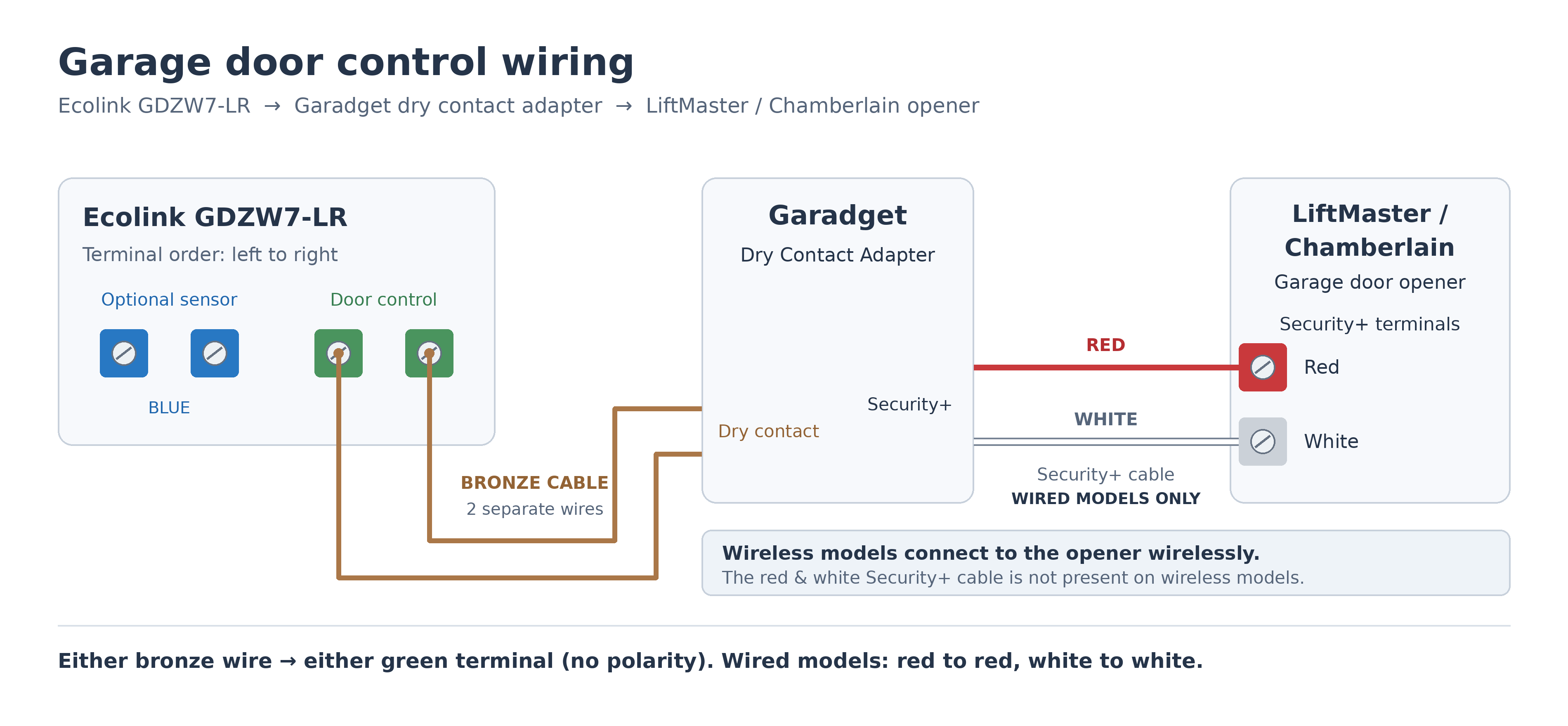
Connect the adapter to the opener
Wired Garadget models: With opener power disconnected, connect the adapter’s red and white Security+ wires to the corresponding wall-control terminals specified by the adapter and opener instructions. Keep the existing wall-control wiring connected. Restore power and complete the adapter’s setup or synchronization procedure.
Wireless Garadget models: Pair the adapter to the opener using Garadget’s linked remote-control instructions. These models do not have a red and white Security+ cable to the opener.
For either type, initially keep the bronze dry-contact wires separate and unconnected. Test the adapter’s own button to confirm it operates the door before connecting it to the Ecolink. The product pages in the table above include the installation instructions.
Connect the adapter to the Ecolink
Connect the two bronze dry-contact wires from the Garadget adapter to the Ecolink’s two green door-opener relay output terminals on the right, one wire per terminal. Either bronze wire can go to either green terminal. This connection has no polarity.
The two blue terminals on the left are for an optional wired door-position sensor. Connect the Garadget to the green relay terminals, not the blue sensor terminals. Keep the adapter near the Ecolink and follow Garadget’s cable-length instructions; the wired adapters’ bronze leads should not be extended.
Test Control Through Alarm.com
Follow the Ecolink manual’s system test procedure. First operate the door through a complete open-and-close cycle using the existing wall button to calibrate the controller’s sensors. Then test opening and closing from Alarm.com while the door is in view and its path is clear.
Confirm that the door’s reported status matches its actual position, the Ecolink’s warning light and beeper operate during the closing test, and the original wall control and remotes still work.
If the door status updates but the door does not move, test the Garadget’s own button first. If that fails, check adapter pairing and opener compatibility. If the adapter works independently, check the connection to the Ecolink’s relay output and review the Ecolink troubleshooting instructions.
Other Tips for a Reliable Setup
Use Z-Wave Long Range When Possible
If your Alarm.com control panel supports Z-Wave Long Range (LR), we recommend using it for the Ecolink. Traditional Z-Wave works, but a garage door controller is often far from the panel and separated from it by exterior walls. LR’s greater range gives it a better chance of maintaining a reliable connection in that location.
Enroll the Ecolink using SmartStart in Long Range mode. Traditional Z-Wave inclusion adds it as a mesh device, even when both the controller and panel support LR. See Z-Wave Long Range in Alarm.com for panel compatibility and enrollment details.
Improve Door-Position Sensor Reliability
The older GDZW7-ECO had a less reliable door-position sensor than the newer GDZW7-LR. If you have a GDZW7-ECO and experience sensor problems, consider upgrading to the GDZW7-LR. If your GDZW7-ECO is still under warranty, contact support to troubleshoot the issue and check whether it qualifies for replacement.
For the most reliable door-position sensing, we recommend a GRI 4532L wired garage door contact. Connect it to the Ecolink’s optional door-sensor input, the two blue terminals on the left, and follow the external-contact setup procedure in the Ecolink installation manual. Once configured, the wired contact replaces the wireless tilt sensor for door-position reporting. The Garadget adapter remains connected to the green door-control terminals on the right.