Z-Wave Long Range (Z-Wave LR) is the biggest change to Z-Wave since Z-Wave Plus. Instead of relaying signals from node to node across a mesh, Z-Wave LR talks directly between your panel and each device, dramatically extending range, boosting battery life, and scaling to thousands of devices. Here we cover what Z-Wave LR is, how it differs from traditional Z-Wave, how it compares to PowerG, what hardware is required, and the trade-offs you should understand when deciding whether to use it.
What Is Z-Wave Long Range?
Z-Wave LR is an extension of the Z-Wave standard. It runs on the same sub-GHz frequency band as regular Z-Wave (around 908 to 920 MHz in the U.S.), so it doesn’t suffer the congestion of 2.4 GHz Wi‑Fi and Zigbee, but it changes the fundamentals of how devices communicate.
The headline improvements are:
-
Much greater range: up to roughly 1.5 miles line-of-sight, versus a couple hundred feet for a single standard Z-Wave hop.
-
Massive scalability at the protocol level: Z-Wave LR uses 12-bit addressing to support up to 4,000 nodes, compared to the 232-node limit of a traditional Z-Wave mesh. That 4,000 figure is the specification’s ceiling, not a number you’ll reach on Alarm.com, since the control panel enforces much lower per-category limits (see Device Limits on Alarm.com below).
-
Longer battery life: dynamic power control lets a device use only as much radio power as it needs to reach the panel, enabling up to ten years of battery life on a single coin cell for low-traffic devices.
-
Simple enrollment: Z-Wave LR devices are added with SmartStart by scanning the device’s QR code, rather than putting the panel into a learn/inclusion mode.
The catch is that Z-Wave LR achieves this by abandoning the mesh.
Mesh vs. Star: The Core Difference
The most important thing to understand about Z-Wave LR is its network topology.
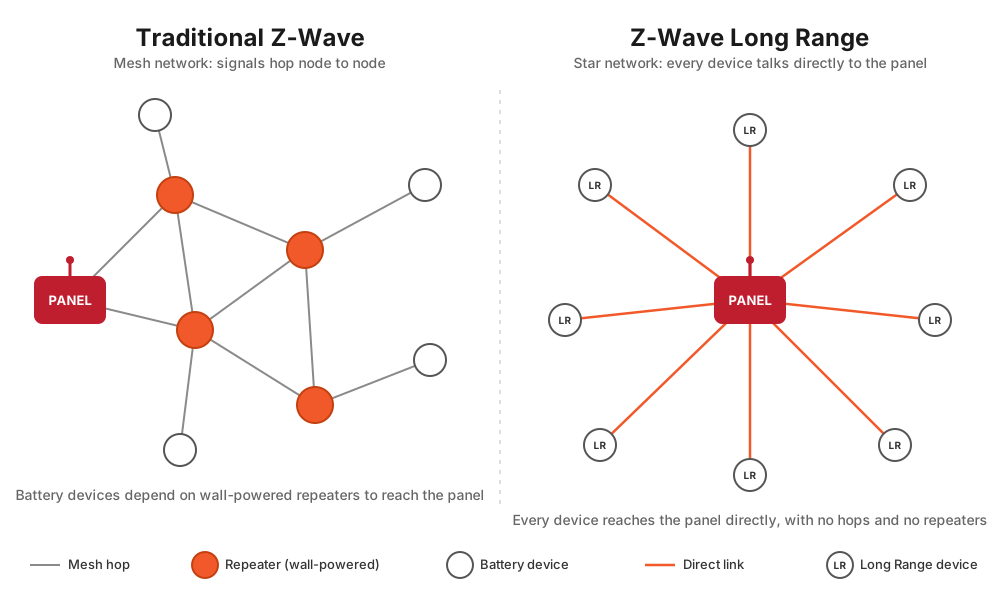
Traditional Z-Wave is a mesh network. The panel and all the wall-powered (always-on) devices form a web. A signal can “hop” from the panel through one or more powered devices, such as light switches, plug-in modules, and powered thermostats, to reach a device that’s too far away to talk to the panel directly. Every powered Z-Wave device acts as a repeater, and the mesh heals and re-routes itself as you add devices. The more powered devices you have, the stronger and more far-reaching the mesh becomes.
Z-Wave LR is a star network. Every Z-Wave LR device talks directly to the panel, and only to the panel. There are no hops. Coverage comes entirely from the raw range of the radio (which is very high) rather than from relaying through other devices.
This distinction leads to two consequences that are easy to miss and frequently cause confusion:
Z-Wave LR Nodes Do Not Repeat, Even Powered Ones
In a traditional mesh, plugging in a powered device like a light switch or outlet module improves your whole network because it adds another repeater. That is not true for Z-Wave LR. A Z-Wave LR device never repeats or relays signals for any other device, even if it’s a wall-powered device that sits there with full power available 24/7. Each LR device is an endpoint that communicates only with the panel.
So if you’ve gotten used to “drop in a few plug-in switches to strengthen the mesh,” that strategy does nothing for Z-Wave LR devices. An LR device extends your reach only because its own radio reaches the panel from far away, not because other devices help it along.
Z-Wave LR Devices Cannot Be Directly Associated
Traditional Z-Wave supports direct association, where one device is configured to control another device directly, device-to-device, without the panel being involved in the moment (for example, a scene controller or remote switch directly toggling a load). This works because mesh devices can talk to each other.
Z-Wave LR devices cannot be directly associated with other devices. Because every LR device only talks to the panel, there is no device-to-device path for association to use. LR devices also do not communicate with traditional Z-Wave nodes. If your use case depends on direct association, meaning instant, local, device-to-device control independent of the hub, that device should be added as a traditional mesh device, not in LR mode. With Alarm.com, automations and scenes are usually orchestrated by the panel and the platform anyway, so this limitation affects fewer Surety customers than it might on a hobbyist hub, but it’s important to know it exists.
How Z-Wave LR Differs From Traditional Z-Wave
| Traditional Z-Wave (mesh) | Z-Wave Long Range (star) | |
|---|---|---|
| Topology | Mesh, signals hop node to node | Star, every device talks directly to the panel |
| Range | ~100 ft indoors per hop; coverage extended by repeaters | Up to ~1.5 miles line-of-sight, direct to panel |
| Max devices (protocol limit) | 232 nodes | Up to 4,000 nodes |
| Repeating | Powered devices repeat and strengthen the mesh | No device repeats, not even powered ones |
| Direct association | Supported (device-to-device) | Not supported |
| Battery life | Good | Excellent, with dynamic power control |
| Enrollment | Inclusion mode or SmartStart | SmartStart QR scan only |
| Self-healing mesh / Rediscovery | Yes, included in Z-Wave Rediscovery | LR nodes skipped during Rediscovery (link quality still reported) |
A few items deserve extra explanation.
Dynamic Power Control
Z-Wave LR devices adjust their radio transmit power on every transmission. A device sitting close to the panel sends at low power; a device far away ramps up. The specification supports output up to 30 dBm, with around +14 dBm typical for battery devices and +20 dBm for wall-powered devices. The practical payoff is twofold: batteries last longer because the radio isn’t blasting at full power when it doesn’t need to, and the same device can be reliable whether it’s in the next room or across a large property.
Rediscovery Behavior
Z-Wave Rediscovery is the process that rebuilds and optimizes the mesh routing table. Because Z-Wave LR devices aren’t part of the mesh and don’t have routes to optimize, they are skipped during Rediscovery. They aren’t lost. Alarm.com still reports link quality for LR nodes for troubleshooting; they simply aren’t remapped the way mesh nodes are.
Backward Compatibility
Z-Wave LR is backward compatible. A single Alarm.com panel can run both a traditional Z-Wave mesh and Z-Wave LR devices at the same time. Adding LR devices doesn’t break your existing mesh, and you can mix and match based on what each device is for.
Device Limits on Alarm.com
The 4,000-node number above is the Z-Wave LR specification’s theoretical maximum, not a limit you’ll reach in practice. Your Alarm.com panel enforces its own, much lower limits, and these apply to Z-Wave devices whether they’re traditional mesh or Long Range. On the Qolsys IQ Panel 4 and IQ Panel 5, the caps by category are:
- Lights: 80
- Door locks: 20
- Thermostats: 40
- Other / miscellaneous Z-Wave devices: 21
- Garage door openers: 6
Separately, Alarm.com pushes only up to 122 unique Z-Wave devices to its servers for remote control through the app and website. Devices beyond that limit remain usable locally at the panel but won’t appear in the Alarm.com app. Alarm.com also recommends keeping the number of Z-Wave thermostats low (around five) for best performance, even though the category cap is higher.
The takeaway: Z-Wave LR’s large address space is a real architectural advantage of the technology, but for a typical Alarm.com installation the practical ceiling is set by these panel limits, not by the protocol.
Z-Wave LR vs. PowerG
Surety customers often ask how Z-Wave LR compares to PowerG, since both are “long-range” technologies in the Alarm.com world. These two are genuinely comparable, and in some ways they’re competing technologies. Both use a direct, point-to-point architecture where each device talks straight to the panel rather than hopping through a mesh, both reach far across a property, and both can handle the same kinds of devices.
PowerG is a proprietary wireless protocol from DSC, used by IQ Security (Qolsys) and DSC systems. It uses 128-bit AES encryption along with Frequency Hopping Spread Spectrum (FHSS) and synchronized TDMA communication, giving it resistance to jamming, interference, and replay/relay attacks, with an open-air range rated up to about 2 km (roughly 6,000 ft). PowerG is best known for security and life-safety sensors (door/window contacts, motion, glass-break, smoke), but it is not limited to them. There are PowerG home automation devices too, so PowerG spans both sensors and automation.
Z-Wave LR is an open standard with a huge multi-vendor ecosystem. On Alarm.com it’s used for home automation devices such as locks, lights, switches, plugs, thermostats, garage controllers, water valves, and energy meters.
| PowerG | Z-Wave Long Range | |
|---|---|---|
| Architecture | Direct to panel (star) | Direct to panel (star) |
| Type | Proprietary (DSC & IQ Security / Qolsys) | Open standard (Z-Wave Alliance) |
| Range (open air) | Up to ~2 km (~6,000 ft) | Up to ~1.5 miles line-of-sight |
| Security | 128-bit AES, FHSS, TDMA | S2 security; AES-128 |
| Device types | Security/life-safety sensors and automation | Automation devices (locks, lights, etc.) |
| Ecosystem | Single-vendor (DSC/Qolsys) | Large multi-vendor ecosystem |
| Repeaters | Optional PowerG repeater doubles range | No repeating; direct-to-panel only |
| Use for security sensors on Alarm.com | Yes | No |
| Use for smart home devices on Alarm.com | Yes | Yes |
Hardware Requirements: What You Need for Z-Wave LR
Z-Wave LR has firm requirements on both ends of the connection.
The Panel / Controller
Your Alarm.com panel must be Z-Wave LR-capable. The panel needs a 700-series Z-Wave chip or newer and SDK version 7.15 or higher, plus current firmware. In practice this means a reasonably current 2GIG EDGE or Qolsys IQ Panel 4 / IQ Panel 5 family panel on up-to-date software. See the compatibility article for the exact panels and minimum software versions.
The Device
The device itself must also be Z-Wave LR-capable.
A common point of confusion: “800-series chip” and “Z-Wave LR” are not the same thing. Z-Wave LR is a capability/mode, not a chip generation. Most new Z-Wave LR devices on the market today use 800-series chips, and LR is possible on some 700-series chips, but a device having an 800-series chip does not automatically guarantee it can operate in LR mode. What matters is whether the device actually supports and enrolls in LR mode.
For a list of specific devices verified to work in Z-Wave LR mode with Alarm.com and Surety, see Alarm.com Z-Wave Long Range (LR) Compatibility.
You Must Enroll With SmartStart
Even when both the panel and the device support Z-Wave LR, the device only joins as a Long Range node if you enroll it using SmartStart by scanning the device’s QR code. If you add the same hardware through traditional Z-Wave inclusion (learn mode), it joins the classic mesh as a normal Z-Wave device, not as an LR node, even though the hardware is LR-capable. When enrolling with SmartStart, you can optionally choose traditional/mesh mode, but most LR-capable devices default to Long Range mode.
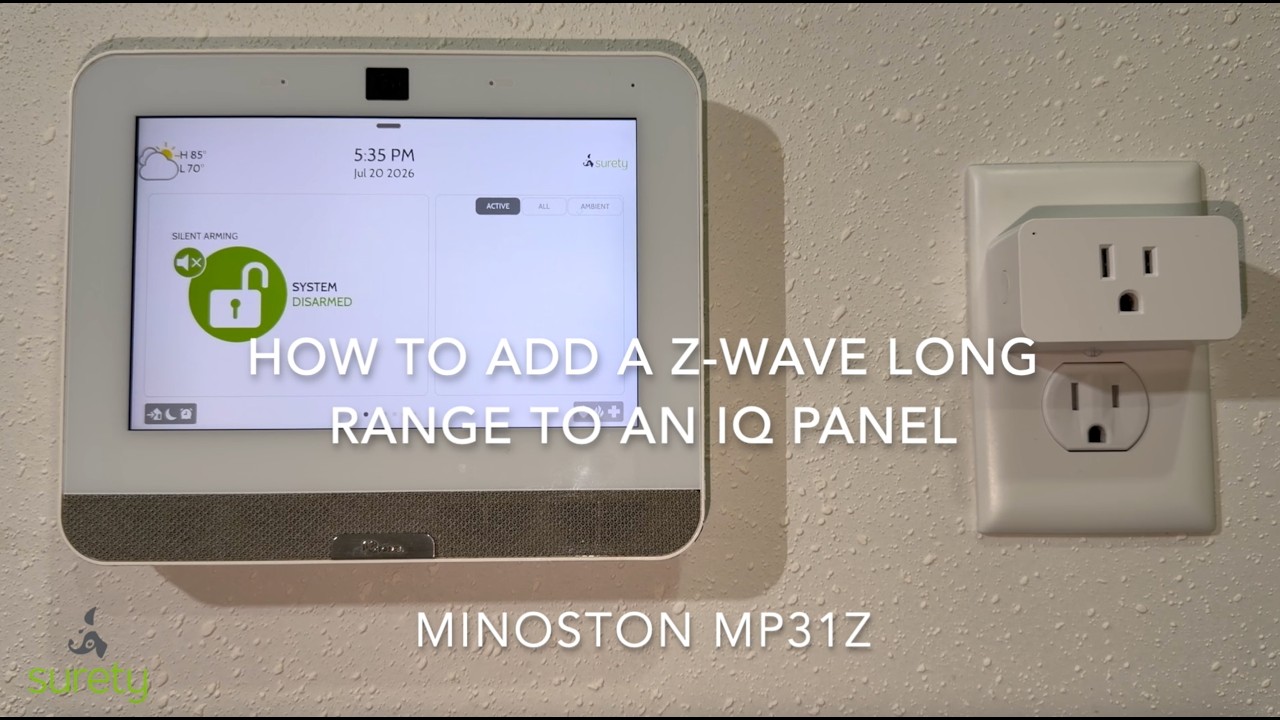
To switch a device between LR and non-LR after it’s already enrolled, you have to delete it and re-add it, since the mode is chosen at enrollment.
Pros and Cons: Z-Wave LR vs. Traditional Mesh
Here are the pros and cons of using Z-Wave Long Range.
Advantages of Z-Wave LR
-
Far greater range without adding repeaters, ideal for outbuildings, gates, garages, detached structures, and large lots.
-
No dependence on mesh quality. A device’s reliability depends only on its own link to the panel, not on whether there happen to be enough powered devices in between. This removes a whole class of “the mesh is weak in that part of the house” problems.
-
Large address space at the protocol level (up to 4,000 nodes), though in practice your usable device count is set by your Alarm.com panel’s limits, not the protocol. See Device Limits on Alarm.com.
-
Longer battery life typically, even though “long range” sounds like it should drain batteries faster, not slower. The key is dynamic power control. An LR device transmits at only the power level actually needed to reach the panel, so a device sitting close by sends at very low power and only ramps up toward maximum when it’s actually far away. A traditional Z-Wave device, by contrast, transmits at a fixed power level every time regardless of distance. Just as important, an LR device reaches the panel in a single direct hop, whereas a mesh device’s message may be relayed through several nodes, with acknowledgments and retries at each step that all cost energy. So while LR is capable of long-range, high-power transmission, in practice it spends most of its time sipping power on short, direct, efficient exchanges, which is how LR devices can reach up to roughly ten years on a coin cell.
-
Backward compatible, coexisting with your existing Z-Wave mesh on the same panel.
Disadvantages / Trade-offs of Z-Wave LR
-
LR devices don’t repeat. They add zero coverage for any other device. A network made entirely of LR devices has no mesh to fall back on; every device stands or falls on its own direct link to the panel.
-
No direct association. Device-to-device direct control without the hub isn’t possible for LR devices.
-
No mesh self-healing for LR nodes. LR nodes are skipped in Z-Wave Rediscovery; there are no alternate routes to heal because every path is a direct one. In practice this usually doesn’t hurt LR performance, because devices can communicate well from far away, so you don’t need alternative routes.
-
Smaller (but growing) device selection. Fewer devices support LR mode on Alarm.com than support traditional Z-Wave, and not every 800-series device qualifies.
The reverse is also true: a traditional mesh shines when you have many powered devices close together that benefit from repeating and self-healing, and when you need direct association. But it’s limited to 232 nodes and about a hundred feet per hop, and weak spots in the mesh can be frustrating to chase down.
When Should You Use Z-Wave LR vs. Traditional Z-Wave?
There’s no universal answer. It depends on a number of factors: whether the device supports LR mode in the first place, where it lives relative to the panel, whether you want it to act as a repeater for your mesh nodes, whether you rely on direct association, and how much you want to deal with building and maintaining a mesh network. Some practical guidance:
Reach for Z-Wave LR when:
-
You want simplicity and less maintenance. This is one of the biggest advantages of LR. Because every device connects directly to the panel, there’s no mesh to carefully build out and no mesh to break when you move or remove a device. You don’t have to think about repeater placement, routing, or healing the network. If you want a setup that’s easy to build and largely maintenance-free, LR is the simpler path.
-
You want maximum battery life out of a battery-powered device like a lock or battery-powered thermostat (with no C-wire).
-
The device is far from the panel, such as a detached garage, a gate or garage controller, an outbuilding, a shop, the far end of a large property, or outdoor lighting at the property edge.
-
You’re on a large property where building out a reliable mesh would otherwise require scattering repeaters around.
-
The device is on the supported/verified LR list and you don’t need direct association for it.
Use traditional Z-Wave (mesh) when:
-
You want your powered devices to strengthen the network for everything else. In a typical house, a healthy mesh of switches and plugs benefits all your mesh devices.
-
You rely on direct association for instant, local device-to-device control.
-
You have devices that don’t support LR mode and need a mesh network.
Our recommendation: decide early which approach you’ll use. If you don’t have a specific reason to use mesh, we recommend using Z-Wave LR for all of your devices, for the simplicity, reliability, battery efficiency, and minimal maintenance described above. If you do have a good reason to use mesh, such as including older devices that don’t support LR or relying on direct associations, then commit to building out a sufficiently strong mesh network with enough wall-powered repeating devices to keep it reliable. The one thing to avoid is drifting into a half-built mesh by accident: a handful of mesh devices with too few repeaters gives you the maintenance burden of a mesh without the robustness it’s supposed to provide.
That being said, there’s nothing wrong with using both LR and mesh in the same system, as long as you ensure a sufficiently strong mesh network for your mesh devices.
Frequently Asked Questions
Do I need to replace my whole system to use Z-Wave LR?
No. Z-Wave LR coexists with your existing Z-Wave mesh on the same panel, as long as your panel is LR-capable. Add LR devices where they make sense and leave the rest alone.
If I add a Z-Wave LR plug or switch, will it improve my Z-Wave coverage?
No. Z-Wave LR devices never repeat for other devices, even when wall-powered. If you specifically want a device to act as a repeater and strengthen coverage, add it as a traditional mesh device instead.
My device has an 800-series chip. Does that mean it runs Z-Wave LR on Alarm.com?
Probably, but not necessarily. 800-series is a chip generation; Z-Wave LR is a mode. The device must actually support LR and be enrolled via SmartStart, and Alarm.com support varies by device. Check the compatibility list.
I added an LR-capable device but it doesn’t seem to be in LR mode.
It was probably added through normal inclusion rather than SmartStart. The mode is chosen at enrollment, so delete the device and re-add it by scanning its QR code with SmartStart.
Is Z-Wave LR more secure than regular Z-Wave?
Z-Wave LR uses S2 security and offers improved overall performance. For security/life-safety sensors, though, PowerG is the security-grade choice on Alarm.com.
For the maintained list of panels and devices verified to work in Z-Wave LR mode with Surety and Alarm.com, see Alarm.com Z-Wave Long Range (LR) Compatibility.