GPS Fleet Tracking & Management for Small & Mid-Size Business - Powered by Alarm.com
Overview
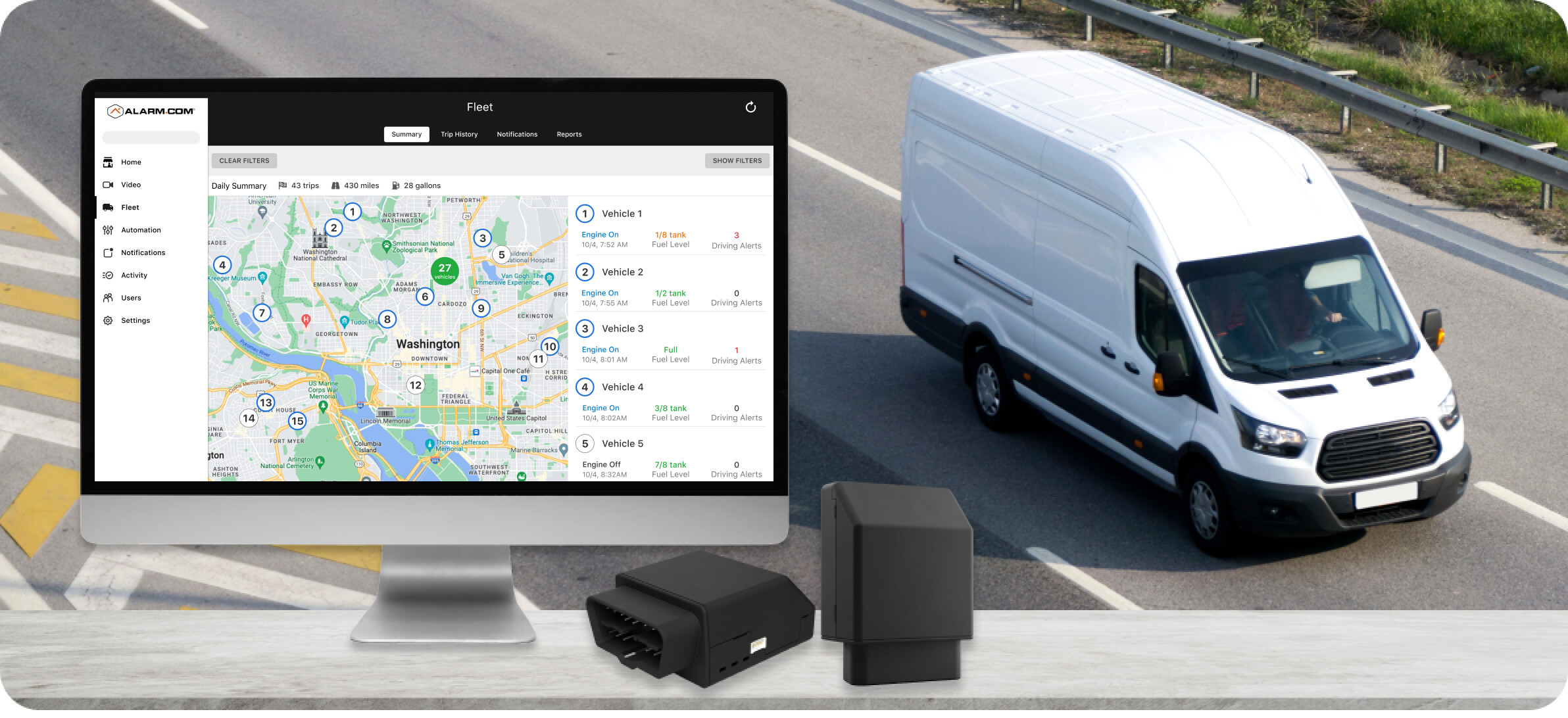
Surety Business Fleet is a cloud-based GPS fleet tracking and management service powered by Alarm.com Connected Fleet. It gives small business owners real-time visibility into their vehicles with GPS location tracking, driver behavior monitoring, engine diagnostics, fuel efficiency reports, and automated trip logging, all managed through the Alarm.com for Business platform.
Whether you have a handful of service vans or a growing fleet of delivery vehicles, Connected Fleet helps you keep tabs on where your vehicles are, how they’re being driven, and when they need maintenance. It’s designed to be affordable and easy to deploy, with a simple plug-and-play OBD-II device that installs in seconds with no tools or wiring required.
For businesses already using Alarm.com for security, Connected Fleet integrates seamlessly into the same app, giving you one login, one app, and one bill for security, cameras, access control, and fleet management.
Connected Fleet vs Connected Car
It’s important to note that Alarm.com Connected Fleet is not the same as Alarm.com Connected Car. Both services use the same hardware, the Alarm.com Car Connector (ADC-CC100), but they serve very different purposes and are designed for different audiences.
Connected Car is a residential service. It connects a personal vehicle to your Alarm.com smart home system. It enables home automation based on your vehicle’s location, such as adjusting your thermostat, arming your panel, or locking your doors when you leave or arrive home. Connected Car is available on residential Alarm.com accounts.
Connected Fleet is a commercial/enterprise service. It is fleet asset management and tracking designed for businesses. Connected Fleet provides fleet-wide dashboards, trip history reports, driver behavior scoring, vehicle diagnostics, fuel monitoring, and enterprise-level multi-location management. Connected Fleet is available on Alarm.com for Business accounts and can track up to 100 vehicles per business location.
While the Car Connector hardware is the same, the Connected Fleet service package unlocks an entirely different set of business-oriented features, dashboards, and reporting capabilities that are not available with the residential Connected Car service.
How Connected Fleet Works
Connected Fleet uses the Alarm.com Car Connector (model ADC-CC100), a small OBD-II device that plugs into the standard diagnostic port found in virtually all vehicles manufactured after 1996. Once plugged in, the Car Connector powers on in about 60 seconds and begins transmitting vehicle data to the Alarm.com cloud platform over a built-in LTE Cat-M cellular connection. No Wi-Fi, phone hotspot, or tethering is required.
The Car Connector includes integrated GPS for precise location tracking (approximately 2-meter accuracy), a built-in triple-axis accelerometer for movement and driving behavior detection, and a 450 mAh backup battery that maintains reporting even if the device is disconnected or the vehicle battery is depleted. It enters a sleep/hibernation mode after one week of engine inactivity to preserve the vehicle battery.
From there, all vehicle data is accessible through the Alarm.com customer website and mobile app, where business owners and fleet managers can monitor vehicles in real time, review trip history, configure alerts, and generate reports.
Hardware
Alarm.com Car Connector (ADC-CC100)
The ADC-CC100 is a compact OBD-II telematics device. It’s the same hardware used for both Connected Car and Connected Fleet services.
Key Specifications:
- Cellular: LTE Cat-M1, GSM 1900 MHz
- Positioning: Integrated GPS (~2m accuracy)
- Accelerometer: Built-in, triple-axis
- OBD-II Interface: CAN ISO-15765, ISO 9141-2, ISO 14230 (KWP 2000), SAE J1850 PWM, SAE J1850 VPW
- Internal Battery: 450 mAh backup battery
- Operating Voltage: 8–18V
- Power Consumption: 850 µA @ 12V (idle with modem off)
- Operating Temperature: -22°F to 149°F (-30°C to 65°C)
- Dimensions: 2.4 x 1.1 x 2.0 inches (61 x 27 x 50 mm)
- Status LEDs: Tricolor LED
- Certifications: FCC, IC, PTCRB
Vehicle Compatibility
The Car Connector works with gas-powered vehicles, trucks, vans, SUVs, and hybrid/electric vehicles equipped with a standard OBD-II port. This includes virtually all vehicles manufactured after 1996. Fuel level monitoring and fuel efficiency reporting require vehicles manufactured in 2010 or later.
Installation
Installation requires no tools and no wiring. Simply plug the Car Connector into the OBD-II port located under the vehicle’s dashboard. The device powers on automatically and connects to the Alarm.com platform within about 60 seconds. Most small businesses can complete their full fleet setup in under 30 minutes.
If the OBD-II port is in a tight or awkward location, you can use a quality OBD-II extension cable (available from retailers like Amazon, Walmart, and auto-parts stores). Do not use an OBD-II splitter cable. The Fleet Connector requires a dedicated connection to the OBD-II port and will not work reliably with multiple devices sharing the port.
Getting Started
Features
Real-Time GPS Tracking
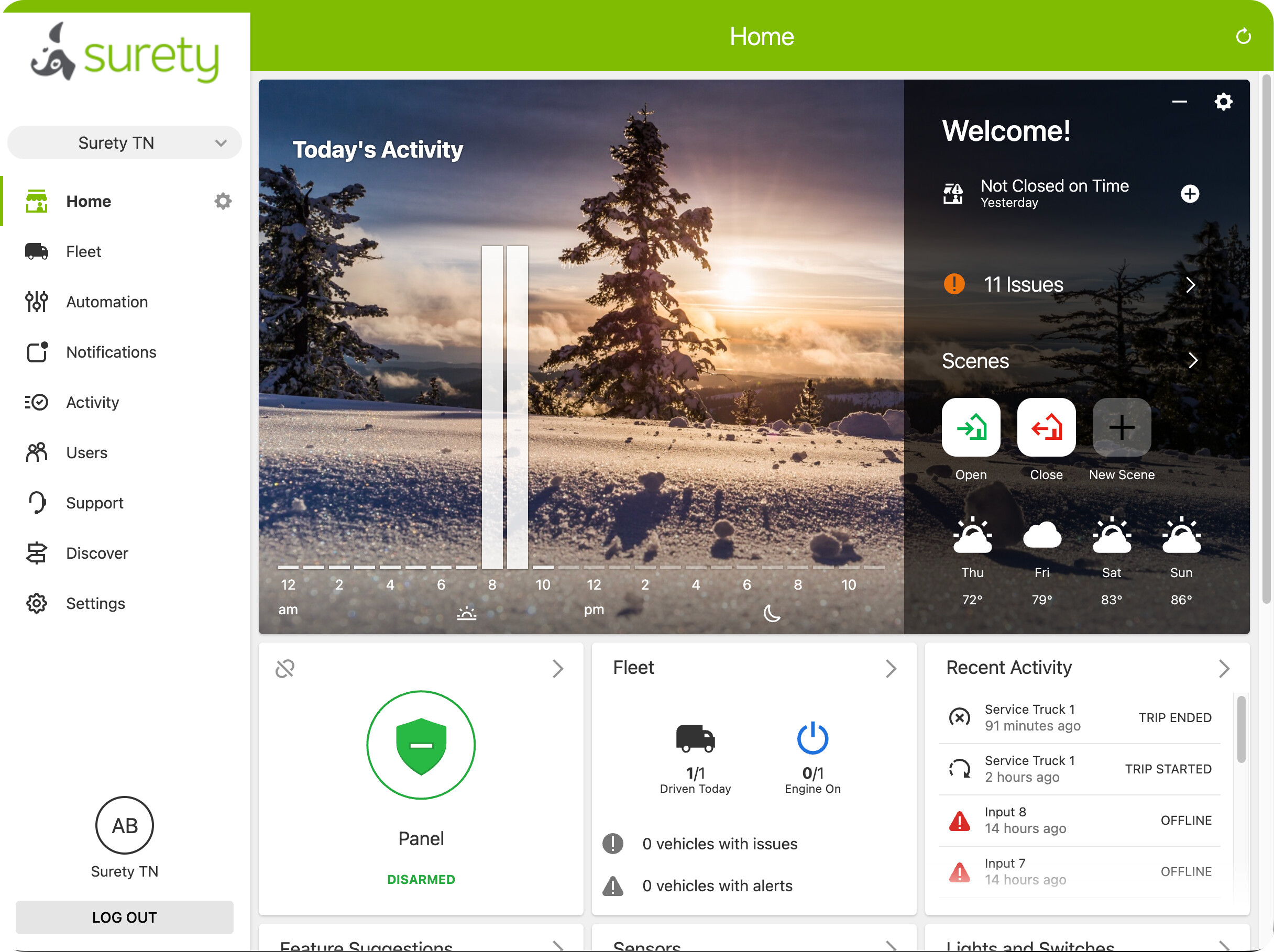
View the live location of every vehicle in your fleet on an interactive map. The Connected Fleet Summary dashboard shows all enrolled vehicles at a glance, with each vehicle’s current status including engine on/off state, fuel level, and any active driving alerts. GPS coordinates update every few seconds while vehicles are in motion.
Trip History & Route Playback
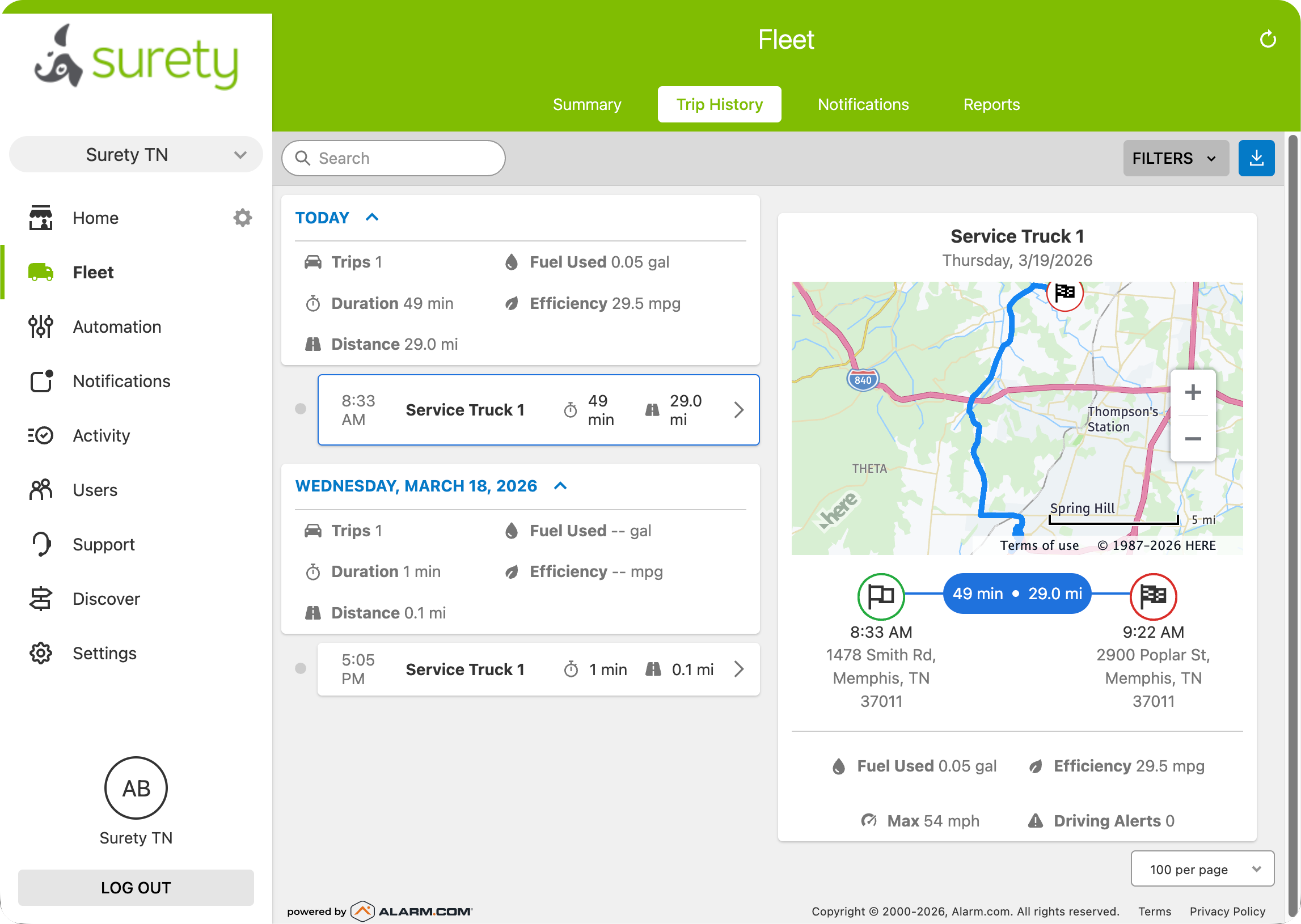
The Trip History dashboard provides a detailed historical view of every trip taken by every vehicle. Each trip record includes start and end times, duration, distance traveled, fuel consumed, fuel efficiency (MPG), maximum speed, and any driving alerts that occurred during the trip. View the exact route on a map with full playback capability. Vehicle addresses are displayed for completed trips, with GPS coordinates shown when an address cannot be resolved.
Driver Behavior Monitoring
Connected Fleet monitors driving behavior and generates alerts for events that could indicate unsafe or costly driving habits. Configurable driver behavior alerts include excessive speeding, hard acceleration, and sudden braking. These alerts help business owners coach drivers, reduce accident risk, lower insurance costs, and cut fuel waste from aggressive driving.
Vehicle Diagnostics & Maintenance
The Car Connector reads the vehicle’s onboard diagnostic system and reports diagnostic trouble codes (DTCs), battery status, and fuel levels. You’ll receive alerts when a vehicle has a maintenance issue, low fuel, or low battery, helping you stay ahead of problems and avoid unexpected breakdowns or roadside emergencies.
Fuel Monitoring & Efficiency
Track fuel consumption and efficiency across your fleet with detailed per-trip and per-vehicle fuel data. Identify vehicles and drivers with poor fuel efficiency, reduce excessive idling, and make data-driven decisions to lower your fleet’s operating costs. Fuel level monitoring is available for supported vehicle models (2010 and newer).
Geofence Alerts
Create virtual geographic boundaries (geofences) around job sites, office locations, restricted areas, or customer locations. Receive instant alerts when a vehicle enters or exits a geofenced zone. Geofences are useful for verifying that drivers are arriving at job sites, staying within assigned territories, and not using company vehicles in unauthorized areas.
After-Hours & Unexpected Movement Alerts
Get notified if a vehicle is used outside of normal business hours or if unexpected movement is detected when the engine is off. These alerts help detect unauthorized vehicle use and potential vehicle theft.
Tampering & Disconnect Alerts
If the Car Connector is unplugged or tampered with, you’ll receive an alert. The built-in backup battery ensures the device can still report even after being disconnected from the OBD-II port.
Fleet Trip Reports
Generate automated Fleet Trip Reports on a daily, weekly, or monthly schedule. Reports can be emailed to specified recipients and include comprehensive trip data across your fleet — start/end times, duration, distance, fuel consumed, efficiency, max speed, and driving alerts. Reports are available at both the individual location level and across your entire enterprise.
Notifications
Connected Fleet supports a full suite of configurable notifications that can be applied to all vehicles or specific vehicles. Available notification types include:
- Car Event Alert — Low battery, low fuel (supported models), low responsiveness, car connector plugged/unplugged, and diagnostic issues.
- Car Unexpected Movement Alarm — Movement detected when the engine is off.
- Driver Behavior Alerts — Excessive speed, hard acceleration, or sudden braking.
- Trip Started/Ended Alert — Engine turned on or off.
- Car Reminder Alert — Vehicle document expiration reminders.
Notifications can be delivered via push notification, email, or SMS, and can be configured from both the customer website and mobile app.
Connected Fleet Dashboards
Connected Fleet includes three main dashboards for monitoring your fleet:
Summary Dashboard (Single Location)
The Connected Fleet Summary dashboard provides real-time visibility into all enrolled vehicles for a single business location. View each vehicle’s current status on an interactive map, including engine state, fuel level, and driving alerts. A daily summary shows total trips, miles driven, and fuel consumed across the fleet.
Trip History Dashboard (Single Location)
The Trip History dashboard provides a chronological view of all trips across your fleet, organized by day. Select any trip to view the route on a map along with detailed trip data including duration, distance, fuel used, efficiency, max speed, and driving alerts. Trip data can be filtered and exported.
Enterprise Dashboard (Multi-Location)
For businesses with multiple locations, the Enterprise-level Connected Fleet dashboard provides an overview of all vehicles across all locations in one view. The Enterprise dashboard shows vehicles driven, fuel used, maintenance status, and driving alerts organized by location. This makes it easy to manage a fleet that spans multiple offices, branches, or job sites.
Integration with Alarm.com for Business
Connected Fleet is part of the Alarm.com for Business platform. When bundled with a Surety Business security system, fleet management integrates directly alongside your intrusion detection, video surveillance, access control, and energy management — all in one app with unified login, user management, notifications, and billing.
This integration also enables automation rules between your fleet and other business systems. For example, you could configure an automation to disarm the alarm at a location when a company vehicle arrives.
Pricing
Surety Business Fleet is available as a standalone service or as a discounted add-on for businesses with a Surety Business alarm monitoring plan.
Standalone Connected Fleet
| Vehicles | Monthly Cost |
|---|---|
| First vehicle | $15/month |
| Vehicles 2–20 | $12/vehicle/month |
| Vehicles 21–50 | $10/vehicle/month |
| Vehicles 51+ | $8/vehicle/month |
Connected Fleet Add-On (with Surety Business alarm plan)
| Vehicles | Monthly Cost |
|---|---|
| Per vehicle | $8–$12/vehicle/month |
Surety Business alarm plan customers receive a $3/month per vehicle discount.
Hardware Costs
| Item | Price |
|---|---|
| Fleet Connector (ADC-CC100-BX) | $99 |
All plans are month-to-month with no long-term contract. Cancel anytime. Volume discounts are available for larger fleets.
Who Is Connected Fleet For?
Connected Fleet is ideal for any small to mid-size business that operates a fleet of vehicles, including:
- HVAC, plumbing, and electrical contractors
- Pest control companies
- Landscaping and lawn care services
- Delivery and courier services
- Cleaning and janitorial companies
- Property management companies
- Construction companies
- Any business with field service operations
Requirements
To use Connected Fleet, you need:
- A Fleet Connector device (ADC-CC100) for each vehicle
- The Connected Fleet service package (available through Surety Business)
- A compatible vehicle with an OBD-II port (1996 or newer)