Hi there - I moved into a home that has an existing IQ Panel 2 that was installed through Guardian Protection. I’d like to use this panel through Surety, but when I called Guardian, they said they weren’t able to release the panel so that other distributors could use it. They said it’s proprietary when they install it and a new keypad (panel I assume?) would need to be installed.
I was able to get the IMEI number from the back (I don’t have the installer code and Guardian will not give that number out) and checked via this link (Can I activate my equipment? - Surety) and it shows that “Excellent! Your Verizon 4G LTE Alarm.com module can be activated!”.
I’m just not sure if the panel will work with Surety? I don’t want to purchase a Surety Plan and find out the panel doesn’t work.
2nd question, can I get Surety Alarm plan today, and then later purchase and hook up cameras and bump up into a Surety Protect plan? I’m sure I can, just wanted to verify.
The IQ Panel 2 wouldn’t be be a proprietary system. Do you have the model number of the panel?
When signing up, you will need either the installer, dealer, or master code. Do you have the master code for this panel? This is to send the test signal once the account has been activated. If you do not have any codes, it could still be possible it will connect automatically and you can change these codes after.
Yes, this can be done through the system manager. Since all accounts are month to month, this change can be done at any time.
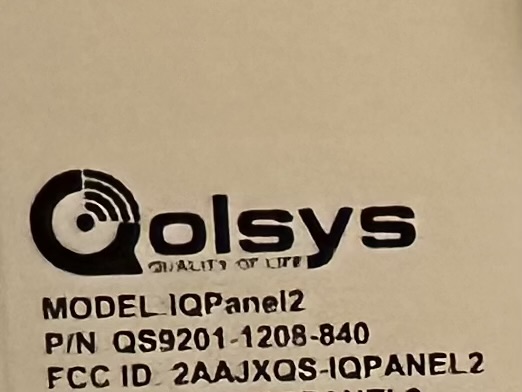
Where would I find the model number? On the back, I do see the Model is IQ Panel 2, and I see the Part Number, SN, and IMEI.
I don’t have any of the installer, dealer, or master code. I bought the house with this panel already installed and the previous owners do not have that number.
Any way to check if the panel will connect automatically or do I have to purchase a plan and see? Could I cancel the plan if it doesn’t work?
What is the part number? Its possible you have a proprietary unit but in general if it reports unregistered, it can be connected.
You will need the Dealer (default 2222) Installer (default 1111) or Master User (default 1234) code to run a cellular communication test to connect the panel to service.
Part number looks to be QS9201-1208-840. I’ve attached a picture. If I don’t have the Dealer, Installer, or Master User code, will I not be able to use this panel then because I can’t run a cellular communication test? Those numbers did not work.
A Qolsys Panel can often connect without the need for a cell test. It is not always required to have a code ahead of time.
Without a code to run the cell test or connect to wifi it is not guaranteed though, especially if the panel is on an old firmware version that has not received critical communicator updates yet.
For the IQ Panel 2, version 2.7.1 contains a communicator update and older versions it is possible to run into trouble if you do not have a code.
Got it, and there’s no way to check what firmware version the panel is on. If I get a Surety plan and go through the steps to set it up and find myself not able to connect the panel, would I be able to get a refund on the plan?
Alarm.com uses Cellular as the primary means of communication. The panel has a built in cellular radio and wi-fi radio. While Wi-Fi can be used it is not needed to start service.
I have the same question… already have a system but don’t know any of the codes. The typical dealer codes do not work. I would like to sign up as well, but if I can’t get into the panel, it would be pointless.
Yes, you can check your panel’s IMEI to verify it is unregistered and ready to go, and purchase a plan on our website to get started. Activation on our site is a short process which can take as little as 5-10 minutes.
I have signed up and entered the IMEI number and it said it was good to go… but the panel is still stuck and I can’t get in. What are the next steps now that I have signed up?
I just sent a command to the system but it looks like it has not started communicating yet. If it is older than 2.7.1 firmware on an IQ Panel 2 there may be trouble connecting via cellular.
One thing you can try is a power cycle of the panel. Unplug the panel’s plug-in power supply, then open the panel up and unplug the battery.
Wait at least 5 minutes with the panel powered off, then plug in the battery, close up the panel and plug in the power supply. Use the power button to turn it on and then let us know when complete and it boots back up.
I can try sending a couple commands to see if it is possible to connect.
I have it plugged in, but it’s stuck in armed mode and I’m not able to put in the correct code because I don’t know it and none of the tech codes are working. Is there anyway that you can get into it and help me change the password?