I will be migrating my vista system shortly to Surety using an SEM300. I looked through the forum ride information on environmental sensors as I have several flood sensors setup as Zone Type 8 24 Hr Auxiliary Alarms. What I can’t seem to find is how do I indicate these sensors are environmental floods and not medical emergency panics, which I also have on the keypad panics setup as zone type 8, for the central monitoring station? With my previous monitoring station I had to tell them what zones were environmental versus medical panics.
Per Honeywell, you have the option below
Change the field options below for custom zone type 90
Field 182 : 8282820002
Field 183 : 154300
You can then change the Zone Type to 90 for this sensor. This should now report as water leak. Make sure to test to confirm
Let us know if you have any additional questions
Thank you
Would this code work for an RF zone?
Getting confused by Honeywell’s programming table as selection 8 would appear as not applicable to RF zones. Sorry should have specified the sensor type it’s a 5800 Flood RF.
Also this would seem to indicate setup as a trouble condition and how would it be treated by the central station monitoring procedures? Would it log or would they call? Objective is to have them call as these sensor are in an attic space that would result in significant damage to house if left unresolved. Think I read something in the forum recommending to use Zone Type 8 as Central Monitoring would only call for alarm conditions? Not sure if the Contact ID is what resolves this?
Sorry for the delay I was confirming some information with my team.
Can you confirm that you have an RF receiver on your panel? Do you have other wireless zones programmed into the panel?
The monitoring station does call the contact list for flood sensor alarms. When learning in the flood sensor, there will be an option for reporting code. Make sure you have a number in there. Do not leave it as 00 or it will not report.
You can use either zone type 08 for auxiliary or group type 90 which will report it as water leak
Be sure to test your devices when finished programming to confirm it is all working properly
Let us know if you have any additional questions
Thank you
No problem. Correct I do have an RF receiver that I have several wireless zones attached.
I have the medical panic keys on the keypad and wireless flood sensors programmed as zone type 8. However my old central station could not tell the difference between the medical panic and the environmental floods since they are programmed as the same zone type. They almost dispatched an ambulance when my flood sensor had a water leak.
Your suggestion of coding a configurable zone is interesting as I had not thought of this. Your suggested code for zone type 90: 8282820002, the first input of the 10 digit code, 8 would seem to indicate a trouble zone that the Honeywell manual says is not applicable to an RF zone based on note 5, but it’s the first time I have made a configurable zone so I’m unsure it just says “RF Zone N/A”. So I was unsure what the entires should be for a wireless RF 5800 flood as I thought maybe you did not know it was a wireless contact.
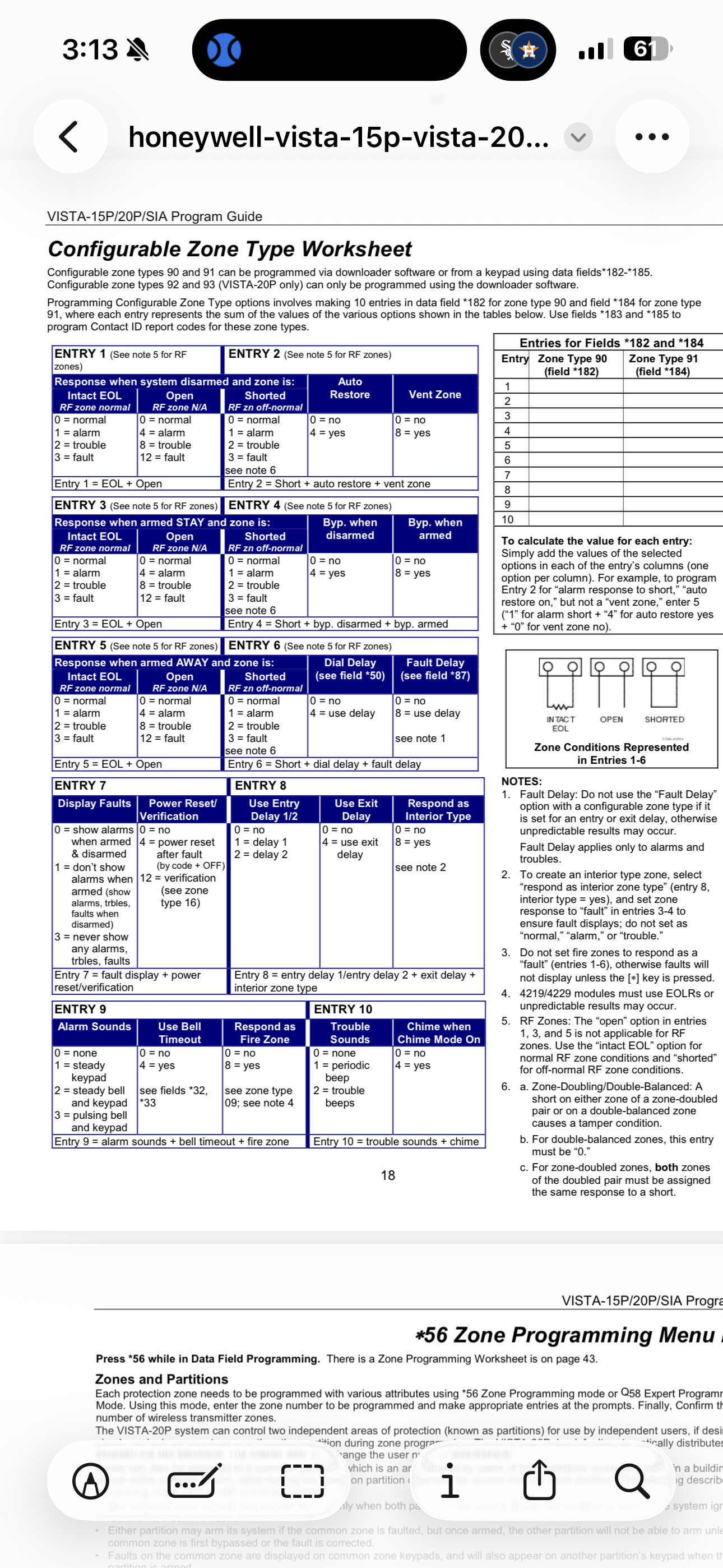
Reading the table I would think the field should have been:
Field 182: 0202020002
Field 183: 000154
can you confirm if this is correct?
or if central station does not call for troubles:
Field 182: 0101010050
Field 183: 154000
This is what was sent to me by a Honeywell representative however I just went over section 182 and 183 with them and we did agree that 0202020002 would be the correct programming with what we are trying to achieve.
Options under RF Zone NA are available to RF Sensors. It saying that for the open above it.
For field 183, I’m still trying to confirm the best option but it looks like you may be correct
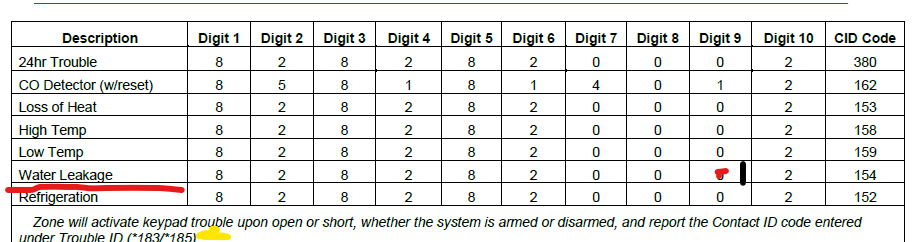
That makes sense based on what I saw in the table. Should I program it as an alarm or trouble? Not sure that it matters as reading field 183 alarm or trouble just seems to be what contact ID is transmitted to central station. I had read that the central station handled troubles versus alarms different (e.g operator call versus robo call) and was unsure if that was programmed by the Contact ID or zone type/signal type? So I’m assuming that’s why you said they would call for water leak because it’s based on the contact ID not the alarm/signal type?
So performed the coding as specified and when I installed the SEM all my zones were added except for the custom zones made in this manner. I confirmed my suspicion and changed the zone types to 8 again as previously discussed and the SEM pulled the zones during the zone scans. @vidail can you confirm if custom zone configuration are compatible with the SEM? If so how do we get them to be added? If not how do I distinguish between my wireless floods and medical panic key? Also when I finally got them included in a zone scan it says the sensor status is unknown how do I resolve this?
This should be possible but I am confirming this now with alarm.com.
I would say you test both the keypad panic and the flood zone panic so we can see how alarm.com sees them. It may be easier to just put a note on the flood zones and say handle them like flood zones.
When showing as status unknown, trigger the device and the status should change.
@vidail when I had them as custom zones they did not populate in the zone list at all. When I changed them to standard Zone Type 8 they did pull in but had status unknown. I tested a flood sensor to see if it cleared the unknown status and it did transmit as extreme temperature/ flood but for both the panic key and floods sensors. However, now the tested sensor will not clear its tripped status, so now need to try to reset sensor locally to see if I can clear the latched status. Not sure if it’s a failed sensor or deeper issue at this point. I found this other article about this same issue or similar: Change 5800 wireless device type - #4 by jwcsurety
@vidail Invited you to the PM I have on this issue with my zone list.