Upgrading from 2GIG GC3 to Qolsys IQ5 with Surety & Need Help Planning the Transition

Hi all, hoping for some guidance from the knowledgeable folks here on upgrading my home security system.

Current Setup

I have a 2GIG GC3 main panel plus two SP1 accessory panels, all wall-mounted. In my primary bedroom closet there are also some circuit boards that I believe convert my hardwired sensors to work with the panel, along with a large wall-pack adapter that I was told provides backup power to the GC3.

Problems I’m Having

My system has become increasingly unreliable over the past few months:

My door locks no longer sync properly. Locking a door still shows as unlocked in the app and on the panel, and vice versa. Sensors randomly go offline and reappear about 24 hours later for no apparent reason. Z-Wave devices constantly drop off and require rediscovery. Firmware updates have never worked on my GC3. Brinks sent a tech out twice to sort it out and they couldn’t get it to work either.

Why I Want to Switch

I’m ready to move to a Qolsys IQ5 and also break away from Brinks, whose monitoring costs keep going up.

Two small but important WAF considerations before I commit: the 2GIG’s automated door chime voice is noticeably smoother and more pleasant than the robotic, fast-talking voice on the Qolsys IQ4, and the GC3’s default screen just looks better. I’m not sure if either of these were improved on the IQ5.

What I’m Working With

When my original installer set up the 2GIG system with Alarm.com, they told me many of my windows were already hardwired by the home builder, so they only needed to add wireless sensors in a few spots. I also have a few glass break sensors and smoke detectors that appear to listen for my regular smoke alarms and relay alerts to Alarm.com.

My Questions

I want to reach full parity with my current setup. That means keeping three wall-mounted panels (one near the front entry, one at the garage entry, one in the primary bedroom), ensuring my existing hardwired sensors are compatible with or convertible for the new system, and ideally avoiding those large, bulky white plastic sensors that sit on door and window frames. My current setup doesn’t use those and I’d like to keep it that way.

Is there a way to pull a full list of my current sensors and zones from the GC3 before I make the switch? I do have my installer code and can get into the backend if that helps.

Any other things I should be thinking about that I might be missing? Appreciate any help. Thanks so much!
Hello,

Do you know if your current sensors are encrypted? If they are, they would need to be replaced to use the IQ Panel 5. If they are not, then you can use them on the IQ Panel 5 with a 345Mhz legacy card. You would need the PowerG Secondary Keypads to replace the SP1 Keypads. The keypad and transformer would need to be replaced for each.

Do you know how many hardwired sensors you have? You may need to replace it with a PowerG Takeover module.

Below are compatible sensors with the IQ Panel 5 located on page 200. If you are using a TAKE345, it is not listed as a compatible sensors. While not listed as a compatible sensor, it could mean that it hasn’t been tested and but could possibly work.

You can enter programming by pressing

  1. From the home screen, tap System Settings
  2. Enter your Installer Code (default is 1561)
  3. Tap Installer Toolbox
  4. Tap System Configuration
  5. Tap Wireless Zones

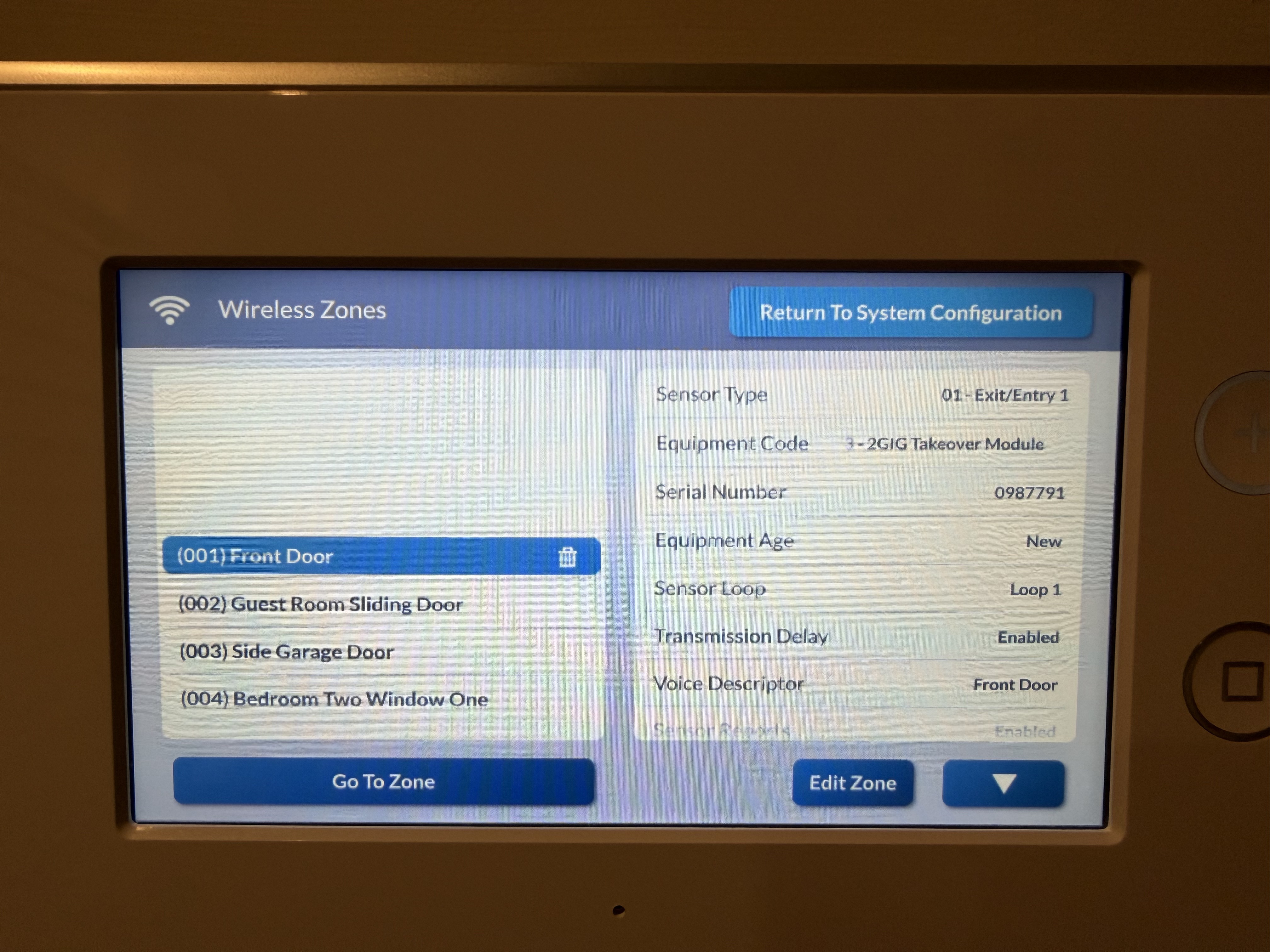
From here, you can scroll through each zone and get a full zone list. The most important things would be the Zone Number, the Zone description, the serial number, and the loop number

Thanks so much for the detailed response, really appreciate it.

I went through my wireless zones and have a total of 37 zones broken down as follows:

  • 4 motion detectors

  • 3 glass break detectors

  • 1 fire detector

  • 10 doors

  • 19 windows

I also have 5 Z-Wave door locks and around 20 Z-Wave light switches and outlets.

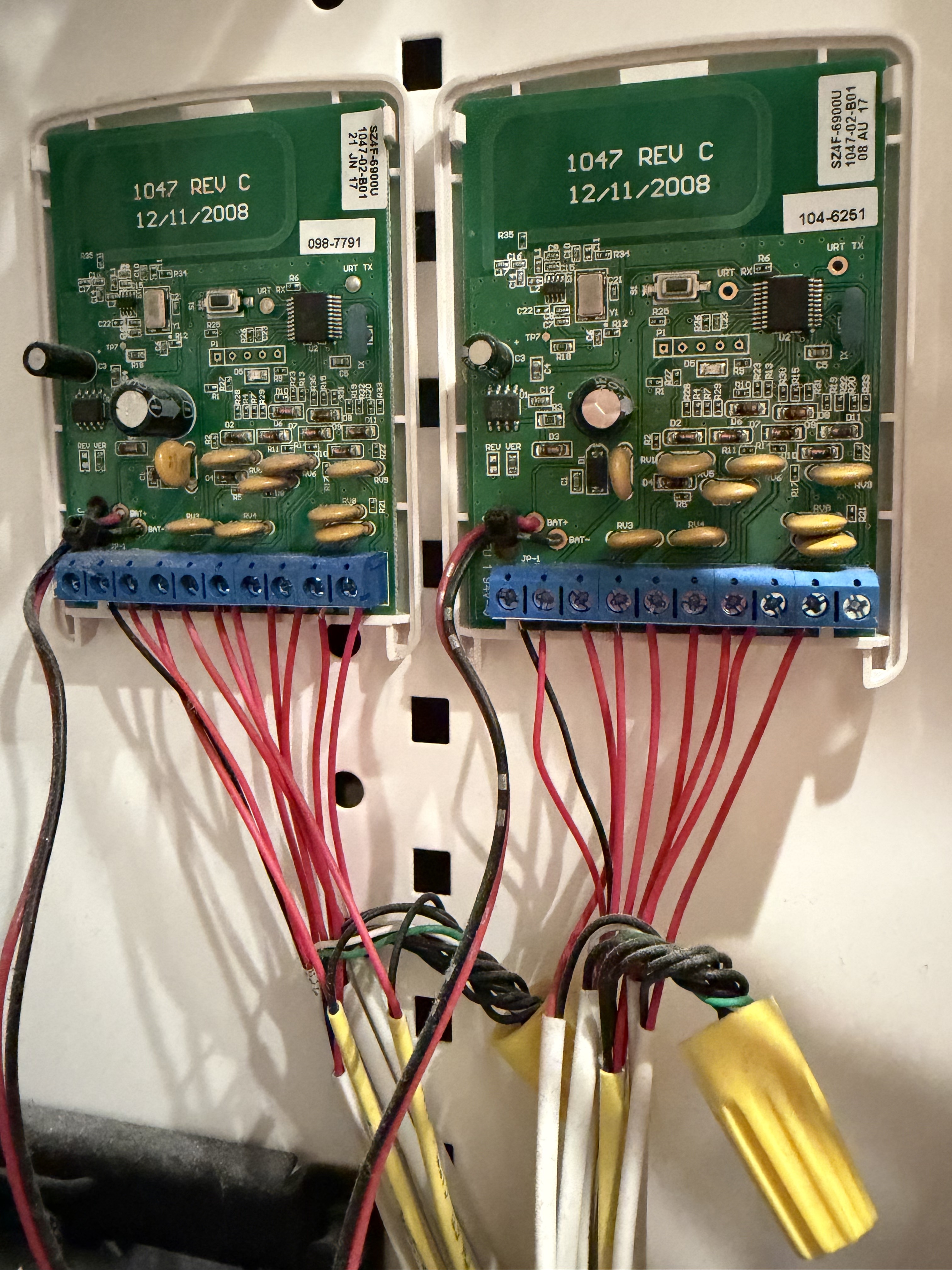
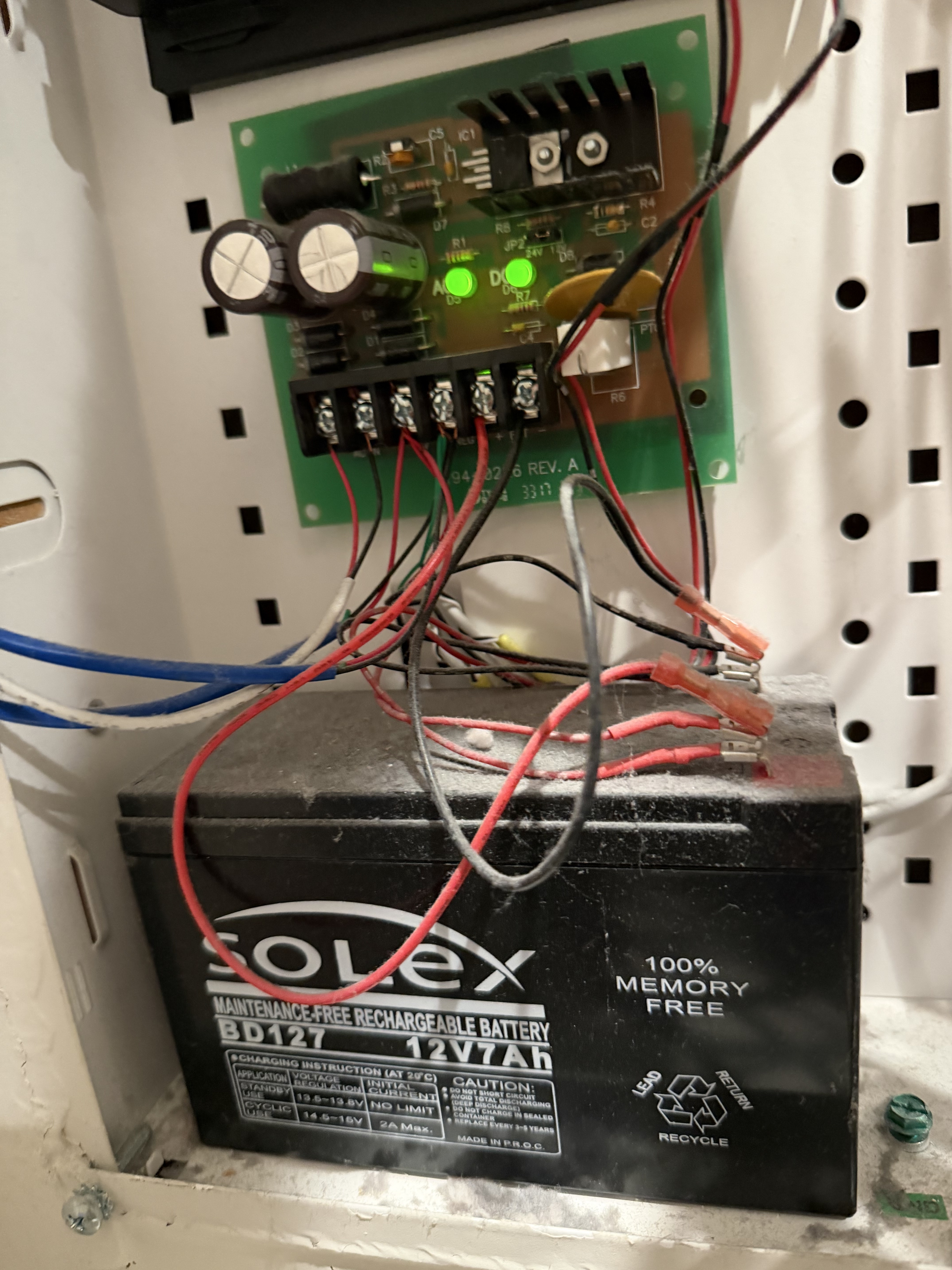
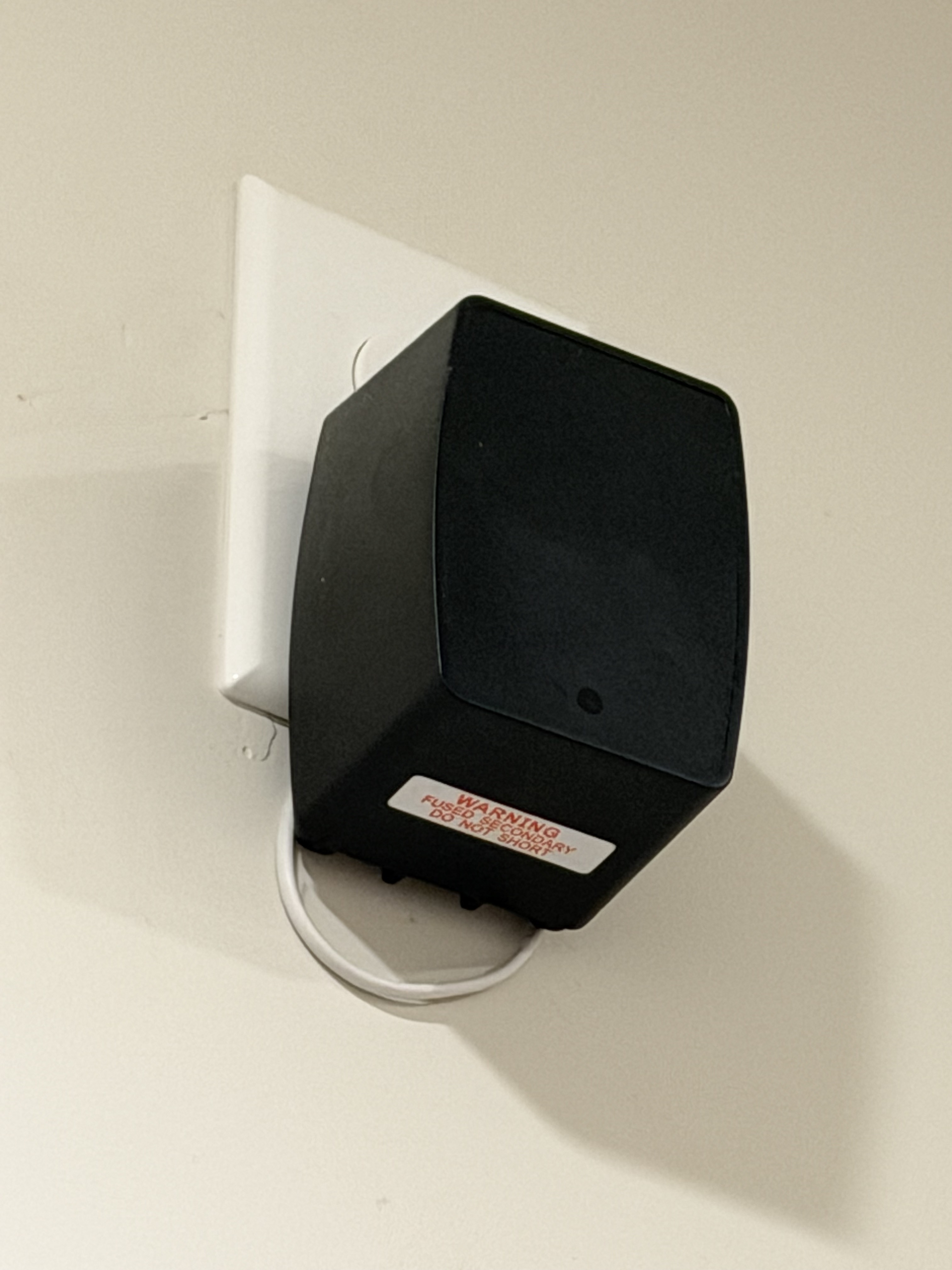
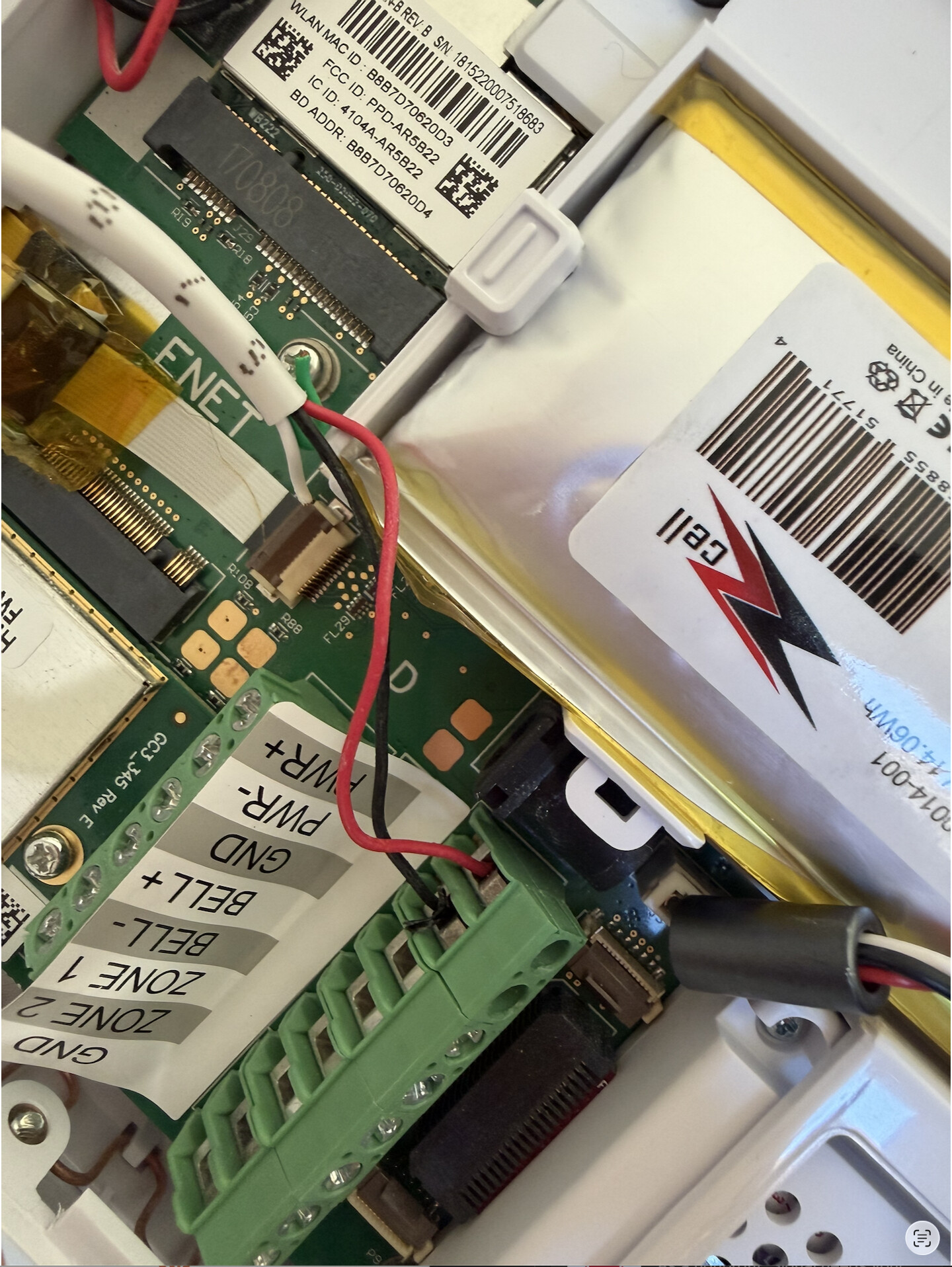
Regarding the hardware in my primary bedroom closet, I have two small circuit boards that appear to be connected to many of my sensors. My guess is these are the hardwired sensor converters, but I’m not certain (picture included). There is also what looks like a backup battery that all three panels seem to connect to, and I believe it is being charged by a wall-pack adapter plugged in near the ceiling of the same closet, though again that is just my guess (picture included).

As for your question about whether my sensors are encrypted, I honestly am not sure. Is there a way to check that from within the panel?

With all of this in mind, would love any further guidance on what I would need to purchase to reach full parity with my current setup. Thanks again for the help, I really appreciate it.

Pictures below:

Those are two 2GIG-TAKE-345 Wired to wireless converters. The large 12V brick battery is their battery backup. Unclear from the photos alone but the black power supply plugged into the outlet likely provides power for the takeover units.

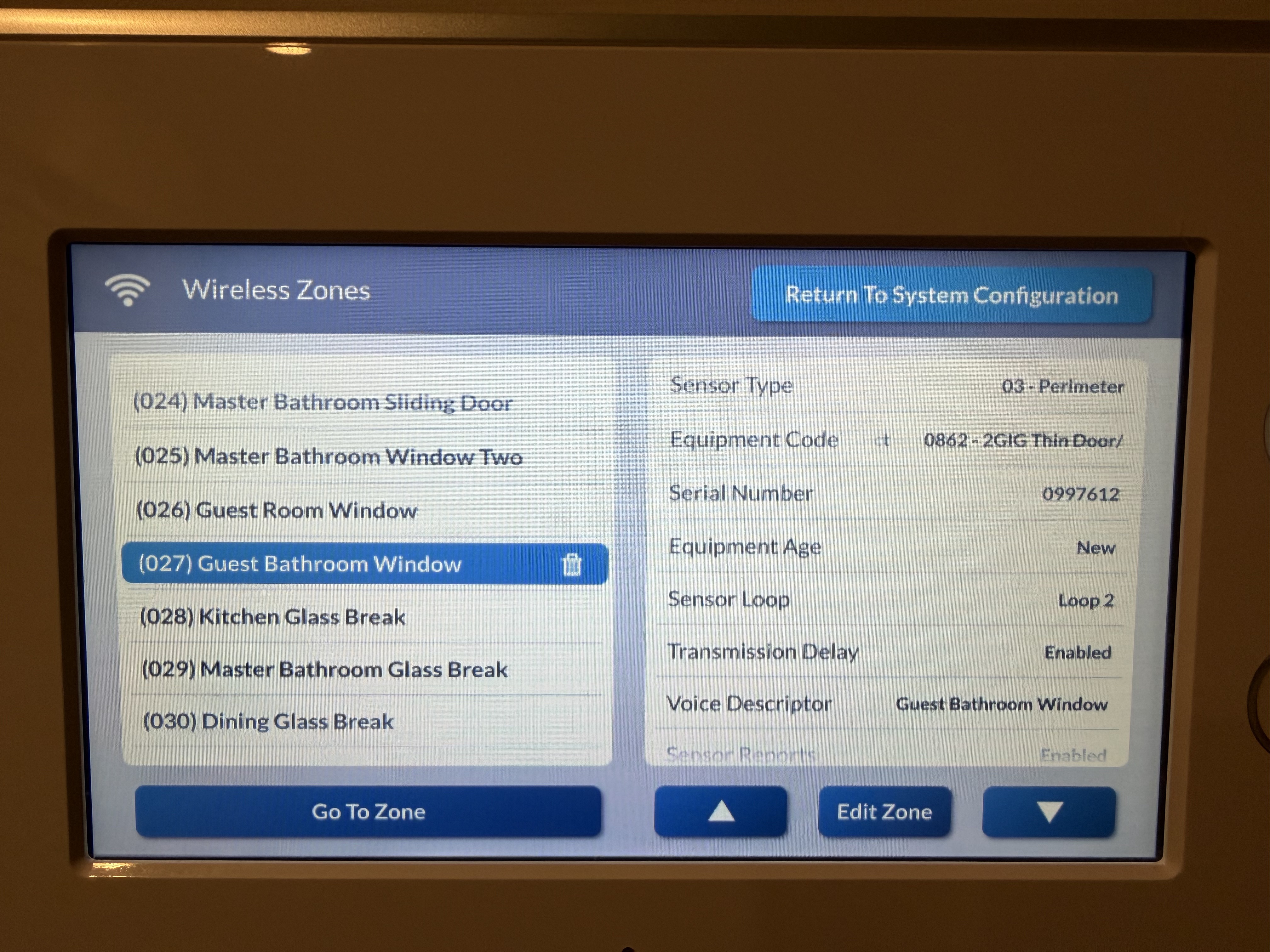
Encrypted Wireless Sensors would have an equipment code that shows eSeries. For example an encrypted DW Contact should show 2862-eSeries Thin Door/Window Contact. A standard one might show 0862-2GIG Thin D/W Contact

Based on the panel screen image, you likely have standard sensors, not eSeries encrypted.

Thanks Tyler, that’s really helpful. Based on what you described, it does sound like my sensors are standard and not encrypted, which is good news.

A few follow-up questions:

Battery backup: Will my current 12V battery backup system work with the IQ Panel 5 and its accessory panels, or would that need to be replaced as well?

Keeping vs. replacing the hardwired sensors: Would you recommend sticking with my existing hardwired sensors via the TAKE-345 converters, or would it make more sense to switch to newer wireless battery-operated sensors? Are there any drawbacks to keeping the old sensors beyond the encryption issue?

Faulty window sensor: One of my window sensors has been acting up for the past few months. It chimes correctly when the window opens, but the rest of the time it shows a “sensor not ready” alert and I have to bypass it every time I arm the system. I’m not sure if this is a panel issue, a TAKE-345 issue, or the sensor itself. Any thoughts on what might be causing this?

Shopping list: Would someone at Surety be able to help me put together a complete shopping list for everything I’d need to replicate my current setup on the IQ Panel 5, including the wall-mounted accessory panels?

Thanks again for all the help.

The IQ Panel 5 has its own battery. If you replace the TAKE-345 modules with an IQ Hardwire Takeover, you can reuse the battery. How old is the battery? If it is close to 5 years, I would recommend replacing it.

The TaKe-345 is not compatible on the compatibility list for the IQ Panel 5 however it could still work with it. Since it is not on the list, I would recommend you replace it with a PowerG takeover module and a zone expander to be able to reuse all 16 of your hardwired zones.

It sounds like there may be an alignment issue or a weak magnet if it chimes when opening/closing but shows open when closed. Make sure the magnet and the sensor are aligned correctly on the window or frame. Use something metal to check the magnet strength. If there is a bigger gap between them, the issue could be that the magnet is not strong enough.

It looks like you would need one IQ Panel 5, Your additional secondary keypads, One hardwire translator and one zone expander for your hardwired devices.

Thanks for the detailed response Vidail, really appreciate it! A few more questions:

Battery backup: My GC3 panels have their own internal batteries but also appear to connect via wire to the larger battery in my closet. Would the IQ Panel 5 be able to make use of that larger battery in addition to its own internal one? If not, no worries since the larger battery can still be reused with the IQ Hardwire Takeover modules as you mentioned. Either way, since the battery is about 7 years old I’ll be replacing it regardless.

PowerG Takeover and Zone Expander: Makes sense, I’ll plan on going with those. Will my existing Z-Wave devices and glass break sensors carry over to the IQ Panel 5 or will those need to be replaced as well?

Window sensor: Good news on that one — it turned out to just be a misalignment and it’s working correctly now. Thanks for pointing me in the right direction.

Z-Wave migration: This one has me a little nervous. Will I need to unpair every single Z-Wave device from my current panel before pairing them to the IQ Panel 5? I’ve found the pairing and unpairing process on my current system to be really unreliable and error prone. Is there a way to factory reset the devices directly and skip the unpair step entirely? Most of mine are Yale Z-Wave door locks and GE/Jasco light switches.

Thanks again!

I had a few more questions as I work through this process:

Nest Thermostats with IQ Panel 5 I currently control two 3rd Gen Nest Thermostats through Alarm.com scenes and the app via my 2GIG GC3. I do not see Nest listed in the IQ Panel 5’s compatible thermostat list, which has me a little concerned. I vaguely recall there being some initial setup workaround with the GC3 as well, but once it was configured it worked seamlessly. Is the situation similar with the IQ5, or is Nest integration no longer supported?

Aging 2GIG Sensors All of my existing 2GIG sensors are about 8 years old and I have never replaced the batteries. I have 13 Thin Door/Window contacts, 4 pet-immune PIR motion sensors, and 3 glass break sensors. Should I proactively replace all the batteries before migrating, or at this age is it more practical to just replace the sensors entirely? I am also not sure if the batteries in these are even user-replaceable.

Dual Frequency: 345 MHz + 319.5 MHz If I go with a 345 MHz IQ Panel 5 to retain compatibility with my existing 2GIG sensors, is there a way to also get 319.5 MHz support on the same panel? I am interested in adding IQ branded sensors down the road since they appear to be more affordable than PowerG, and I believe those run on 319.5 MHz.

Garage Door Control I currently use a LiftMaster 828LM Internet Gateway to control my garage doors through Alarm.com, and both openers have Security+ 2.0 built in. It felt like a bit of a workaround when it was set up 8 years ago. Is the 828LM still the right approach, or is there a cleaner solution available now with the IQ Panel 5 and current Alarm.com integrations?

Thanks again for all the help, this community has been really useful.


Battery backup: My GC3 panels have their own internal batteries but also appear to connect via wire to the larger battery in my closet. Would the IQ Panel 5 be able to make use of that larger battery in addition to its own internal one? If not, no worries since the larger battery can still be reused with the IQ Hardwire Takeover modules as you mentioned. Either way, since the battery is about 7 years old I’ll be replacing it regardless.

Are you referencing the large 12V battery in the above mage with the TAKE-345s? How are the GC3 and secondary panels connected to that battery?

Wave migration: This one has me a little nervous. Will I need to unpair every single Z-Wave device from my current panel before pairing them to the IQ Panel 5? I’ve found the pairing and unpairing process on my current system to be really unreliable and error prone. Is there a way to factory reset the devices directly and skip the unpair step entirely? Most of mine are Yale Z-Wave door locks and GE/Jasco light switches.

Yes. All Z-Wave devices need to be cleared from their current network then paired to the new network. Clearing and pairing can be done at the new panel.

Nest Thermostats with IQ Panel 5 I currently control two 3rd Gen Nest Thermostats through Alarm.com scenes and the app via my 2GIG GC3. I do not see Nest listed in the IQ Panel 5’s compatible thermostat list, which has me a little concerned. I vaguely recall there being some initial setup workaround with the GC3 as well, but once it was configured it worked seamlessly. Is the situation similar with the IQ5, or is Nest integration no longer supported?

Nest connects to Alarm.com via Wi-Fi, it does not connect to the panel directly. Those can still be used with Alarm.com but dont interact with the panel itself.

Aging 2GIG Sensors All of my existing 2GIG sensors are about 8 years old and I have never replaced the batteries. I have 13 Thin Door/Window contacts, 4 pet-immune PIR motion sensors, and 3 glass break sensors. Should I proactively replace all the batteries before migrating, or at this age is it more practical to just replace the sensors entirely? I am also not sure if the batteries in these are even user-replaceable.

The vast majority of wireless 2GIG Sensors are serviceable by the end user and can have their batteries replaced easily. Most DW Contacts use coin style CR2032s. Motions and Glass Breaks usually have CR123A batteries. Battery life varies from sensor to sensor and by use case. A low battery alert should be generated at the panel when the battery needs to be replaced.

If the sensor is working then replacement wouldn’t be necessary but if you are looking to update to an encrypted communication type, you could switch to PowerG on the IQP5.

Dual Frequency: 345 MHz + 319.5 MHz If I go with a 345 MHz IQ Panel 5 to retain compatibility with my existing 2GIG sensors, is there a way to also get 319.5 MHz support on the same panel? I am interested in adding IQ branded sensors down the road since they appear to be more affordable than PowerG, and I believe those run on 319.5 MHz.

No. The IQ Panel 5 works with powerG by default and 1 legacy radio can be installed, either 319.5MHz, 345MHz, or 433Mhz. You cannot install two separate legacy radios into 1 panel.

Qolsys S-Line 319.5MHz sensors do include encryption. 345MHz sensors in use on the IQ Panel 5 would not. The S-Line encryption and communication distance are not going to be as robust as that of their PowerG counterparts.

Garage Door Control I currently use a LiftMaster 828LM Internet Gateway to control my garage doors through Alarm.com, and both openers have Security+ 2.0 built in. It felt like a bit of a workaround when it was set up 8 years ago. Is the 828LM still the right approach, or is there a cleaner solution available now with the IQ Panel 5 and current Alarm.com integrations?

myQ with an 828LM still works with Alarm.com . myQ does require the LiftMaster/Chamberlain myQ add-on ($1 /mo) to the service plan.

Yes, exactly. The large 12V SLA battery in my primary closet has wiring going to both the GC3 and the 2 SP1 accessory panels that provides them with backup power in addition to their built-in battery. (Images attached).

Thanks, that is great that I can just unpair them from the IQ5 rather than having to do it from the GC3.

A few more questions if you do not mind, I really appreciate your patience!

Sensors Going Offline When Away When we travel for a few days I occasionally get Alarm.com alerts that one or more wireless sensors have gone offline. Interestingly this never seems to happen when we are home, only when we are away for a long weekend or longer. It has happened consistently enough that I do not think it is random. Most recently we were gone for 4 days and the 2GIG FireFighter sensor went offline, but when we returned it came back on its own without any intervention. I am wondering if this is a sensor age issue or possibly something panel-related. Worth noting that this has been going on for years so it is not something that just started recently.

Yale Z-Wave Lock State Reporting For about the past year my Yale Z-Wave door locks have not been reporting their state accurately through the current system. It will show a lock as locked when it is actually unlocked, or the other way around, and every now and then it happens to get it right. Curious whether this is typically a panel issue or just something that tends to develop with Z-Wave locks after a few years of use.

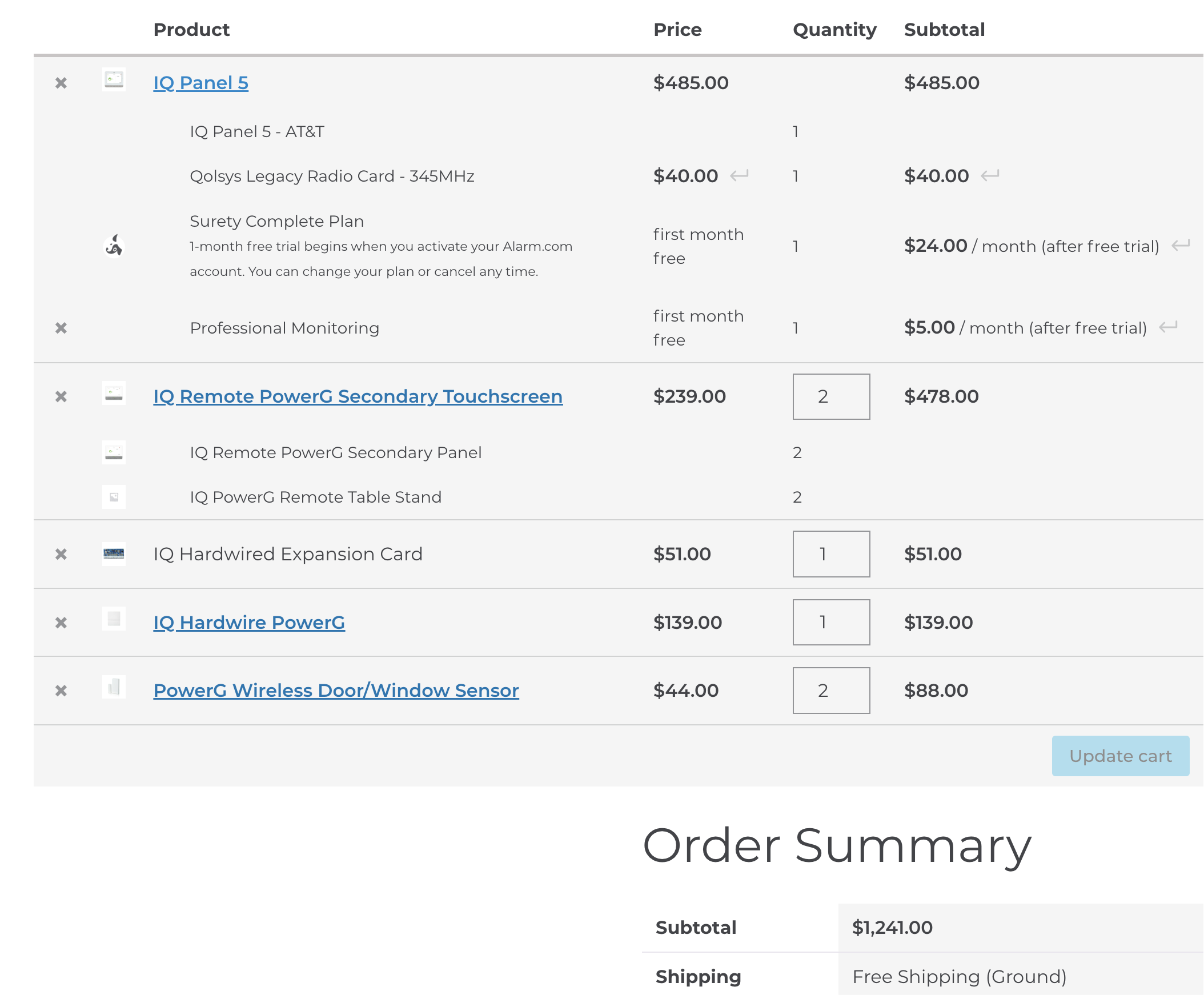
Parts List Check I have put together a parts list and just want to make sure I have everything I need to get up and running. The only thing I am grabbing separately is the 12V SLA battery through Amazon. Would love a quick sanity check if you have a moment!

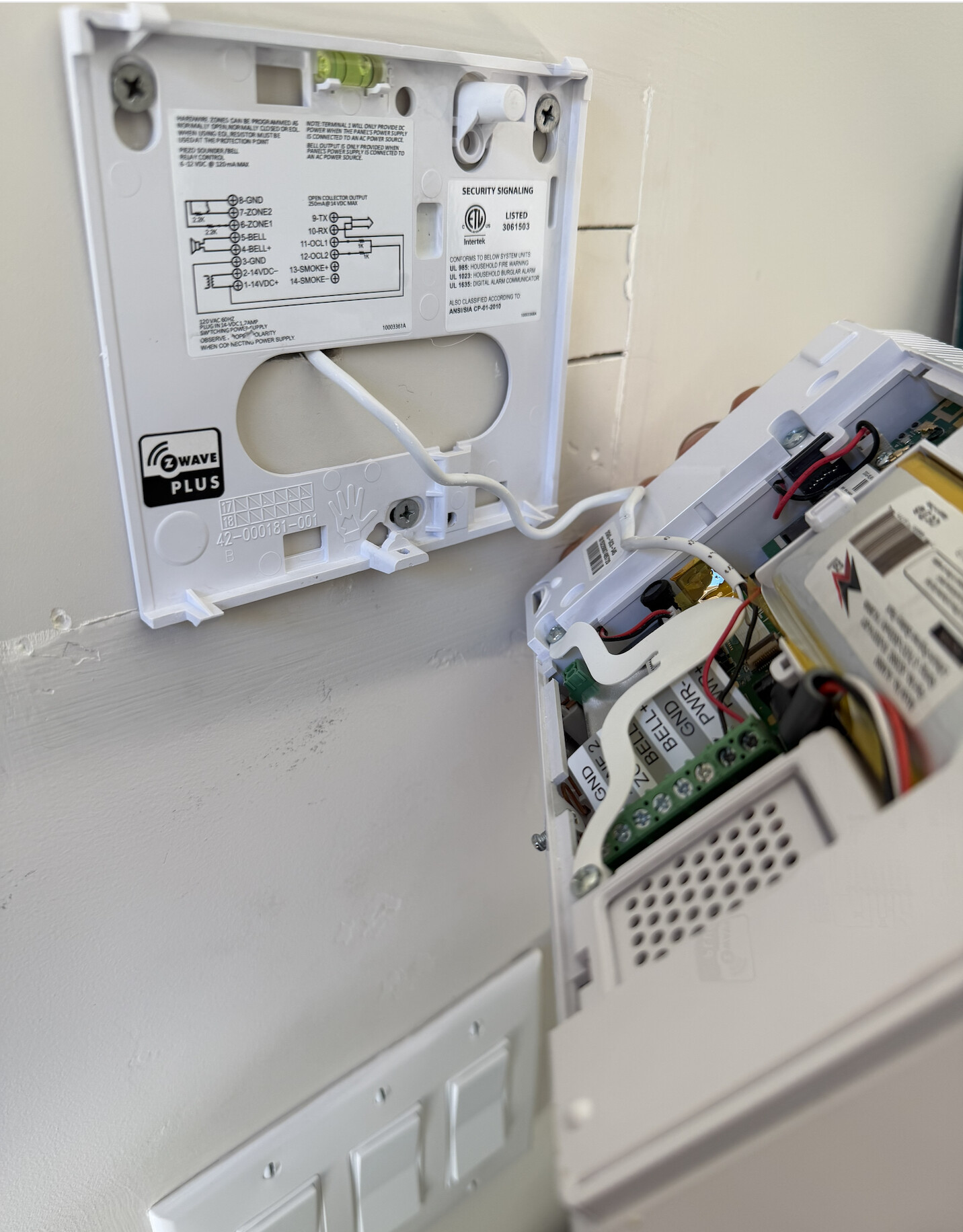
The 2GIG panel wiring leads connecting to the +/- terminals in the panel should connect to a 14V power supply that typically plugs into a wall outlet. The power supply looks like this:

Sensors Going Offline When Away When we travel for a few days I occasionally get Alarm.com alerts that one or more wireless sensors have gone offline. Interestingly this never seems to happen when we are home

The malfunction or offline trouble condition indicates the device, typically a sensor or Z-Wave device, is having trouble communicating with the panel. Generally speaking, the issue can be resolved via the following means:

  1. Verify that the device is still active and powered on.
  2. Power cycle the device.
  3. Verify there is nothing that could be interfering with communication, such as range (distance from sensor to panel, or Z-Wave device to nearest repeating node).
  4. If applicable, verify the batteries are charged. If uncertain, try replacing the batteries. Borderline low battery levels on alarm sensors and Z-wave locks are a common cause of intermittent signal trouble.

Steps on how to resolve a malfunction can be found here

Yale Z-Wave Lock State Reporting For about the past year my Yale Z-Wave door locks have not been reporting their state accurately through the current system. It will show a lock as locked when it is actually…

There can be a number of causes for a Z-Wave lock not reporting correct status. Power issues with drained batteries or off brand batteries. Z-Wave communication issues due to range or lack of repeating nodes, physical issues with the lock like the bolt not fully extending when the door is closed.

Parts List Check I have put together a parts list and just want to make sure I have everything I need to get up and running…

Everything in the image is compatible with one another and should work with the devices you currently use.

The IQ Panel 5 and IQ Remote PGs will include their own power supply that must be used when powering the panel. Existing cables in the wall can be used so long as they meet the specs outlined in the manual.

For the IQ Panel 5, from page 11:

  • 12v⎓DC Transformer: Use 18AWG (0.75mm2) wire no longer than 98.5ft (30m) to ensure sufficient power is received at the panel.
  • The minimum permissible wire size shall not be smaller than 22 AWG (0.33mm2)
    ** 12v⎓DC power supply output shall not exceed 15VA (15W) under any conditions

For the IQ Remote, from page 9 of the corresponding manual:

  • 12vDC Transformer: Use 18AWG wire no longer than 98.5 ft to ensure sufficient
    power is received at the panel.
  • The minimum permissible wire size shall
    not be smaller than 22 AWG

Hey Tyler, sorry for the confusion on that! You were right, my GC3 does have a power adapter plugged into the wall. It was tucked behind some furniture so I missed it at first.

That said, I cannot find any power brick near either of my two SP1 panels. Is it possible they are being powered by the 12V SLA battery I have in my primary closet? I am attaching a picture of the setup in that closet and was hoping you might recognize the circuit board sitting above the battery. My guess is that it is what is distributing power to the SP1 panels at their various locations around the house, but I am not certain.

If that is the case, would I be able to reuse that board with the IQ Panel 5 setup, or is there an equivalent accessory on the Qolsys side that would serve the same purpose? The reason I ask is that neither of the two locations where my SP1 panels are currently mounted have an electrical outlet nearby, so I would need some way to power the new secondary panels without running new wiring.

Thanks so much!

The SP1 voltage requirements are 14VDC. The power supply in the picture as well as the back up battery are both 12VDC which is slightly lower than what the SP1 keypad needs. It should have its own dedicated transformer. Sometimes it can be in hidden locations like the attic or a closet.