Is it possible to create an SD card removal rule for the doorbell? I have it enabled for all of my other cameras, but I don’t see a way to enable it for the doorbell.
The initial analytics rule that was created after I installed the camera indicates the rule is off. if I enable it, and save it I don’t get an error - but when I return to the automation screen it shows off again.
as a note - I just added a second rule to accomplish what I asked in another post - which was about enabling perimeter guard only when the system is armed. @nicholas mentioned that I wouldn’t be able to create a second rule for the doorbell, but I was able to do so. the initial rule would show off before I created that second rule - so it doesn’t seem that it’s related to the second rule.
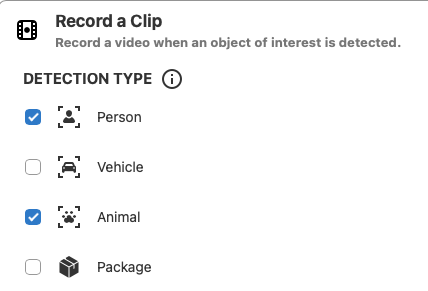
in that initial rule - under record a clip - package isn’t selected:
if I enable it, and then save, and go back into the rule - it’s unchecked again.
and finally - if the system had detected a package and it hasn’t been picked up - can the doorbell automatically beep / light (perimeter guard) to help protect packages?
Apologies for the delay, I reached out to Alarm.com to get clarification on some things.
Alarm.com’s release notes mentioned that the VDB775 is compatible with that rule, but their documentation does not list the VDB775 as compatible.
I’ve reached out to one of our contacts at Alarm.com to see if we can get some additional information, but at this time, it does not look to be compatible with the SD Card Removed Rule.
I’m checking on a few additional things with our team, but based on the information given, Alarm.com has recommended further in-depth troubleshooting, which would require additional permissions.
I’ll follow up with you regarding this tomorrow via private message if we need to go ahead and move forward with more in-depth troubleshooting. Otherwise, I’ll follow up here with additional steps.
My apologies, the information that I was originally given was incorrect. The ADC-VDB775 uses a newer version of video analytics, which allows it to have up to 3 video analytics recording rules, unlike the other video doorbells.
That may be related to the issues you’re having with enabling that recording rule. I’ll follow up on this tomorrow as well.
There isn’t one specifically for that, but alternatively, you can have a separate recording rule to trigger a sound to occur when a person is detected, and nobody is home or the security system is armed.
As a test, if you delete that original rule that won’t turn on, then create a new rule and only select package (no person or animal yet) as the recording trigger, are you able to save and use the rule?
Thanks, that should help narrow this down. On that new rule, if you do not select Package, and instead just select Person as the trigger, are you able to turn it on?
Instead of under the record a clip section, if you scroll down to the Notifications section on that rule, can you successfully select the two Package notification types? Do they remain if you wait a moment and revisit the rule?
so as the rule is - where you asked me just to include people - I can’t select packages for notifications.
if I re-enable packages in the record a clip section I can then select notifications for both package options.
when I save and go back to the automations - the rule we’re working in is still “on”.
if I edit that rule, under record a clip - people is still selected. package is now not selected - and b/c it’s not selected the two notifications for packages are greyed out.
Thank you for the description, this is very helpful to be able to relay the behavior to Alarm.com. We’re investigating this with Alarm.com, and we will follow up here ASAP.
so not sure if i need to do anything like update camera firmware, etc - but i seem to be having the same issue.
if i edit my 775 rules (Doorbell Rule 1 (re-created) or Doorbell Rule 2) - i can see that the record a clip (and notification) for packages are disabled.
if i enable the record a clip, it auto checks the boxes for package delivery and retrieval. if i save the rule and go back in - record a clip for packages is turned off again.
happy to re-create that rule if that’s what’s required - but figured i’d pass along what i was seeing before i did anything else.
It’s possible the update is just not live yet. Alarm.com announced these updates for today but they write them early before pushing the update. Let me know if you still see the same thing if you try in a few hours.
I don’t believe there should be any firmware update for the camera itself. This is a back-end change.
so I tried to edit my existing rule - and got the same results.
I tried to create a new rule to see if that would help - but the system indicated that I couldn’t create another analytics rule.
so i deleted the rule I was trying to edit and created it from scratch and see the same behavior.
if I select packages for video clip, it shows package delivery / retrieval boxes checked. if I save and go back into the rule, the video clip (and notification boxes) for packages are unchecked.
Alarm.com is saying to power cycle the doorbell, then try again.
If it still does not work it may be necessary to delete, factory reset, and re-add the doorbell to the account. Once it is re-added, create the Video Analytics rule and enable the package detection option.