Nami Install questions/issues

Hello.
I’m setting up the new nami system here in my home as an evaluation. I ran into two small issues and have a couple of questions.

Issues:

  1. During the joining of the devices the alarm.com app actually locked up when adding the motion sensor. So, when I went back into the app, I had to do the ‘add additional sensor’ option to add the rest of the components. That went ok, but I then didn’t have the ability to enter the system test mode as the instructions indicated. Is there a way to manually run the system test to verify everything?
    (Edit: Please disregard - I found the setting in the app to launch the test mode. Security System > Gear Icon > System Test)

  2. Also, the motion sensor has a broken tab on the battery compartment. (one of the two tabs on the ‘twist lid’ that covers the battery fell out when I opened it.)
    I was able to get the battery to seat with just one tab, but just wanted you to know. I’m thinking it was broken from the factory, as when I first opened it I noticed the battery door was seated a little crooked. The sensor is working, however.

Questions:

  1. An odd question: The directions say there should be a blue LED on the motion sensor but honestly I can’t find any light at all. Same for the door sensor - directions say there should be a white LED but I can’t find that either. In any case, both are joined and working. But if you have a pic of where that led should be maybe that would be helpful. Or maybe I just need thicker glasses. :slight_smile:

  2. I just want to be sure I understand the alarm.com plans required for nami. From reading the plan page, am I correct in this understanding:

  • To control the wifi sensing plugs, I would need Complete or Home plans.
  • However if I purchased the Alarm only plan, the sensing plugs would still do their sensing thing, but they would not be controllable from the alarm.com app. Is that correct?
  1. When adding the extra sensing plugs and door sensor (part of the AWARE 10 kit) to this existing ALARM 15 kit I just installed, should I add those items as individual sensors in alarm.com, or choose the option to install the AWARE 10 kit itself?

  2. (For future knowledge) Can the AWARE 10 kit can be a standalone purchase if you only want activity awareness and not alarm features, or must all purchases/installs start with the ALARM 15 kit as a base?

Thank you for your help!
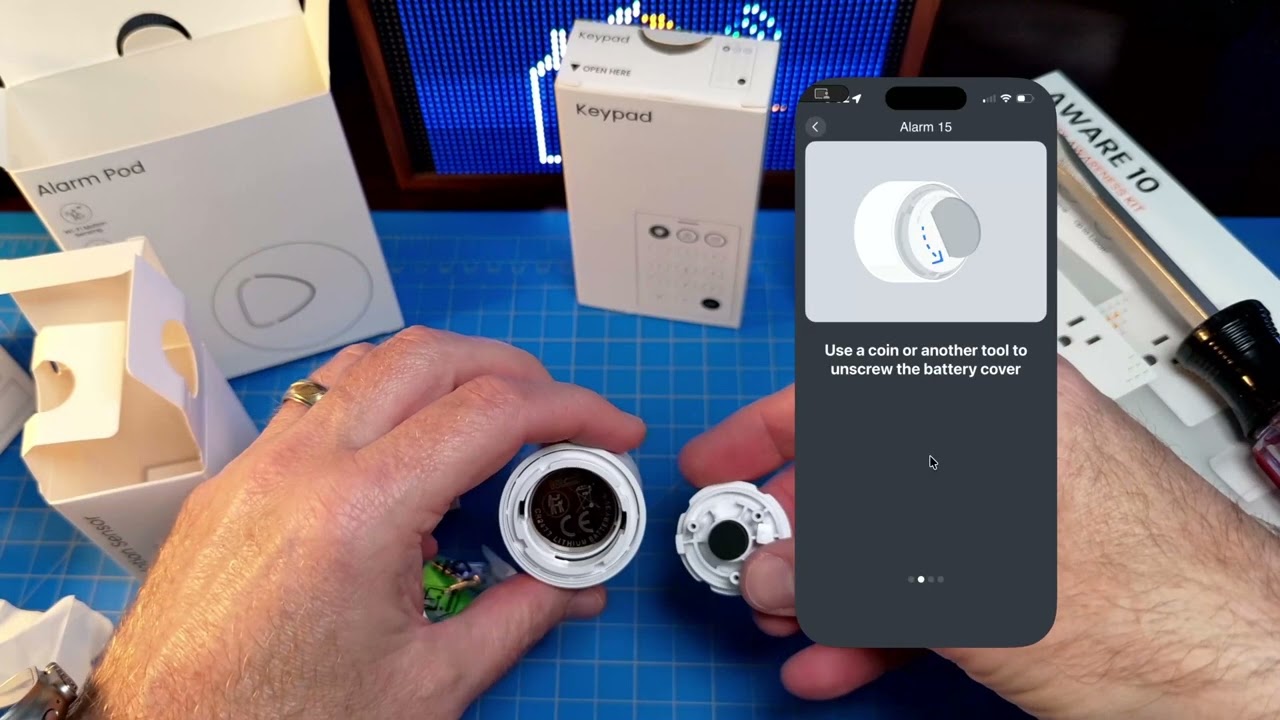
Also, the motion sensor has a broken tab on the battery compartment. (one of the two tabs on the ‘twist lid’ that covers the battery fell out when I opened it.)

If possible, can you submit a photo of that battery compartment?

An odd question: The directions say there should be a blue LED on the motion sensor but honestly I can’t find any light at all. Same for the door sensor -

They are super faint and more white than blue. The light is about a quarter inch down from the button.

If I purchased the Alarm only plan, the sensing plugs would still do their sensing thing, but they would not be controllable from the alarm.com app. Is that correct?

Correct. To control the plugs remotely, you would need Home Automation to be a part of the service plan. Currently that would be the Surety Home or Complete plans.

You can use the motion sensing via the Alarm, Home, Protect, or Complete plans.

  1. When adding the extra sensing plugs and door sensor (part of the AWARE 10 kit) to this existing ALARM 15 kit I just installed, should I add those items as individual sensors in alarm.com, or choose the option to install the AWARE 10 kit itself?

It depends on where you are adding them. An Area requires 2+ Wi-Fi sensing devices.

If you set up the full Aware 10 kit (Settings > Manage Devices > Nami > Aware 10) ADC going to prompt you to set up a new Area.

If you add devices individually (Settings > Manage Devices > Nami > Set Up Single Device) you can add them to the existing Area from the Alarm 15 set up, or you can add them to a new Area (requiring 2+ sensing devices).

Using the Set Up a Single Device link will skip some of the placement guides. You can use this path to add a single device to an existing area. Use the Aware 10 link to have the guided set up.

(For future knowledge) Can the AWARE 10 kit can be a standalone purchase if you only want activity awareness and not alarm features, or must all purchases/installs start with the ALARM 15 kit as a base?

The Aware 10 kit can’t be used by itself with our current security plans but we intend to offer a non-security monitoring plan in the future that will work with the Aware 10 kit as the base.

1 Like

Hi Tyler.

I was recording this as I was installing, so here’s a short video of me opening it for the first time and realizing it was broken. Let me know if you want closer/better pictures.

FYI - I was able to get it to latch even with the missing tab and it is functional at the moment. Thank you

Thanks for that information. Id be happy to get replacement started. Could you PM a picture of the QR Code and SN from the back of the motion?

Hello.
Not sure if I should keep this here or start a new thread?

I just got home and experienced an issue with nami. It was armed away. I walked in, and walked around trying to trip it with wifi sensing (deliberately not opening the door with the sensor or entering the room with the PIR sensor). It wasn’t going off, even when waiving my hand around the pod in all directions.

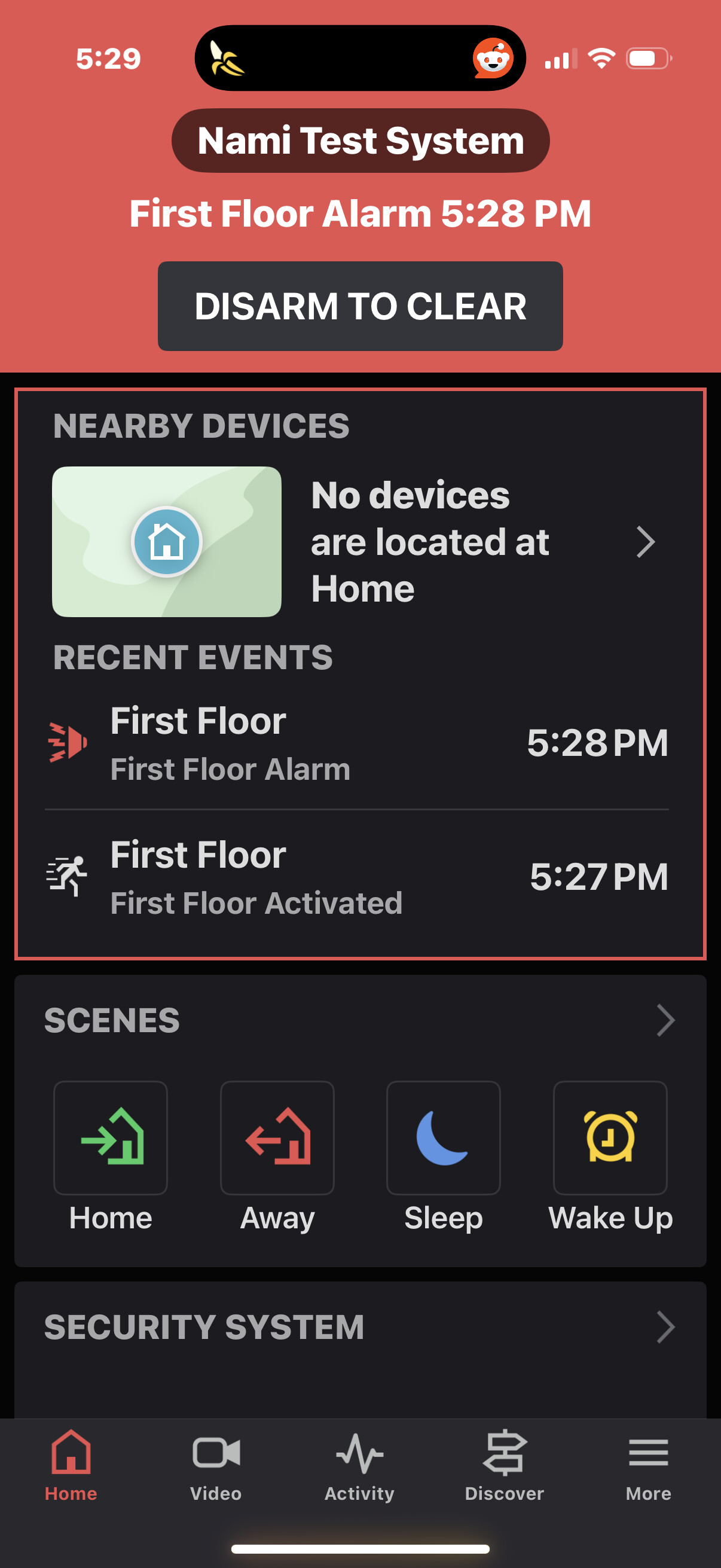
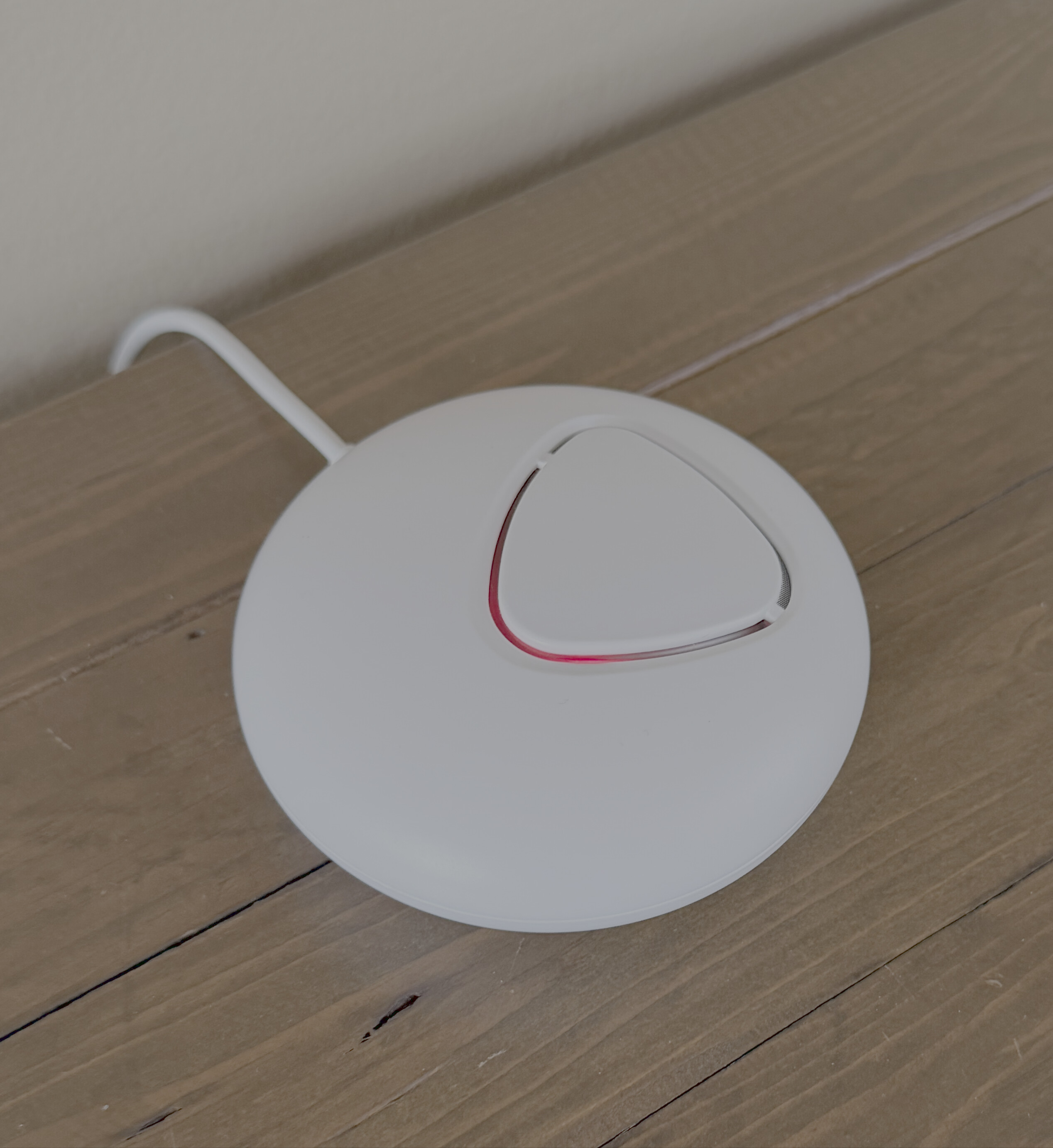
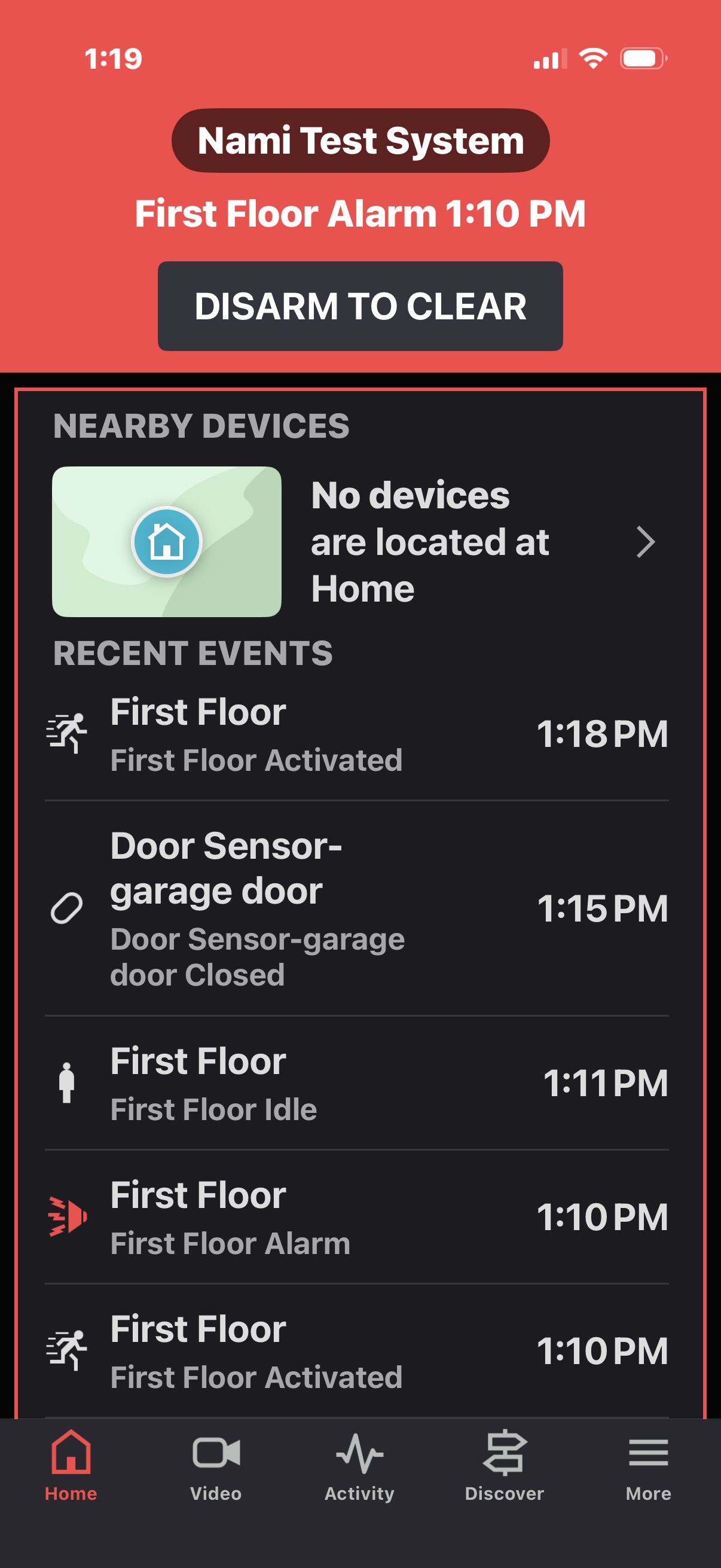
I then checked the app, and saw the system was in alarm !? However the unit was making no noise at all. Here’s a pic of what the pod looked like and what I saw in the app.


Then, I went to disable the system by entering my code on the keypad, and pressing the green ‘home’ button. When I did that, then the nami pod started to sound the siren.
I had to enter my code and press the green button a second time to get the siren to stop and the pod to go back to a disarmed state.

Let me know if I can provide any more details.

Thank you

Hey, I’m sorry about the issue. :flushed_face: The product team investigated and they think they see what happened, reproduced it, and have deployed a fix. At your convenience, would you mind trying again to see if the problem is resolved?
1 Like

Absolutely. I’ll repeat the scenario today and let you know. Thank you !

I’ve been testing the nami repeatedly since the change was made, making sure to replicate the same scenario and others, and so far it has worked flawlessly. Thank you!

2 Likes

Unfortunately I just had a repeat of the ‘no audio alarm’ again, with slightly different behavior.

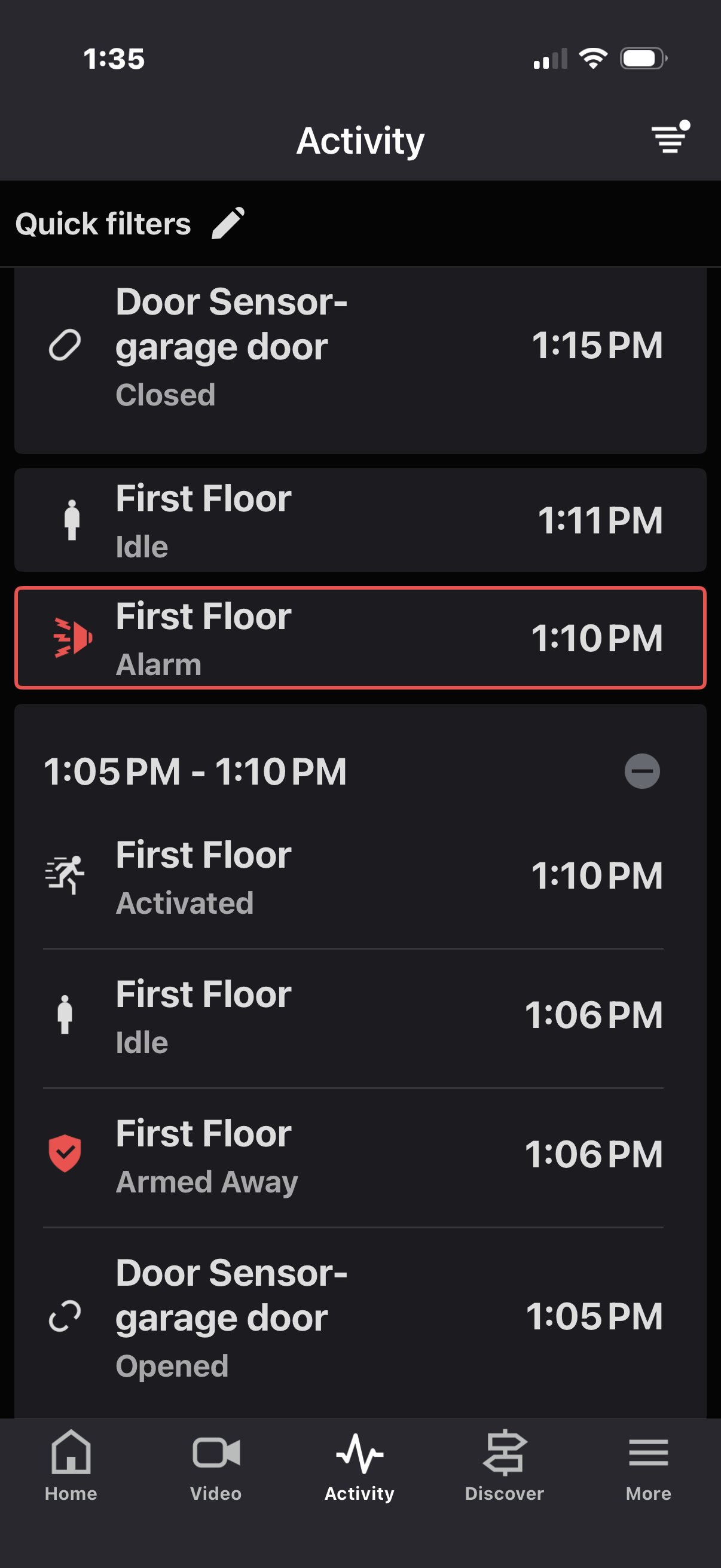
Armed away. Entered home via a door that would be subject to wifi sensing only. No audio beeps at all, but I noticed the red light was flashing on the pod. Below is a screenshot of the ADC app at that time: What’s interesting is I walked in at 1:18pm, but the time on that alarm is 1:10pm!?

I’ll PM you a video of the pod and me disarming via keypad in case that is helpful. Note that the siren did not blare this time like it did in the past. It just silently disarmed the system.

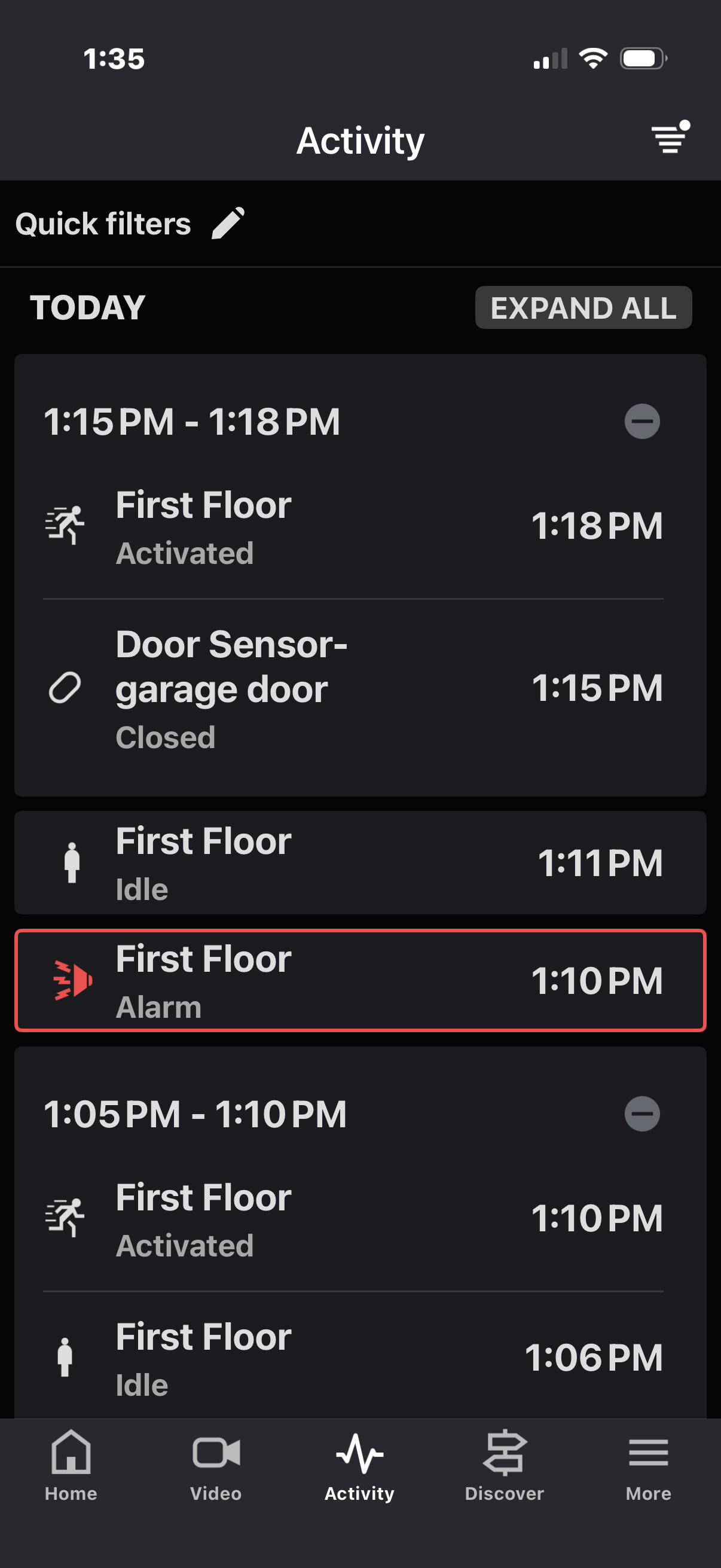
Here’s the final activity log after the disarm: (2 screenshots to show it all)


Note that in the log it looks like the system alarmed at 1:10pm ? No one was here (I was out walking the dog from 1:05 - 1:18). It appears wifi sensing thought there was motion at 1:10 but I think it might have been a false positive somehow. No other animals or people in the home. I verified this via the log on my real home alarm and camera feeds. The only thing that happened was my door locks auto-locked at 1:08pm on my IQ system.

Also that garage door sensor closed at 1:15 was very late reporting, as the door actually closed at 1:05pm. I’ve seen this a lot where the door sensor status is very delayed to ADC, but it passes the self test in near real-time.

I’m thinking the system was still in alarm mode at 1:18 from the false trip at 1:10. Interesting that the unit was silent - does it only siren for a short amount of time?

Let me know if you need more data. Thank you.

We’re looking into it. The First Floor zone was activated at 1:10 which triggered the alarm, went idle at 1:11, and then activated again at 1:18. Do you have any idea what might have activated the zone at 1:10?

No… Literally there was no one here at all. No one on the property, etc. I double checked our cameras just in case maybe someone was in the yard etc but no one. Doors /windows closed (so no breeze or movement), no animals since the dog was with me, etc. No heat sources running (dishwasher, etc). I even went as far as to check my power monitoring to see what was running and if something kicked on… nothing notable, although the central AC was running in stage 2 but had been that whole duration.

The only thing I know is at 1:08 my IQ panel triggered the Kwikset z-wave lock in the garage to lock. That was it.

Curious about the behavior, though…When the siren goes off, how long does it blare before auto-silencing? And, if it trips again, shouldn’t the pod sound a second time?

Thanks

It sounds like we have 3 separate questions to address. I’m going to reply in a separate post for each.

What caused the Wi-Fi motion zone to false alarm at 1:10?

We don’t currently know whether it was tripped by something inside or outside. From your coverage video, there are a couple sense plugs on exterior walls. The one by the window activated a little when you were outside.

Is there anything small in the house that moves and may have activated it? Such as a Roomba or ceiling fan?

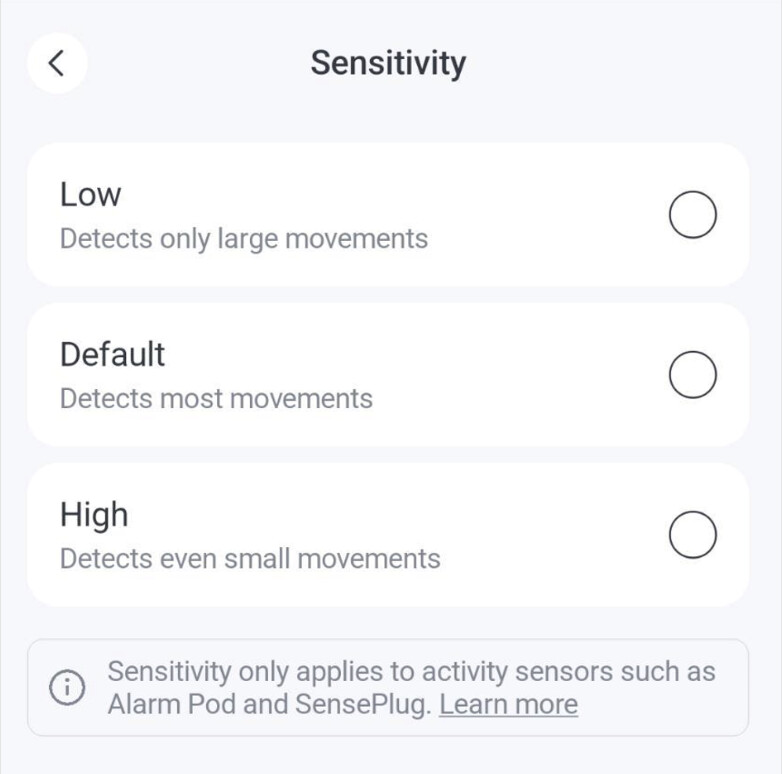
The first thing we should try is reducing the sensitivity of that motion zone.

For reference, the Low setting is recommended for households with pets or robot vacuum cleaners to prevent their activity from triggering unwanted alarms.

If reducing the sensitivity doesn’t solve the problem then the next step would be to move the sense plug to an outlet that isn’t on that exterior wall to remove the possibility that something outside activated it.

Why didn’t the siren sound when alarm activated the second time?

We’re still investigating this because it doesn’t appear to be documented.

I can confirm that the siren times out after 3 minutes.

My hypothesis is that the system may be designed to work this way, with an aggressive swinger shutdown behavior (a zone can only trip the alarm once), to avoid nuisance sirens when a zone is activating repeatedly. If that’s the case then we will push back on whether that’s the best default behavior for a security system.

I’ll follow up on this when I learn more.

Why does the event history show the garage door sensor closed at 1:15?

I see the event history shows that sensor opened at 1:05. Just so we know what actually happened, did you open it and then close it right away like a person would normally do when leaving the house? So what we should expect in the event history is to see the door both opened and closed at 1:05?

Just confirming so I can pass this along to nami.

No, nothing like that. Fans were off, and we don’t own any robot vacs. As I said, nothing was on, and nothing was outside moving either. It wasn’t even windy that day.

As for moving the plug away from an outside wall, I can do that but I wasn’t sure if it was directional - in other words that would create a dead spot behind the plug? But I can test that later.

Yes, I did. The door has an aggressive auto-close on it so it is impossible to keep open without using a doorstop. It opened/closed at 1:05.

That makes sense.
I also changed the notification settings to send alarm push notifications to my phone so if this happens again I’ll know in the moment that the siren goes off. I usually test this when we are all (dog included) out of the house.

It could, yes. It would depend on where it’s located. I would try changing the sensitivity to low first, before moving it.

I was able to confirm that, yes, the system is currently designed to only sound once when an alarm occurs. They listened to our feedback about the industry-norm swinger shutdown behavior and will consider that for a future OTA update. :crossed_fingers:

Regarding the “garage door closed” event showing up in Alarm.com 10 minutes late, here is what nami says:

We’ve identified that the delayed door sensor status reporting is related to limited Thread network connectivity. When the connection quality between the door sensor and the Thread border router is weak, event reporting can be delayed.

This can typically occur under the following conditions:

  • The door sensor is located more than approximately 10 metres (30 ft) from the nearest Thread border router (Alarm Pod or SensePlug).
  • There are multiple large metallic objects between the door sensor and the Thread border router, which can attenuate the wireless signal.

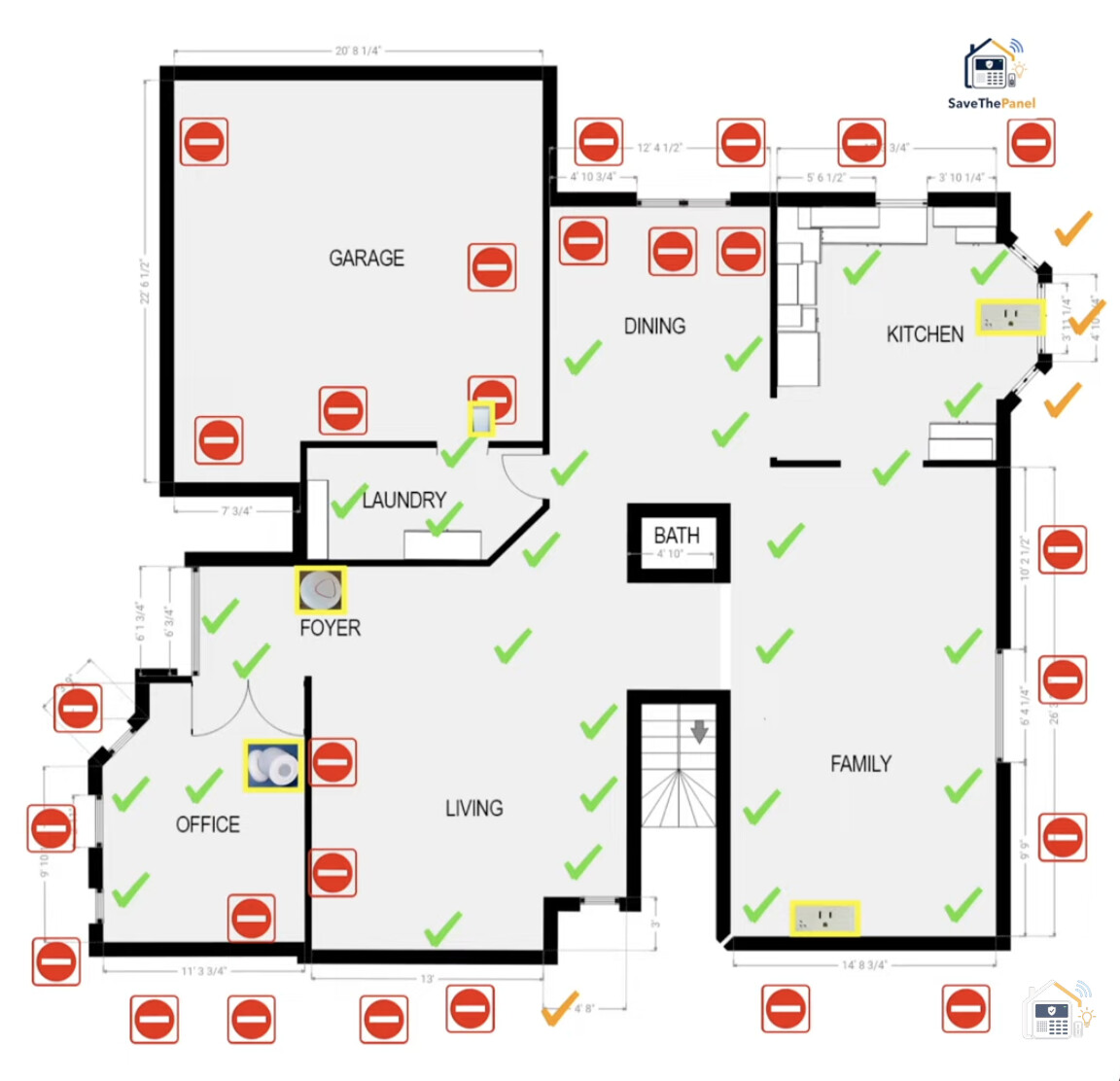
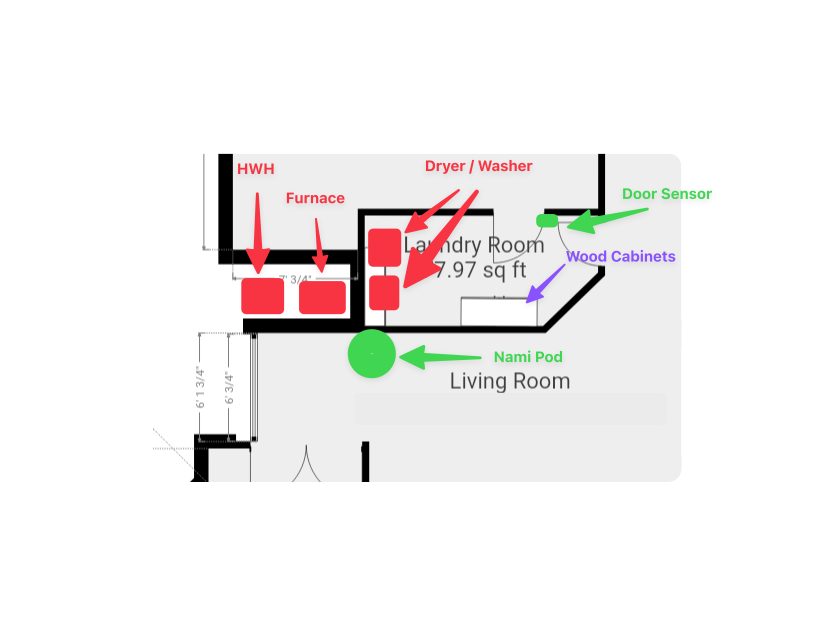
Looking at the floor plan, the door sensor appears to be located near the laundry room. If there is a washing machine, dryer, or other large metal appliance positioned between the door sensor and the Alarm Pod or SensePlug, this could potentially impact Thread connectivity.

Is there is a washing machine, dryer, or any other large metallic object along that path between the door sensor and the Pod?

Sort of… Here’s a diagram… and to potentially add to this - the laundry room door is a steel covered door (since it is a garage that is code here).
(Note that I have the sensor adhered to the door itself, not the frame because of mounting issues with the trim. The magnet is on the trim.)

Actual distance from Pod to Sensor is about 15 ft (but through the walls, etc)

I can try adding a sense plug somewhere, but the only options are in the laundry room above/behind the washer or in the dining room just outside the laundry room door (to the right of the word ‘cabinets’ in the diagram.). Dining room might be better?

From the diagram, it doesn’t look like the washer and dryer are directly blocking the path from the door sensor to the pod.

I lean toward the problem being that the sensor is mounted directly in a steel door. That can interfere with both wireless signaling and the magnetic reed switch itself. Metal doors, especially ferrous metal like steel, are notorious for causing problems with wireless sensors. I think Thread sensors, using 2.4 GHz which is higher frequency than traditional wireless alarm sensors, are even more susceptible to this problem.

The first thing I recommend is to see if you can reproduce the problem reliably so that you have a way to test potential fixes. Without changing anything, are you able to open and close the door and see either event delayed in the Alarm.com event history? Maybe open and close 10 times or so to get multiple data points with each test.

Once you have a reliable test, then I recommend doing one or both of these:

  • Add a rubber, wood, or other non-magnetic spacer (1/8 inch / a few mm or more) under the sensor to add space between the sensor and metal door.
  • Move and/or re-orient the sensor (from top of door to side or vice versa) because interference/attenuation isn’t uniform, it depends on the environment.

Then re-run the test to see if the situation improves.

I would also recommend trying the sensor on the frame and the magnet on the door (again with a spacer) but, as you said, there may not be room for that on this door frame.

Adding a sense plug to the dining room isn’t a bad idea either. It certainly can’t hurt when it comes to network reliability. Thread works better when it has a dense network of routers (sense plugs and pods). My only concern would be if you placed it so that it senses motion in the garage before you open the entry door, that would cause a false alarm.