I bought the PG9979 which is the new heat sensor only. It programmed it into the IQ4. I used the auto learn. It captures the secondary ID. I states its a smoke detector even though its a heat detector. It populated group 26 heat/smoke. Is this OK? I have non PG sensors that allow me to program in the HEAT SENSOR option and show as that.
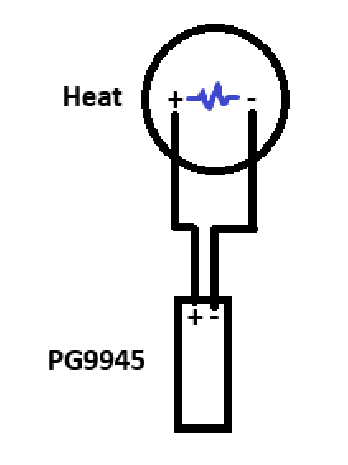
Secondly, I am going to use a mechanical heat sensor for the garage. Its the System Sensor 5601. I will wire it like this but I wont put the Power G transmitter in a junction box. It has a NO circuit. This is what the Power G transmitter PG9945 needs, right? https://youtu.be/JDCNkhMKb6o?si=kfTU3iz2a-saHGTn
Do I select sensor group 26 for the Power G sensor?
I just installed the System Sensor and 9945 my in my garage and found the video you linked to be outdated. I needed to add a resistor across the terminals on the system sensor for end of line. Also I did not use a box at all. I surface mounted the system sensor and the 9945 with a short wire (about 10 inches) connecting the two. It’s the garage not a fashion show (lol) so I was fine with it being exposed.
Also I didn’t have to do the business of taping the magnet to the sensor.
Programmed as per Ryan’s article :
(change the settings in this order):
Sensor Input: End Of Line
Sensor Type: Heat
Sensor Group: 26-Smoke-Heat
Here’s a link to my discussion about my garage install etc. About the EOL resistor:
My biggest issue was the included eol resistor was too short to span the terminals on the system sensor, and I didn’t want a splice in there. I actually used a different resistor with the same ratings I had on hand that had longer leads to make it cleaner.
Hope this is helpful.
In that thread, Vidal states that a resistor is not needed as there was a panel firmware update?
He confirms it is required. The above post is good info to follow. Here is the post from Vidail linked below:
I bought the PG9979 which is the new heat sensor only. It programmed it into the IQ4. I used the auto learn. It captures the secondary ID. I states its a smoke detector even though its a heat detector. It populated group 26 heat/smoke. Is this OK?
Yes, sensor group 26 is the group you want to use, that is the fire detection sensor group used for smoke detectors and heat detectors, that’s normal.
Do I select sensor group 26 for the Power G sensor?
Yes, the PG9945 would be sensor group 26 for fire detection.
Do the instructions tell you how and where to wire the resistor? Can you dumb it down for me of how and where to wire it in.
And triple confirming. My PG9979 is a heat detector that is showing in the panel as a smoke detector, and this is normal as it is still functioning as a heat detector regardless of what it says in the panel?
One terminal from the heat will go to one terminal of the PG9945. The other terminal of the heat will go to the other terminal on the sensor. It does not matter which one goes on which terminal in this case. Then you just add a resistor across both terminals on the heat.
There was a new update to the panel so the sensor can now only be learned in as EOL and not normally open. I drew the image below to help you out with the wiring. The blue marks the resistor location. The resistor should be included in the box of the PG9945
Yes, it still functions as a fire alarm. This means when the heat detector activates, it will communicate with central station as a zone type 26 alarm which is Fire. Zone type 26 is used for Smokes, heats, waterflow sensors so it is normal for it to be showing smoke and will still function normally.
Per system sensors, if you have a 5601, 5602, 5621, 5622 heat, then you can test the heat of rise with possibly a hair dryer or a heat gun. It is important not to pass the fixed alarm degree as this cannot be restored.
Other than then, make sure it is wired correctly and the wiring can be tested by shorting the two terminals on the back of the heat detect.
Finally getting around to this. I tried to learn in the 9945 to the iq4 panel to see if it works. Just want to test it as a normal windows contact. It won’t auto learn by tripping it with a magnet on the side. Then red led lights up but no enrollement. So I manually add by entering ID. It learns in, but doesn’t announce open or closed audibly when using the magnet to trip it. It doesn’t say P in the list to indicate its power G. Tried loop 1, 2, 3. I think I hear the panel audibly muting a bit but no chime or voice and no indication that this is working as a normal contact.
what am i doing wrong.
I just dont want to wire everything up with the resistor and everything only to find later it was never working to begin with and thats why im trying to test the 9945 first on its own.
To enroll the PG9945 I’ve had to press and hold the enrollment button inside the sensor during auto-learn for it to pop up. Once added properly there are no “loop” options, but instead options for “sensor input” (where you can select “End of Line” for your heat sensor.)
Here’s a link to a quick video I just made on the joining. Hope this helps!
So I manually add by entering ID. It learns in, but doesn’t announce open or closed audibly when using the magnet to trip it. It doesn’t say P in the list to indicate its power G. Tried loop 1, 2, 3.
Manually learning the sensor is fine, I usually do that with my own PowerG sensors, but you would need to select the Source as PowerG.
If you are seeing options for loop number, that means you have the Source set as 345Mhz for that sensor.
Source is in the bottom right of the screen when adding a sensor or editing sensor settings on the Qolsys panel.
I see a Garage Heat Sensor zone which appears to be programmed as expected for a wired heat detector into a PG9945.
If you place your account on test mode with the monitoring station either within Alarm.com or in the System manager here (under the Test my System tab), your sensor can be tested by temporarily shorting the two terminals on the back of the heat detector.
Does this cause an alarm? If so you should be all set.