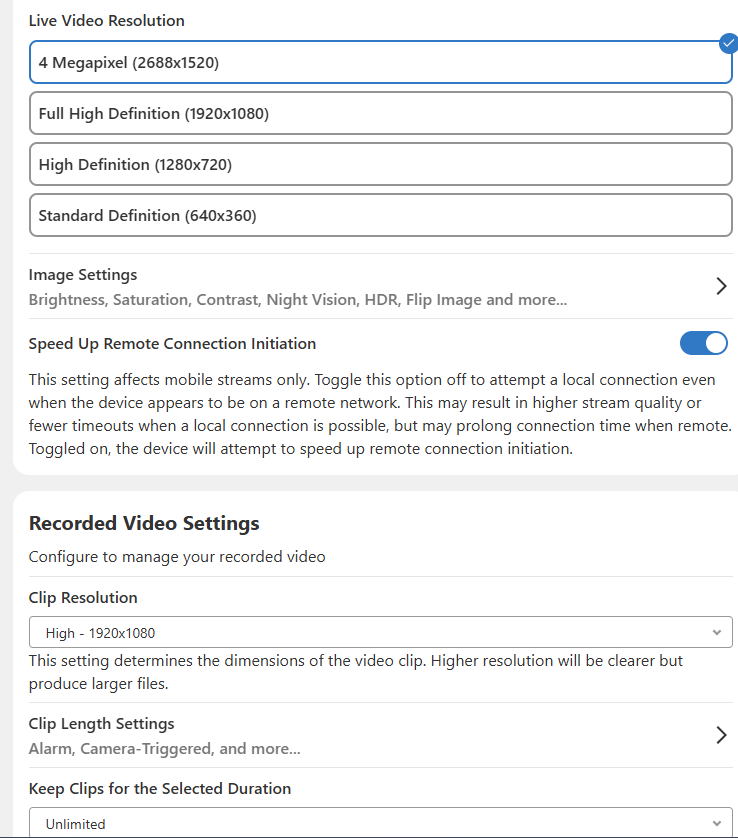
Any reason why? It kind of defeats the purpose of having a higher resolution camera and not being able to export video clips in the highest native resolution.
See atatched screenshot.
Also, any movement by ADC to increase the 30sec triggered clips recording limit?
As of now, all cameras can only cloud record at the medium and low resolution. I did put in a request to hopefully have this changed and have higher resolution in the future.
You are able to record at higher resolutions using on board recording with an SD Card and using an SVR
Thank you… but I was asking NOT about cloud recording resolution but resolution when exporting video clips to a local drive when connected to ADC via web browser… currently as you can see form the screenshot I attached you can export in High resolution that is only 1080p instead of native 2K. Would 2K video clip export available?
We are still limited to a 30sec max time for cloud recordings. Is there any possibility in the future for a longer recording timeline like 60sec?
on a Windows PC, open ADC on a web browser, select Video on the left, select Settings on top right, select camera, select Video configuration form the drop down menu, select the resolution of the Recorded Video Setting. I assume that is the setting for the exported clip that I would normally export the following way:
on a Windows PC, open ADC on a web browser, select Video on the left, then select SVR timeline, click on the Export Video icon on the bottom right of any camera, click Export.
Am I doign this all wrong? or there is an easier way to do this without going to the SVR in order to get 2K resolution clip?
The screenshot that you showed is the settings for clips that would be manually recorded or recorded by an event-triggered rule (eg, an alarm going off or a manual clip requested).
The resolution for 24/7 clips is handled by the local recording rules. These can be found under Video > Settings > Recording Rules > Local Recordings. I’m showing that your V730 camera, on SVR Channel 9, is set to record from that camera at the 4MP resolution (2688x1520).
Using the SVR Timeline is the correct way to export the video from the SVR via the Alarm.com website. When you downloaded the file, what did you use to check the resolution?
Nicholas, thank you so much… all good now… followed your process and confirmed the export from SVR timeline is the max resolution on v730 and v724… on of the 724s had SD card and that needed to be adjusted to max resolution.
what is the max SD card size recommended for 724 and 730? And recommendation for brand and/or type for AZ heat? I have been using Sandisk high endurance 256gb but they mode than doubled in price in last few months.
It is recommended to use microSD cards that are meant for video surveillance applications. These types of microSD cards are made for constant recording and harsh weather conditions that they’d be exposed to.
The following microSD cards are officially supported by Alarm.com. Supported cards can have a maximum capacity of 1.5 TB.
Western Digital Purple microSD cards
Micron Industrial Memory cards
Samsung Pro Endurance
SanDisk High Endurance
SanDisk Max Endurance
SanDisk Video microSD cards
Transcend 460T