If you are adding smart locks, lights, switches, a garage controller, or a thermostat to your Alarm.com system, there is now a fork in the road that did not exist a few years ago. Those same Z-Wave devices can join your panel in one of two very different ways: the traditional Z-Wave mesh that has…
1 Like
If I’m understanding this article correctly, there doesn’t appear to be an easy way to determine whether an existing Z-Wave device is connected using Long Range (LR), other than if it was originally included using SmartStart. If that’s the case, it sounds like the only way to ensure devices are using LR would be to remove them from the network and re-add them using SmartStart.
For users like me who already have a large number of Z-Wave devices installed and working properly, that’s a significant undertaking. I did install a few of my newer devices using SmartStart, so I’m assuming those are already operating in LR mode. However, having to factory reset, exclude, and re-include dozens of existing devices just to take advantage of Long Range seems like a lot of unnecessary work.
It would be great if there were another method to migrate or enable LR on compatible devices without rebuilding the entire Z-Wave network. That would make adopting LR much more practical for existing users with established installations.
For users like me who already have a large number of Z-Wave devices installed and working properly, that’s a significant undertaking. I did install a few of my newer devices using SmartStart, so I’m assuming those are already operating in LR mode.
To clarify, Z-wave LR is a specific capability of newer LR specific devices when paired with a controller that supports LR.
Older or other non-LR Z-wave devices cannot be made to use LR through smart start.
That is correct. We’ve already provided feedback Alarm.com that customers should be able to see that information. We can see whether your devices are enrolled as long range. It doesn’t look like any of yours are currently.
Yes. If your Z-wave network is working fine, I wouldn’t bother changing it. It looks like you have plenty of devices for a strong mesh network. That article was more a recommendation for people planning a new installation.
But if you find a far away device is struggling to communicate and it supports long range, it’s probably worth re-enrolling to try it.
1 Like
@Ryan That is a great article! Very complete picture of a sometimes complicated topic.
FYI - While not in the app or website, you can tell which devices are LR by their device ID number, which is visible in the IQ panel.
On the IQ panels*, I’ve found that mesh (non-LR devices) will have ID’s that are 1 to 229. LR devices will have ID’s that are 230 or greater*
Go to Settings, Advanced Settings, (installer code), devices, z-wave devices, edit device
or
Go to Settings, Advanced Settings, (dealer code), Z-Wave Device List
The left most column is the device ID.
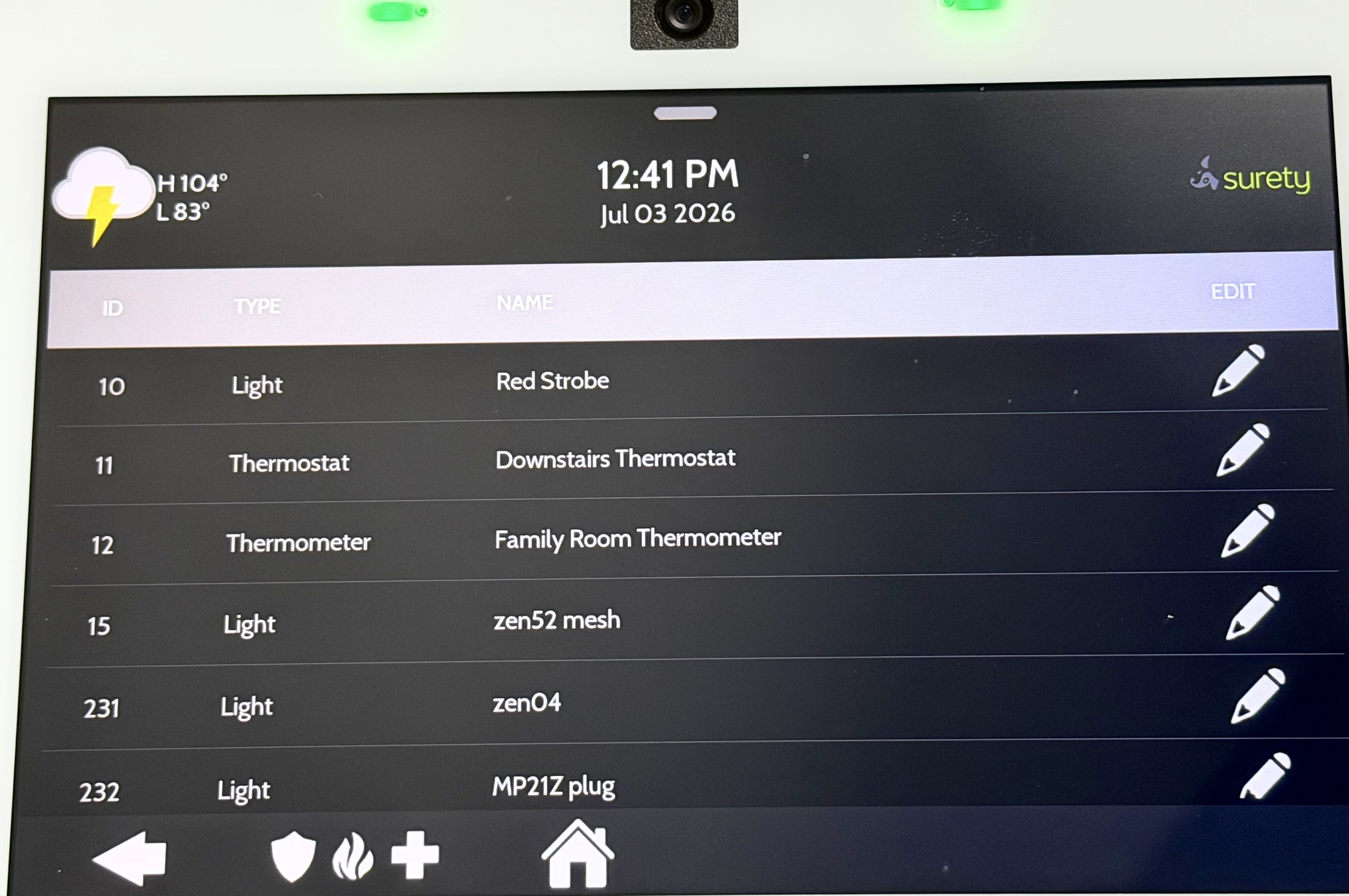
In the example screenshot, the ZEN04 and MP21Z plug are both LR. Remainder are mesh.
*Note that this is not standard. Most hubs follow the Z-Wave standard of reserving 1-255 for mesh and 256 and beyond for LR; it seems the IQ panels do this a little differently in my testing. [I could not find a definitive document on IQ’s node ID structure anywhere - this is just my experience.]
Also, keep in mind that just by scanning the QR code does not mean it will join as LR. If you do a traditional include (where you activate the z-wave device in inclusion mode when prompted, and THEN scan the QR code) that will always join as mesh. To join as LR, you’d need to keep the z-wave device powered off, then go into the smart start screen, scan the QR code there, then click add. At that point power on the device. (Before powering on, I usually go into the provisioning screen and ensure it is properly listed (likely as ‘not in network’) and edit it, click edit gear and verify that bootstrapping mode is set to zwave long range. Then power on the device to allow it to auto-add.)
1 Like
Good point. That’s what we see on our panels too. It’s not super user friendly and it may be panel specific but it’s a way to tell.
On the dealer side they label it with LR if it’s long range.