Gateway LED Reference
The enclosure gateway LEDs can be used to indicate communication errors, panel communication, network communication, and signal strength.
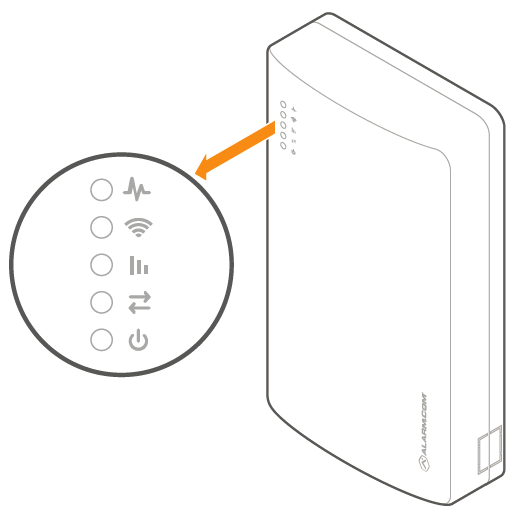
Trouble LED

| Flash pattern | Description |
|---|---|
| 1 | The Alarm.com module cannot communicate with the panel. Perform a power cycle on the panel. |
| 2 then 4 | The Alarm.com module provisioning process could not be completed. Power cycle the system. |
| 2 then 5 | The Alarm.com module provisioning process could not be completed because the module is currently roaming off the carrier’s primary network. |
| 3 | The Alarm.com module is trying to register on the cellular network. If it persists for more than a few minutes, the module is having problems registering. Check L4 for signal level. If signal level is lower than 2 bars, change the panel’s location or use a remote antenna option. |
| 4 | The Alarm.com module is registered on the cellular network but could not connect with Alarm.com. |
| 5 | The radio on the module is not working correctly. If this persists for more than a few minutes, the module may need to be replaced. This error is extremely rare, so please verify that the module is flashing 5 times. |
| 6 | This indicates an error only if it persists for more than a minute. Otherwise, it’s an indication that the module is resolving an unusual condition regarding communication with the cellular network. |
| 7 | The SEM is unable to access panel programming. Check the panel wiring and installer code. |
| 8 | If this error persists, the account may have been set up incorrectly. Check that the serial number being used matches the serial number used to create the account. |
Path LED

| Flash pattern | Description |
|---|---|
| Steady long flash (~2 sec) | The cellular communication path is active. |
| Long flash (~2 sec) followed by a short flash (~0.5 sec) | Both cellular and broadband communication paths are active. |
| Steady short flash (~0.5 sec) | The broadband communication path is active. This should also accompany an error LED flash. |
| No flash | Both communication paths are not communicating. This should also accompany an error LED flash. |
Signal LED

The Signal LED flashes to indicate the cellular signal strength (0 to 6 bars).
Panel LED

The Panel LED flashes with every communication to the panel.
Power LED

The Power LED illuminates solid when power is supplied.