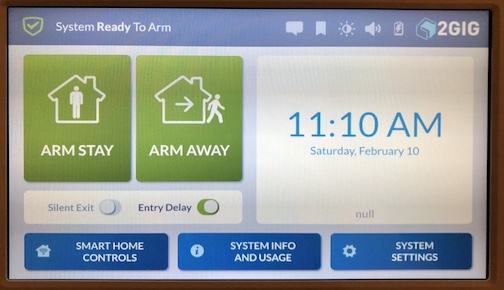
Working on pairing a SP1 to a GC3. The message “DEVICE CONNECTED/NOT CONNECTED BUT NOT PAIRED WITH A CONTROL PANEL” as described in the 2GIG instruction sheet is NOT displaying on the screen of my SP1. Can anyone offer guidance on how to get the SP1 into paring mode? It’s like mine has already been paired to another system so it’s not “looking” to initiate the pair. I can get the GC3 into listening mode but cant get the SP1 to go.
I have updated both to 3.1.1.
Tried various attempts to reset, restore defaults, reboot.
Tried to pair using both my home wifi and the GC3 as the access point.
I have attached an image of the what the SP1 is displaying.
If you need to reset the SP1 to pair with the GC3:
On the SP1, press and hold the two front face buttons for 15-20 seconds, the screen should revert to the wireless setup and pair button screen.
On the GC3 make sure that if you have a current iteration of the SP1 (under system configuration - Keypads) from trying to learn it in that you use the trash icon on the left half of the screen to reset that keypad slot and delete any info.
Then make sure they are on the same wifi network and pair, selecting to pair on the GC3 first.
Thank you Jason. I’ve tried every method to reset the SP1 that I can find, including pressing/holding both buttons. When I press and hold both buttons, they go dark then eventually re-illuminate. No change to the screen. No reset.
When I press and hold both buttons, they go dark then eventually re-illuminate. No change to the screen. No reset.
Hmm, that is strange. You may in fact have a malfunctioning SP1. Have you removed all power to the SP1, left it powered down for a few minutes, then power back up, battery first? Afterward try the face buttons, keep holding them past when you think you should let go. Any luck?
Ive tried that a couple times as well. Still boot’s to the “ready to arm” screen and the dual button hold does not result in any action. Maybe request a replacement? Thank you.
If the SP1 is failing to default, you may have a malfunctioning unit. If purchased through suretyDIY you can find our warranty policy here, along with RMA form.