I recently installed some Schlage Encode locks and integrated them with ADC. I set the automation to disarm my panel when a user code is entered on the lock. The automation does not seem to disarm the system, but it does work for locking them in arming status. I only got it work successfully once but all other time it fails. Standard entry time in use for 30secs. Has anyone noticed this?
With Schlage encode locks, the lock codes are managed in the Schlage app rather than Alarm.com which may have an impact on this particular automation. Let me double check whether that should work (I don’t have an Encode lock with me to test it myself) and we’ll follow up ASAP.
@ryan.boder Further testing seems disarm is sporadic sometimes it works sometimes it doesn’t. So I have confirmed that it does work, but sometimes it comes within the entry delay of 30 seconds sometimes not. Not sure why, I have expanded the entry time out to 90 seconds, but it does not matter as generally when it does disarm it falls within 8-10 secs of unlock. I can say the longer wait periods between arm and unlock seems to ensure it disarms but that wait period itself seems inconsistent. I have waited 5 mins after arm and the disarm after unlock works, but other times not. Not sure how the cloud works on this one. Would traditional Zwave locks work better if using a Vista on an SEM300?
Would traditional Zwave locks work better if using a Vista on an SEM300?
Yes, provided the Z-wave signal is strong at the lock, a Z-wave lock wouldn’t be affected by cloud delays. This often requires that you have a repeating Z-wave device in between the lock and the panel to help.
Z-wave rules are processed on board the SEM rather than in the cloud, and can be much faster to execute.
@jwcsurety I was reading that in my case the SEM300 on a vista still processes completely on ADCs cloud and just eliminates the cloud to cloud linkage between Schlage and ADC. So I believe there is no local control possible for my scenario using a SEM.
I was under the impression that the additional cloud took the disarm command from 2-5 seconds using Zwave to 8-10 seconds using cloud encodes based on previous threads and available information. In my head I was thinking the disarm command should come within the 30 seconds entry period allowance. I’m just wondering if the disarm automation command here is failing to execute for some reason such as cloud status update or cloud lag, because I’m attempting to unlock the lock and disarm the panel within minutes of arming it? My thought process is perhaps the systems lock status had not updated to locked on ADC to know to process the unlock automation. Not sure if there is some cool down period between the cloud integrations as I have noticed the app will frequently show incorrect lock status. For the web portal I can hit a refresh button and update the status but the app has no such way to update status as I have discovered. I was hoping maybe ADC had some general rules for this product integration to help with consistency.
I was able to to confirm that Z-Wave rules are held locally and not on the cloud with alarm.com
Were all these tests done one right after the other?
If you arm your system to away and wait about 5 minutes and then unlock the door. Does the disarm command go through quickly?
Vidail
When you say it’s held locally do you mean to say if connection is lost to ADC the rules continue to function locally? I know this is possible for some of the modern panels like the Qolsys IQ 5 and the IQ Pro, but I have seen lots of documentation that says the SEM is fully cloud based. Here is write up by Alarm Grid: How Do I Add a Z-Wave Device to My Alarm.com SEM? - Alarm Grid
Do you have a source for this information that can be shared this might affect my overall direction with some things.
I did wait in between the tests to a maximum of 5 minutes after the arm and locking were completed from the panel. The system disarmed twice out of about 6 or seven test spread out across two locks using two rules. Behavior was same with both locks. I did notice that I had more success the longer I waited after the arm functioning but it seemed random if it would fail or not.
That article references “local control” as not being available, which is true. There is no way to manually turn on a Z-wave light paired to the SEM via any buttons on the Vista Keypads or SEM itself like there is on many other systems.
Automation rules for Z-wave devices are different. Rules are created in Alarm.com and sent to the controller. Rules that do not require cloud interaction are executed locally. After a rule is successfully sent to the system, you can remove the cell antenna and unplug the broadband ethernet from the module/disconnect wifi so that no communication with Alarm.com is possible; and that Z-wave automation rule will still execute.
Hmm that might lead to swap if this does not stabilize. I thought local rule control did not function as well if cloud connection is lost. That’s what I get for making assumptions and not asking about what’s written. Can you tell me if the access codes are stored locally as well for the locks as I’m wondering if the Zwave locks become completely independent of cloud connection to function the rules as I know you use the ADC to manage the codes?
Are there any go bys from alarm.com to make the cloud integration with the encodes more stable or consistent? I’m in the infancy of testing this but my initial testing seemed to make me think its failure is sporadic, but longer wait periods will help make a final determination. For instance it takes XX long for the sync to occur in the cloud so don’t attempt to unlock disarm before this XX time. The system polls the lock status on the Schlage cloud at XX frequency? I think I’m trying to decide if the panel entry period is too short due to cloud lag or if I’m waiting too short to test due to cloud refresh rate.
Also how do you get the lock status to update on the app as in the web view there’s a refresh button but not on the app?
Can you tell me if the access codes are stored locally as well for the locks as I’m wondering if the Zwave locks become completely independent of cloud connection to function the rules as I know you use the ADC to manage the codes?
Codes are managed online, but they are sent to the Z-wave lock and access is granted at the lock, not even at the panel. The cloud is not involved when a code is entered at the Z-wave lock to unlock the door.
The panel simply sends that event (the door being unlocked by a code) to Alarm.com and it gets logged in history.
Are there any go bys from alarm.com to make the cloud integration with the encodes more stable or consistent? For instance it takes XX long for the sync to occur in the cloud so don’t attempt to unlock disarm before this XX time.
I do not have documented times, we can reach out to ADC to see if they have any they can share, but the nature of third party integrations means that often not only does a device need to communicate to the cloud, Alarm.com also needs to communicate with a third party service to get the status. There will necessarily be more choke points and potential delays and syncronization. The same is true for Wifi lights currently. Sensor activity monitoring adds an extra delay on top of regular latency.
Also how do you get the lock status to update on the app as in the web view there’s a refresh button but not on the app?
On device pages in the app you can pull down to refresh.
So further testing this evening confirmed the cloud theory. I waited 15 mins after the panel fully arming and the locking of the door before attempting to unlock and disarm which worked flawlessly. The panel disarmed within 5 - 8 seconds of entering the unlock code. I think the system needs to verify the lock status before the rule will run which seems to occur some time after the event plus the cloud lag you discussed. Now that I have been educated on Zwave locks will be heading in that direction at some point as I build out this network.
if you don’t mind could you ask ADC how long it takes for status updates to occur? Might be quick on their cloud, but assume transit time also plays a role.
Also for I cannot get the lock status to update on the app by pulling the list down. The only way I have discovered to update them is to await the refresh or to go to the webpage login to manually refresh. With the manual refresh I have noticed the top refresh button for all devices does not update the lock status. I have to update each one individually. Perhaps this is why the drag down does not work? Honestly not sure what it supposed to look like as I see no indication of any sensor refresh. Would you be able to ask ADC if there is some other refresh option on the app?
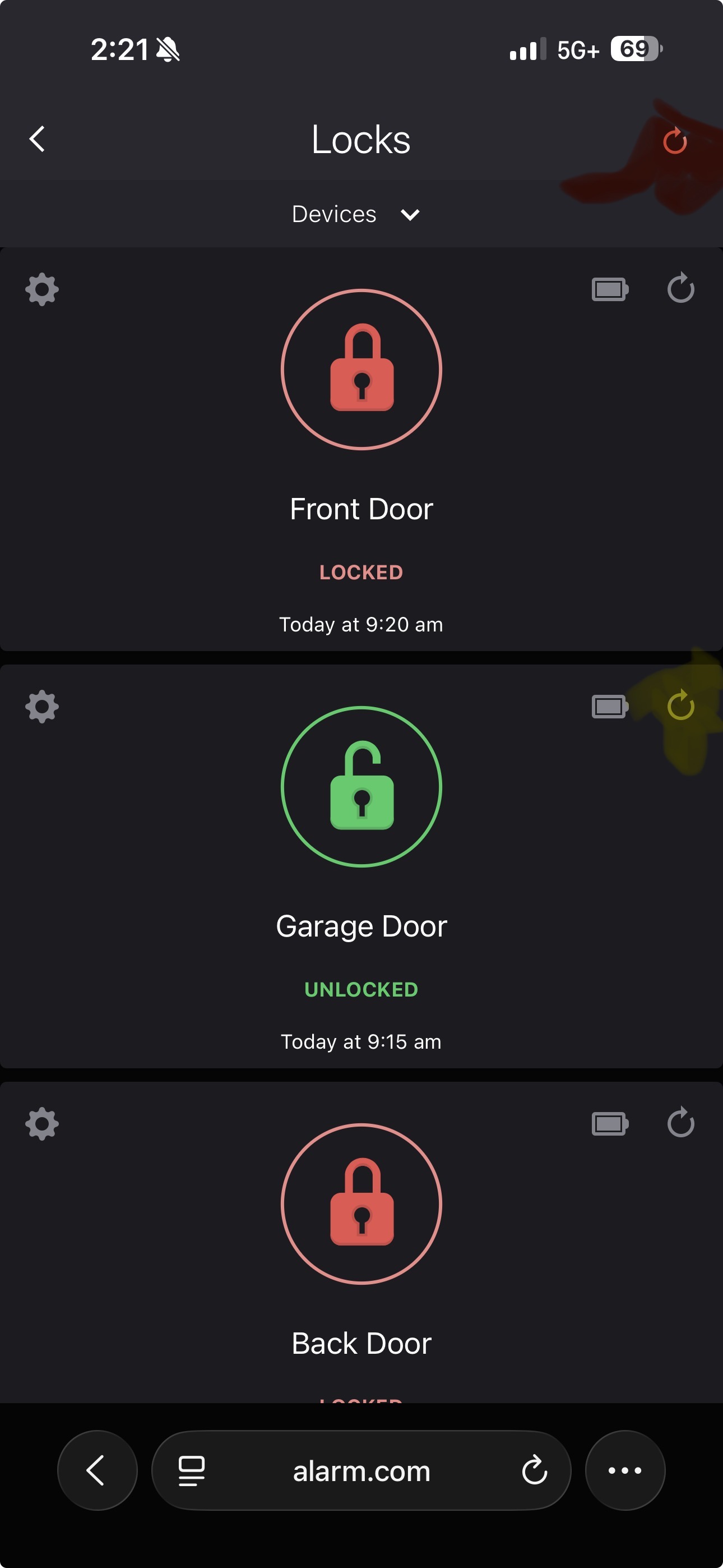
@jwcsurety did ADC ever get you a response?
Exact specified times are not available and not published in documentation. Likewise it looks like Schlage integration docs do not disclose any SLA expectations for latency.
Schlage support documents suggest possible times up to 30-40 seconds with various causes. Presumably somewhat common given the specificity of the time in that article.
@jwcsurety appreciate you looking into it. Looks like the best action is to replace with the Zwave locks to go with a native solution.