
Introduction
Below are the steps to reset power on your hardwired smoke detectors on an IQ Pro Panel v4.3.0n with DSC Neo HS2TCHP Touchscreen Keypads. Once the smoke detectors are reset, you can clear the alarm memory.
Silence the Alarm
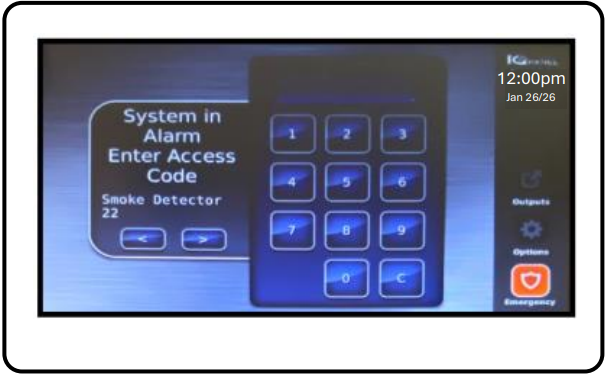
- Once you verify there is no fire in your home, enter a valid code on your keypad to silence the fire alarm
Check your system
If using multiple System Sensors smoke detectors on a single zone, you can walk check your smoke detectors to see which one is in alarm as once you reset the smoke power, you will not be able to check which one in the loop activated the alarm.
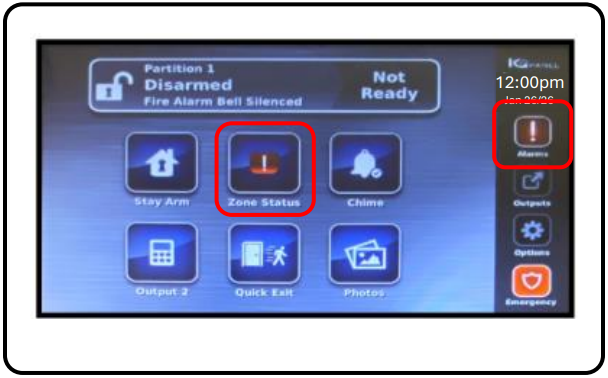
- The keypad will display an alarm memory on the Zone Status Icon and the Task Bar. Review as needed.
Reset Smoke Power
-
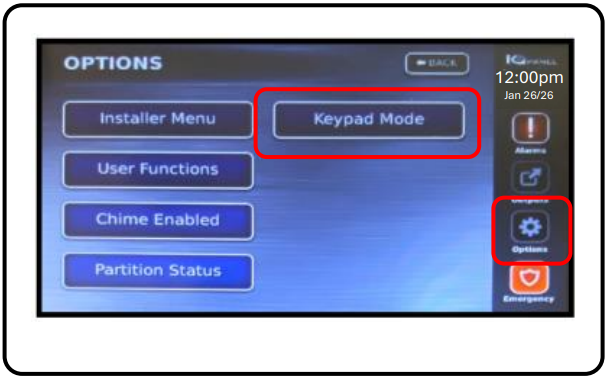
Tap the Options icon on the Task Bar and select Keypad Mode
-
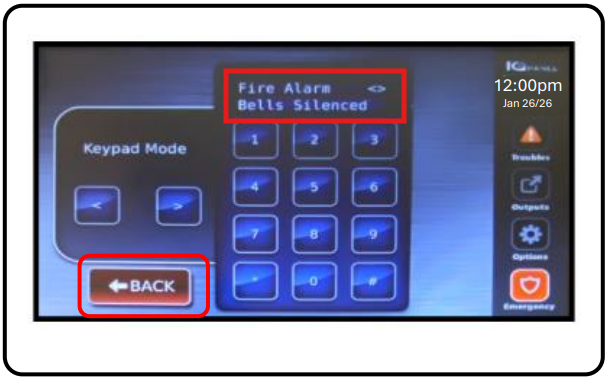
Enter a valid passcode on the Fire Alarm<>Bells Silenced display to clear the fire alarm
Clear Alarm Memory
- Tap the back button and then arm and disarm the system to clear the alarm memory.