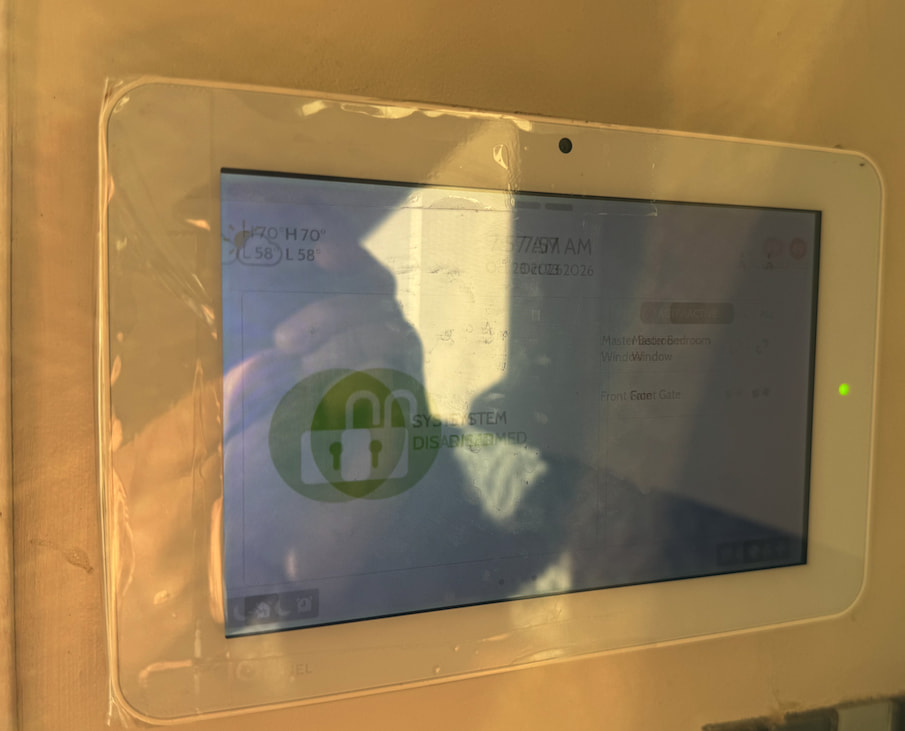
My IQ Panel recently started glitching, and the text and images on the screen are blurry, distorted, and difficult to read.
The touchscreen still responds, but the display is not working properly.
I’ve already tried restarting the panel, powering it off and back on, performing a reboot, and checking for software updates. Unfortunately, none of these steps have resolved the issue.
This problem started suddenly, and I’m not sure what caused it.
Could you please help me troubleshoot this issue and let me know if there is anything else I can try?
Thank you for explaining the troubleshooting steps you’ve already tried. We see that you are using the IQ Panel 2 2.8.1 with the latest firmware.
Have you tried disconnecting both the AC power and internal battery?
If you haven’t performed a complete power cycle by powering down the panel first and disconnecting both the AC power and internal battery, we recommend trying that next.
Go to Settings → Advanced Settings → Power Down.
Unplug the AC power supply from the wall outlet.
Open the panel and disconnect the internal battery.
Leave the panel completely powered off for at least 2 minutes.
Reconnect the internal battery first, then reconnect the AC power supply.
Turn the panel back on.
If the display remains distorted after a complete power cycle, the panel may be experiencing a hardware issue that requires replacement.
Please let us know how it goes, and we’ll help you determine the next steps.
Since the display remains distorted after a complete power cycle and your IQ Panel 2 is already running the latest firmware, this confirms that the issue is hardware-related. Unfortunately, similar cases have required panel replacement since the panel screen alone is not designed to be replaceable.
We recommend replacing your IQ Panel 2 with an IQ Panel 5. Currently, we are no longer selling the IQ Panel 2 and IQ Panel 4. If you decide to replace it with the older models, it can be purchased through other dealers online.
Please inform us if you already have the replacement panel on hand. We will then create a back up of your old panel’s programming and restore it to the new replacement panel. We will also guide you on how to enroll your replacement panel to alarm.com