Radio Not Responding or even Dual Path Communication Failure - Cellular indicates that your alarm panel’s cellular module is no longer communicating with Alarm.com. If your panel only uses cellular to communicate, then your panel is not being monitored and the issue should be addressed as soon as you can.
It is always best to have an ethernet cord connection from the Alarm.com communicator to the router as a backup communication incase your cellular even has any issues as well as it makes updates easier.
Check for power
There are a few different things to check. The first one being make sure your system is still powered up locally. If it is, make sure the Alarm.com communicator is also powered on and has some lights on the LEDS.
Power Cycle the panel
A power reboot would be the next step. To perform this, power down the system by first removing the AC transformer on the wall and then the 12V battery connected to the panel. If the transformer is not in the same room as the panel, you can disconnect the wire in the first terminal on the left but make sure it does not touch anything else as a short to the mainboard can cause panel failure.
Leave the system powered down for 5 minutes. The LED lights on the Alarm.com cellular communicator will also be powered down.
When you are ready to power it back on, connect the 12V battery to the panel first and then connect the transformer on the wall. If you disconnected the wire in the first terminal, it is normal for there to be a small spark when connecting it back.
Check the LED lights
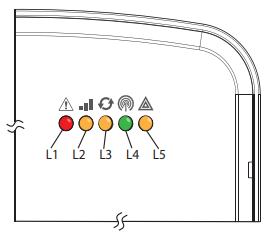
There are 5 different LED lights and you should check L1, L3, and L4. L2 is used to troubleshoot ethernet connection.
| LED | Function |
|---|---|
| L1 | General and cellular error LED. L1 flashes 1 to 8 times in an 8-second interval to indicate the specific error. |
| L2 | L2 indicates broadband errors and panel communication. Flashes 2 to 8 times in an 8-second interval to indicate a specific error on the broadband path. Also flashes once every time the module communicates with the panel. |
| L3 | Cellular Communication. Flashes every time the cellular signal level is checked and when packets are exchanged with Alarm.com |
| L4 | Cellular Signal Strength Level. Flashes 0 to 5 times to indicate signal strength or toggles on/off slowly when communicating with Alarm.com servers |
| L5 | L5 indicates Z-Wave status and errors. |
LED 1
L1 flashes when there is a general error or an error on the cellular path. The number of flashes indicates the error number. If there are two or more errors at the same time, the errors flash one after the other. The LED stays off for at least 4 seconds between errors.
It may take up to 10 minutes before L1 detects and flashes an error code.
| LED 1 Pattern | Device Error and Solution |
|---|---|
| 1 | Module cannot communicate with the panel. |
| 2 | The SIM card is missing. The SIM card holder can be found on the module. Verify that the SIM card holder is closed securely and that there is a SIM card in the holder. If the SIM card is present, do not remove the card. Ensure the SIM is not loose. |
| 3 | The module is trying to register on the cellular network. If it persists for more than a few minutes, the module is having problems registering with the cellular network. Check L4 for the signal level. If below 2 bars, change the panel location. If the signal is good, the module may be roaming on a cellular network that does not partner with our cellular providers, or the SIM card was not activated yet because the Alarm.com account was not created correctly. |
| 4 | The module is registered on the cellular network but cannot connect with Alarm.com. Power down the module, wait 1 minute, restore power and perform a communication test. |
| 5 | Radio portion of the module is not working correctly. Verify correct power is being supplied to the Alarm.com communicator. 1. If power is sufficient and this persists for more than a few minutes, the module may need to be replaced. This error is extremely rare so verify that the module is flashing 5 times. |
| 6 | This is an error only if it persists for more than a minute. Otherwise, it is just an indication that the module is fixing an unusual condition regarding communication with the cellular network. |
| 7 | The module is not compatible with this panel type. Insert a compatible module |
| 8 | If it persists, the account may have been set up incorrectly. Contact Surety Technical Support. |
LED 2
LED L2 indicates an error on the Broadband path and also flashes with every communication between the module and the panel when there is no error condition present. The normal pattern calls for a series of quick flashes every 2 seconds in Idle mode or 4 seconds in PowerSave mode
| LED 2 Pattern | Device Status and Error |
|---|---|
| 1 | Flashed for each communication with the panel, except when LED is displaying a broadband error. This is normal behavior |
| 2 | The Dual-Path LTE module cannot establish a connection with the router. Verify physical connection to the router. Verify MAC filtering is disabled on the router and add the modules MAC to the allow list of the MACs on the router. Verify that DHCP is enabled on the router |
| 3 | The Dual-Path LTE module cannot establish a connection with the internet. Verify other devices on the same network can connect, that the panel has AC power, and that there are no special firewall or network management settings running on the router. |
| 4 | The Dual-Path LTE module cannot establish communication with Alarm.com. Contact Alarm.com CORE Technical Support. |
| 5 | N/A |
| 6 | The Alarm.com backend cannot reach module due to an error with the local firewall blocking signals from reaching the module. |
LED 3
L3 flashes with every communication between the module and its radio unit in Idle mode, and with every communication with Alarm.com in Connected mode. In PowerSave mode, this LED flashes in unison with LED 2.
LED4
L4 indicates the LTE signal level as a number of flashes (0 to 5 bars). The number of bars may not correspond to the bars shown on your cell phone. A level of 5 bars is obtained only in the strongest signal conditions.
Signal level is updated every ten seconds if it fluctuates, or every 30 seconds if it is fairly stable. If L4 is not flashing it indicates one of the following states:
- The module is in PowerSave Mode.
- The module just powered up.
- There is no cellular coverage in the area. Alarm.com recommends a steady signal level of two or higher for proper operation of the module.
In Connected mode, LED L4 toggles on and off.