Radio Not Responding or even Dual Path Communication Failure - Cellular indicates that your alarm panel’s cellular module is no longer communicating with Alarm.com. If your panel only uses cellular to communicate, then your panel is not being monitored and the issue should be addressed as soon as you can.
It is always best to have an ethernet cord connection from the Alarm.com communicator to the router as a backup communication incase your cellular even has any issues as well as it makes updates easier.
Check for power
There are a few different things to check. The first one being make sure your system is still powered up locally. If it is, make sure the Alarm.com communicator is also powered on and has some lights on the LEDS.
Power Cycle the panel
A power reboot would be the next step. To perform this, power down the system by first removing the AC transformer on the wall and then the 12V battery connected to the panel. Depending on the SEM model, the red 12V wire may be connected to the battery. If the transformer is not in the same room as the panel, you can disconnect the wire in the first terminal on the left but make sure it does not touch anything else as a short to the mainboard can cause panel failure.
Leave the system powered down for 5 minutes. The LED lights on the Alarm.com cellular communicator will also be powered down.
When you are ready to power it back on, connect the 12V battery to the panel first and then connect the transformer on the wall. If you disconnected the wire in the first terminal, it is normal for there to be a small spark when connecting it back.
Check the LED Lights
SEM210
SEM210
The Alarm.com Module LEDs can be used to indicate communication errors. For communication errors, check L1, L3 and L4.
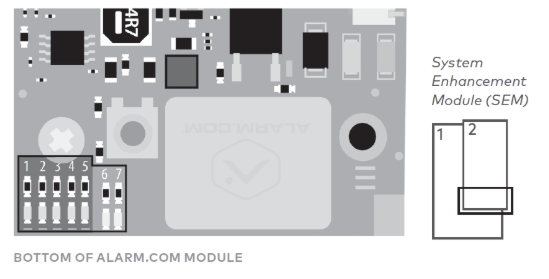
LED L1(Red)
| Number of Flashes | Description |
|---|---|
| 1 | Alarm.com module cannot communicate with the panel. Perform a power cycle on the panel. If the error persists, contact Alarm.com CORE Technical Support. |
| 2 | The SIM card is missing or cannot be read. If the SIM card has been removed, re-insert the SIM card and power cycle the module. |
| 3 | The Alarm.com module is trying to register on the cellular network. If it persists for more than a few minutes, the module is having problems registering. Check L4 for signal level. If signal level is lower than 2 bars, change the panel’s location or use a remote antenna option. If the signal is good, the module may be roaming on a network that does not partner with Alarm.com’s cellular providers. |
| 4 | The Alarm.com module is registered on the cellular network but could not connect with Alarm.com. Contact Alarm.com CORE Technical Support. |
| 5 | The radio portion of the module is not working correctly. Verify the panel is receiving enough power. f power is sufficient and problem persists for more than a few minutes, the module may need to be replaced. This is extremely rare. |
| 6 | This indicates an error only if it persists for more than a minute. Otherwise, it’s an indication that the module is resolving an unusual condition regarding communication with the cellular network. |
| 7 | The SEM is unable to access panel programming. Check panel wiring and installer code. |
| 8 | If this error persists, the account may have been set up incorrectly. Contact us with your panels IMEI and we will check on this on our end. |
LED L3 (Green or Yellow)
L3 flashes with every communication between the SEM and its radio unit in Idle mode, and with every communication with Alarm.com in Connected mode. In PowerSave mode, this LED flashes in unison with LED L2. Is this LED Flashing?
LED L4 (Green or Yellow)
L4 indicates the cellular signal level as a number of flashes (0 to 5 bars). The number of bars may not correspond to the number of bars shown on your cell phone. A level of 5 bars is obtained only in the strongest signal conditions. Signal level is updated every ten seconds if it fluctuates, or every 30 seconds if it is fairly stable.
If LED L4 is continuously flashing, the module provisioning process is in progress. LED L4 begins flashing to indicate signal level as soon as the provisioning process is complete.
If LED L4 is not flashing, this means one of the following:
- The Alarm.com module is in PowerSave mode
- The Alarm.com module just powered up
- There is no cellular coverage in the area
In Connected mode, LED L4 toggles on and off.
SEM 300
SEM300
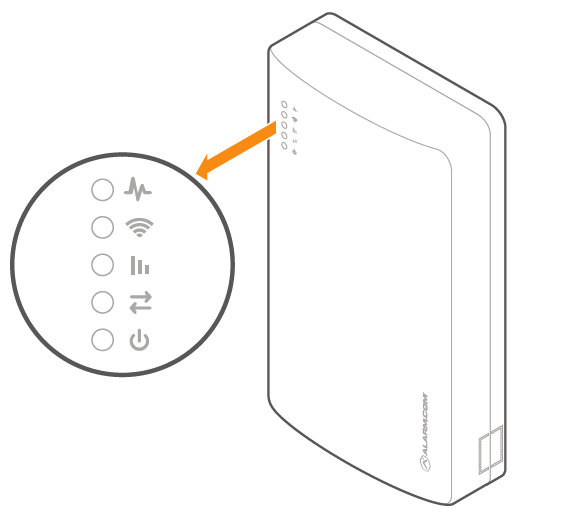
Check the trouble LED, Path LED, and the Signal LED to make sure there is enough signal strength, or if there are any other troubles.

| Flash Pattern | Description |
|---|---|
| 1 | The Alarm.com module cannot communicate with the panel. Perform a power cycle on the panel. If the error persists, contact Surety Support. |
| 2 then 4 | The Alarm.com module provisioning process could not be completed. Power cycle the system. |
| 2 then 5 | The Alarm.com module provisioning process could not be completed because the module is currently roaming off the carrier’s primary network. |
| 3 | The Alarm.com module is trying to register on the cellular network. If it persists for more than a few minutes, the module is having problems registering. Check L4 for signal level. If signal level is lower than 2 bars, change the panel’s location or use a remote antenna option. |
| 4 | The Alarm.com module is registered on the cellular network but could not connect with Alarm.com. |
| 5 | The radio on the module is not working correctly. If this persists for more than a few minutes, the module may need to be replaced. This error is extremely rare, so please verify that the module is flashing 5 times. |
| 6 | This indicates an error only if it persists for more than a minute. Otherwise, it’s an indication that the module is resolving an unusual condition regarding communication with the cellular network. |
| 7 | The SEM is unable to access panel programming. Check the panel wiring and installer code. |
| 8 | If this error persists, the account may have been set up incorrectly. Contact Surety Support with the panels IMEI. |

| Flash Pattern | Description |
|---|---|
| Steady long flash (~2 sec) | The cellular communication path is active. |
| Long flash (~2 sec) followed by a short flash (~0.5 sec) | Both cellular and broadband communication paths are active. |
| Steady short flash (~0.5 sec) | The broadband communication path is active. This should also accompany an error LED flash. |
| No flash | Both communication paths are not communicating. This should also accompany an error LED flash. |

The Signal LED flashes to indicate the cellular signal strength (0 to 6 bars).
If there are still issues, contact Surety Support