Which category is used for thermostat additions
I have a smart thermostat - system asks me to trigger the system. Is it the 3 dots that I press to trigger the thermostat? I have 3 thermostats to add for 3 separate HVAC units
I do see three T2000 thermostats on your account. However, your current plan is the Surety Protect which includes the alarm system and Video devices and does not include home automation devices. You would need to change your plan to Surety Complete to be able to create schedules and remotely control the thermostats.
To change your Surety plan, log into your System Manager of your Surety account, then log in using your Alarm.com credentials. Once this is done, you will have the option on top to change your plan.
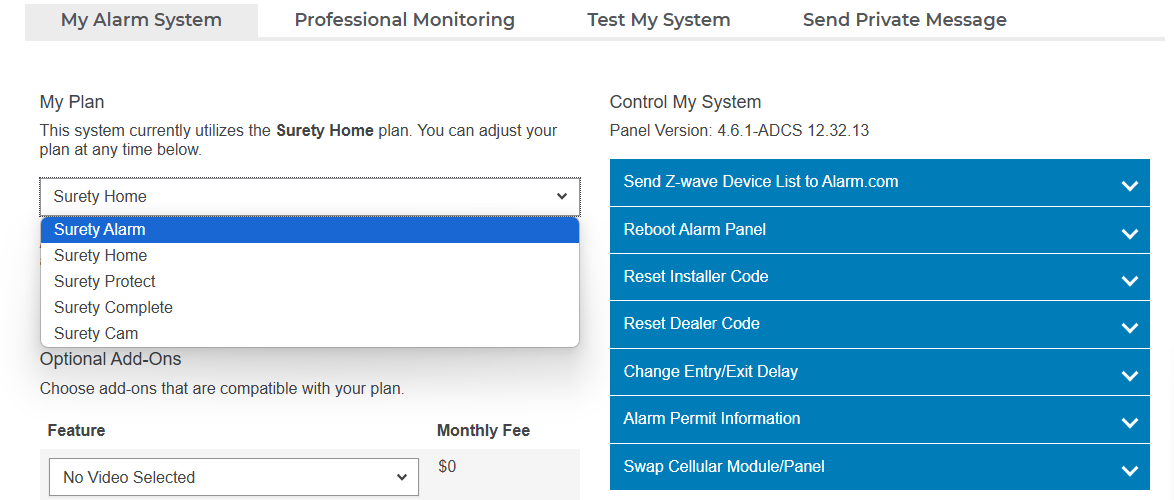
Once you change your plan on the drop down, you will need to scroll all the way down and press save. It will notify you of the price change and you will need to confirm.
Once this is done, the thermostats should appear on your alarm.com app