I confirmed with the dealer that the DSC WS4985 would work with the DSC touch panel. I’ve read and re-read the documentation and for the life of me I cannot get them to work.
I add the sensor and it’s recognized by the panel - type water; I’ve tried sensor sub-type “multi-function-1” and “Flood-2”, sensor group “38-water sensor”.
I attach the sensor leads to the wireless module - it does not appear to matter which lead is connect to which connector but I’ve also tried both ways.
If I open the wireless module part, it shows as a tamper on the panel (as expected).
If I fully immerse the water detection part inside a cup of water, nothing happens - not immediately, not 10 minutes later.
Hmm, this does not appear to be a multi-function sensor, so you would want to use:
Type: Water
Subtype: Flood-2
Sensor Group: 38
To isolate the issue, have you tried just shorting the terminals on the sensor to determine that it will send the appropriate signal after being programmed? (removing the probe out of the equation)
If not, try just using a short jumper wire between the two terminals. Within 5-10 seconds it looks like a flood alert should be generated. Does this work?
That would be the current firmware version on the panel, which helps, can you also provide the hardware revision? It is likely found lower on that same menu and labeled “Hardware Version”
Jason reached out to us at Qolsys about this topic and we were able to successfully simulate a flood alarm for the DSC WS4985.
It must be learned as a Type: Water , Sub-type: Flood-2.
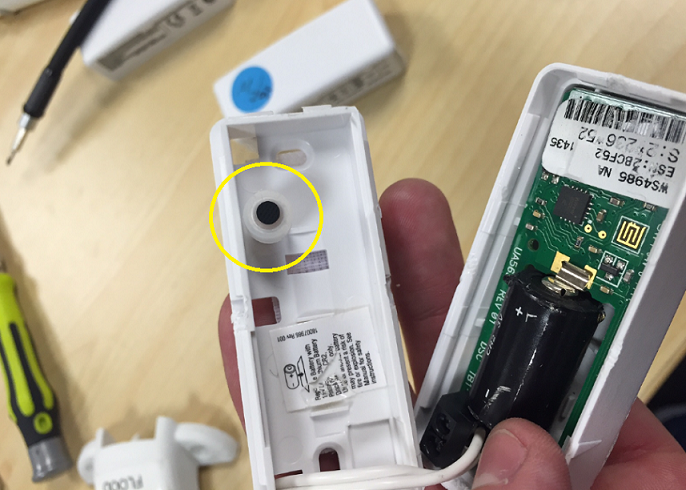
The other piece that I believe was missing from the original test was the plastic / rubber tamper piece. See in attached. This must be installed in order to get anything other than a tamper condition. Once installed, and cover is closed, it should go to normal status.
Simulate a flood using water between the contacts for a few seconds and it will go into alarm. See attached picture I circled the piece in yellow that is needed for the tamper.
Reply back if this does not work after checking the tamper button and we would be glad to take another look.