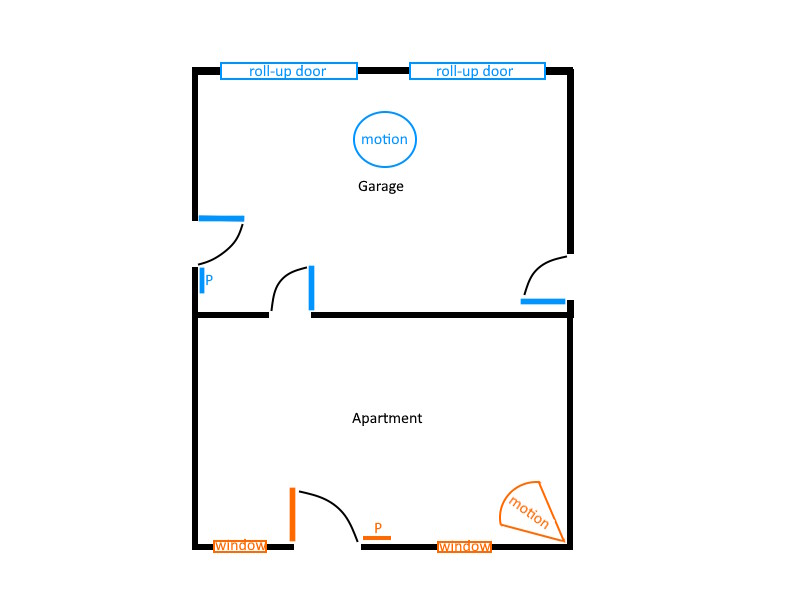
I have a separate property that consists of a garage with an attached apartment. I need to install an alarm on both and would like the ability for each area to be controlled independent of the other. I’ve attached an over-simplified picture of the layout. Everything in blue should be treated independently from everything in orange, and each should have a panel “P” that should be capable of turning on/off that area.
You can use an IQ Panel 4 with a IQ Remote PowerG Secondary Keypad. You can use one main panel and once secondary panel and assign each area its own partition. You will then assign each sensor a partition. You will be able to arm and disarm each independently of the other. If purchasing the 319.5Mhz version, you can use any of the sensors below.
That sounds perfect. One follow-up question since this will be my first time working with partitions: will I be able to have each panel default to the partition it is intended for? I’m just trying to keep things simple for the occupant of the apartment.
With the IQ Panel 4, it would depend on the user code assignment. The way it would work is that the panel/keypad would need a user code in order to unlock and be able to arm and disarm the panel. If the user code entered is assigned to partition 2, then when the keypad is unlocked will only show partition 2. If the user code entered is assigned to both partitions, you will be able to scroll up/down through both and arm/disarm both seperatly. I believe that the keypad automatically locks itself after about 1 minute of last touchscreen press.