I’m looking for clarification on how Video Analytics rules handle recording versus notifications.
Based on the interface, it appears that object-type selections (Person / Vehicle / Animal / Other) are used for notification filtering.
From testing: Any detected motion generate a recorded clip and increment counter, and only notifications can be filtered by object type.
Is this intended behavior?
Is there any configuration where recording itself can be limited to specific object types (e.g., only record people/vehicles) in order to avoid excessive clip counts?
Use case / requirement:
I need a way to configure the system so that:
Activity from my dogs in the yard does not generate excessive clips or noise
But I still reliably capture and am notified when a person enters the property, even if the dogs are present at the same time
If there is a recommended configuration (analytics rules, zones, sensitivity, etc.) to achieve this, I’d appreciate guidance.
Please confirm the intended behavior and best configuration approach.
That’s exactly what’s I’m experiencing. Thanks for clarifying that this is the intended behavior. Unfortunately it’s not what I need.
Is there any configuration where recording itself can be limited to specific object types (e.g., only record people/vehicles) in order to avoid excessive clip counts?
My issue is that I have my dogs running around the yard a significant portion of the day creating unnecessary clips that may well exceed my allotment. If I stretch out the delays, I could miss someone coming onto my property.
Any suggestions welcome.
This is dependent on the camera model, but it is possible on certain cameras using video analytics 2.0 with Alarm.com, and is the direction they are moving with new cameras.
Recording by object type behavior is supported on Video Analytics 2.0 models like ADC-V516, ADC-V730, and ADC-VDB775.
ADC-V731B also supports choosing object types to record.
Other models use the original video analytics onboard and currently only filter notifications by object type. All events are recorded.
Can you confirm that I will be able to configure a recording rule such that only specific object types (e.g., person and/or vehicle) generate recorded clips, and that other object types (e.g., animals) will not be recorded at all?
In other words, is recording behavior actually filtered by object type (not just notifications), unlike what I am seeing with my current ADC-V729?
Also, does the newer ADC-V530 support Video Analytics 2.0 with the same object-type recording control, or is it still limited to notification filtering only?
I just want to be sure before upgrading that I can avoid generating clips from my dogs while still reliably recording people entering the property.
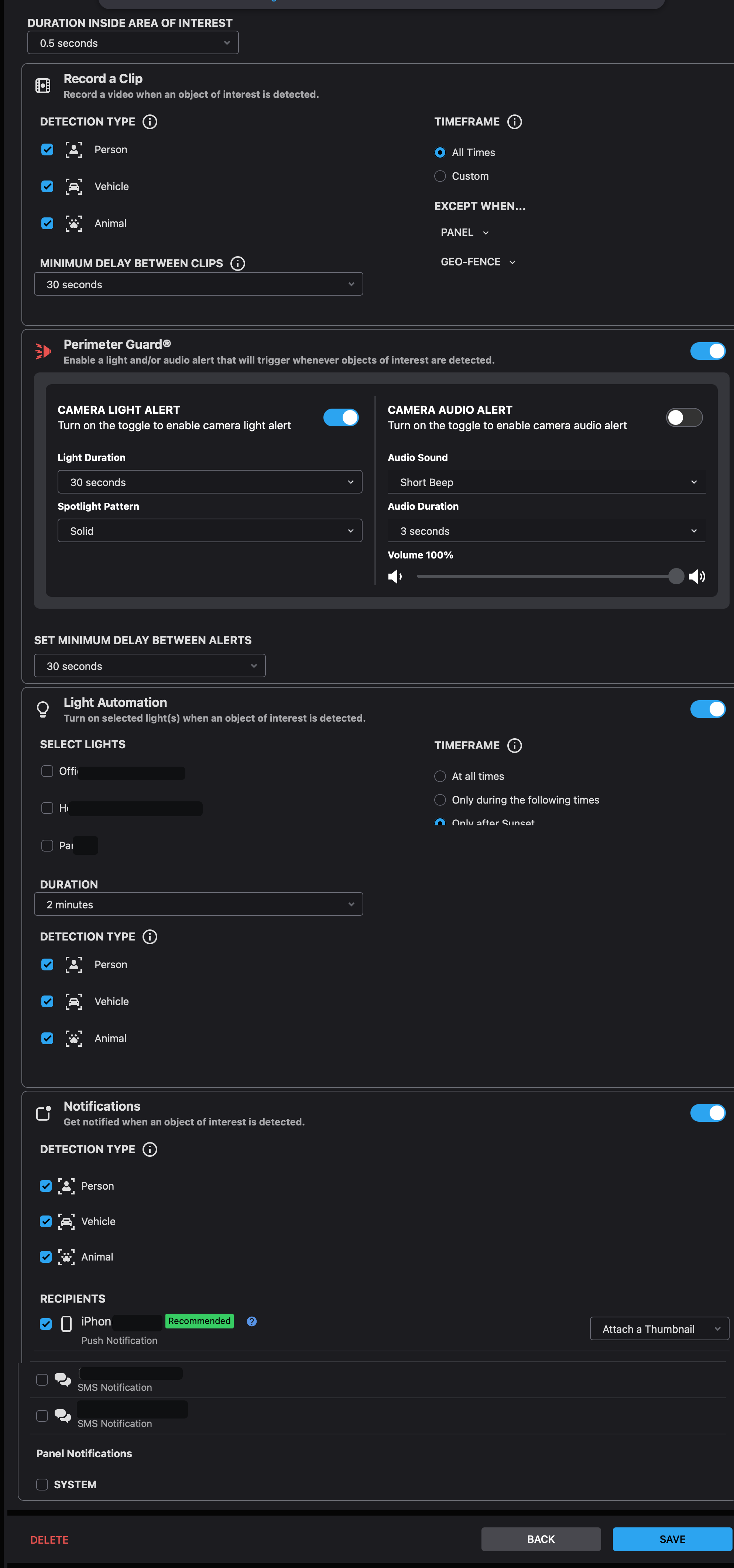
Just to add to this - I have a ADC-V730 and its recording rules look different than my other cameras, and it does have a special section to control when clips are recorded.
Here’s a screenshot of how the 730’s configuration screen looks. For me it is dramatically different than my other cameras (in a good way)… I wish this new display format was used for all the cameras, honestly. It is easier to read and configure, imho.
Can you confirm that I will be able to configure a recording rule such that only specific object types (e.g., person and/or vehicle) generate recorded clips, and that other object types (e.g., animals) will not be recorded at all?
In other words, is recording behavior actually filtered by object type (not just notifications), unlike what I am seeing with my current ADC-V729?
Also, does the newer ADC-V530 support Video Analytics 2.0 with the same object-type recording control, or is it still limited to notification filtering only?
Yes, you can control when clips are recorded, not just notifications, on those specific cameras.
The ADC-V530 hasn’t been added to the documentation yet, however I confirmed with Alarm.com support that the V530 does indeed fall into this category. It uses analytics 2.0 and you can choose which object types trigger recordings.