For a Vista system with an ADC SEM I’m trying to set my Away Scene to close the garage overhead door and arm the system to Away, but I cannot use custom zones to allow the overhead door to be a vent zone. I also cannot it appears add time delay in scenes. So when the panel arms the overhead door appears faulted and the system does not arm away. And automation rules I would not want to trigger a panel away arm just because the I close the garage door. And for automation rules if I trigger off the panel arming away I cannot delay the arm to allow the overhead door to close because the panel is the trigger. Anybody found a workaround for this or an alternate programming methodology. Feel like I got the garage door sorted just to run into a programming roadblock. Just wondering if there is any SEM firmware alternative setup and if not I would like to request for ADC to add that feature as it’s prohibitive in the automation programming for this panel. I will also say my previous communicator with Alula allowed the feature do not sure why ADC could not do the same unless its hardware limited with the SEM.
An Alarm.com scene can’t both arm away and close the garage door.
To make sure we understand what you’re trying to achieve:
You have both a Z-Wave garage door controller and a security sensor on the garage door. You want to press 1 button to arm the system in away mode, close the garage door if happens to be opened, treat the garage door as a security zone that will trigger an alarm (so it can’t be bypassed), and have that security zone status show up in the Alarm.com app (which is why you can’t use a vent zone because the SEM doesn’t support it).
Is that all correct? Am I missing anything?
@ryan.boder you have it sir. I’m trying to get it where the scene closes the garage door if it’s open, arms the system in away and the locks the doors. I built the scene with the garage door included, but realized the panel would not arm unless force bypassed was applied which as you point out leaves the zone unarmed even after closed. So I separated out the garage door but left it setup I’m my Home Scene.
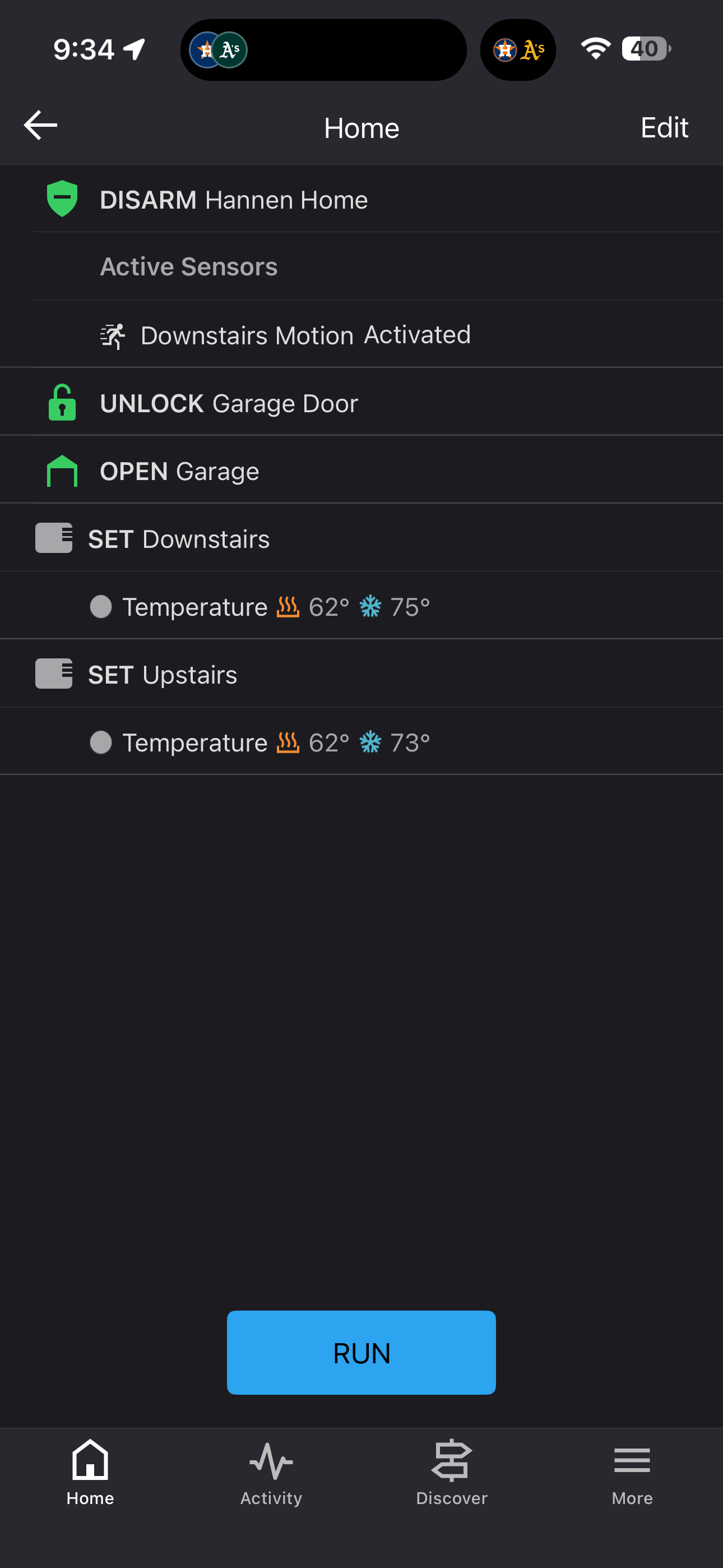
Vidail was originally working with me to setup custom zones on the Vista system to support the garage overhead door as a vent zone to allow this behavior. Unfortunately the SEM does not “fully support” custom zones per the knowledge center and leaves these zones off the sensor list. The Neo seems to have this same limitation, but the auto restore functionality on the IQ series panels seems to permit this functionality. So I was not sure if there is a known workaround?
Also unsure what “not fully supported” actually means as it’s does not seem to be a hard no. This got me wondering if it’s is an architectural limitation or just a firmware coding integration and perhaps this was the reason for the soft no. Other providers I have used like Alula fully support custom zone behavior, but I realize they are two different platforms and it may be architecture limited for implementation. Anyway it got me wondering if it was even possible on the ADC platform and if so can we request the feature.
Using a vent zone is the proper Honeywell Vista solution for this. By “not fully supported”, I think it means that it will work locally at the panel but sensor status will not show in Alarm.com. So it would still trip the alarm but you would not be able to see whether the door sensor was open/closed in Alarm.com. You would be able to see whether the Z-Wave garage door controller’s own tilt sensor is open/closed in Alarm.com so you might find it usable without seeing the alarm sensor status. The two sensors are watching the same garage door.
I don’t have this exact setup available to test myself. It would be worth testing yourself to make sure this is how it behaves. If you have the vent zone configured, try it and make sure the alarm triggers when the garage door is opened.
I think the more common way people handle this is to not try to do it with one button press. You could leave it as a normal sensor (not custom/vent) and see the status in Alarm.com. Don’t enable Quick (Forced) Bypass on the panel. Look at the sensor status on the security system card in the Alarm.com app before arming. If the garage door is open, close it first and then run the scene. If you forget to check first, arming will fail and then you can look at the sensor status and close the garage door first.
A related tool that some people use is the Garage Door Left Open notification. If all your mobile devices leave your home geofence and the garage door is still open it sends you a notification to close it.
Interesting thought I never saw the sensor populated in the zone list when it was configured as a vent zone which is how the knowledge document says it will behave. So your thought process is it will still work locally but not be seen in the app? If it’s not monitored in the app would it even trip the app that an alarm is occurring at the house? Wonder what it would transmit to central station if anything since it can be tied to a zone on the sensor list?
I currently have it separated out as you indicated in your reply. I will give your solution a try and see what happens as I don’t really need to see the contact sensor if I have the Zwave tilt sensor. How do I know if central station got the alarm from the sensor? If it does not work will just revert back to my current setup.
That’s what I’ve heard. I haven’t tried it myself.
Yes, it should. The control panel would still send an alarm signal.
Put your monitoring account in test mode first with System Manager. Then trigger the alarm. We can see what was sent to the central station. Let us know what time it was and we’ll check it.
@ryan.boder I added the zone back as my custom zone and it dropped off the device list. I tested the zone at 4:18, 4:24, 4:35 on test mode with the monitoring station receiving the code. The vent zone worked as intended with system arming even if faulted. I then took the system off test and tested again at 4:49, but I noticed the app did not give a critical alert nor did the alarm sequence initiate in the app. The alarm did go to the monitoring station so would be good to see what they got? But does not look like any of the alert sequences in the app do not work. Also if you look at all the alarm sequences for some reason the alarm condition unlocks my front door at each occurrence one at 4:19, 4:25, 4:36 and 4:50, but the only automation I have for the front door is the fire/co alarm to unlock that door. I can’t see why the door was unlocked as it does not have an identifier on my end. Could you take a look and let me know what you think.
The central station received a burglary alarm at 4:50 for zone/point# 10. I can see the alarm in the Alarm.com event history as well labeled Garage Overhead Door Alarm so Alarm.com knows about it, and even knows the zone name.
It’s odd that Alarm.com would show the alarm in the event history and forward it to the central station but not show an alarm in the app. We’ll check with them tomorrow to see if this is what is expected.
We’ll need to dig into the Front Door unlocking issue as well. You have an automation rule to unlock the Garage Door 1 min after the system is disarmed. I wonder if the Schlage Connect integration is somehow mixing up the 2 locks?
Yeah so the zone is zone 10 so that’s what the point 10 is found it weird that that ADC knew the previous zone label but did not forward it to CS.
Ok so I did some more testing on this one. I get a critical alarm display on the device when set as a custom zone, sorry forgot I had my phone open when doing this initially testing the Ecolink, but I have confirmed that the alarm logic in the app does not work where I can verify or cancel the alarm until a sensors in the contact list is tripped which the garage sensor is not in when it’s a custom zone. Once I open the garage door leading to my house, tripping that sensor in the contact list, then the alarm logic in the app runs to verify the alarm. The I added the garage overhead door back as an entry zone instead of custom zone and the verification logic ran in the app due to it being in the contact list. So yes to critical alert and transmission to CS, but not to verification logic in the app. Would be good to hear from ADC if this is expected logic or if it’s a bug.
Did some more testing on the front door automation logic here. The automation runs no matter the zone type set on the overhead door zone. So I deleted the rule associated with the life sensor alarms to open the font door and tripped the zone and the front door stayed locked see event at 7:42. I then added the rule back and it opened when I tripped the garage at 7:58. To make sure it was not zone specific I tripped the garage entry door at 8:05 and it opened the front door. It appears this is an issue with that ADC automation rule not the Schlage integration as door lock control functions from the app for each lock with no issue. If the integration could not distinguish from each lock then it would open the incorrect locks or both from the lock control? So this is an issue where ADC is opening the front door during any alarm condition from the automation rule regardless of the sensor type based on test at 7-8pm removing and adding the automation back. The only automation I have to unlock the front door is when any life safety sensor is tripped not a contact sensor. Looks like this rule logic is unable to distinguish between contact sensor and life safety alarms even when programmed as such and treat all alarms the same.
So I have two questions:
Is it expected behavior for the verification logic to not run in the app if the sensor is not in the contact list despite the alarm activity.
Why is my automation rule opening my from door for any alarm condition and not just life safety as it’s programmed.
For right now I have deleted this automation rule and set the zone back to an entry until ADC can answer these questions.
Appreciate your help with this.
The only automation I have to unlock the front door is when any life safety sensor is tripped not a contact sensor. Looks like this rule logic is unable to distinguish between contact sensor and life safety alarms even when programmed as such and treat all alarms the same.
If you recreate that rule and instead of choosing Any Fire/CO sensor, specify one of the Fire or CO sensors, does this behavior with the other sensors still occur?
I imagine the behavior should cease and the underlying cause is a matter of the SEM incorrectly differentiating zone types when the “Any” option is selected, but if we can confirm that it should help getting the problem escalated quickly.
Is it expected behavior for the verification logic to not run in the app if the sensor is not in the contact list despite the alarm activity.
The I added the garage overhead door back as an entry zone instead of custom zone and the verification logic ran in the app due to it being in the contact list.
I think the “due to it being in the contact list” is not the underlying problem, just another symptom of it.
Ultimately it looks like this is due to Alarm.com not supporting the custom zoning. When set as the custom zone type, I believe Alarm.com is not able to validate that type and instead of showing a cancel option on an unknown zone it is being skipped. This is likely unintentional, or it could be a result of certain zone types being white-listed rather than certain types being excluded in how the rule is processed.
The at-a-glance sensor status list only shows sensors compatible with sensor activity monitoring. If a zone type is incompatible with activity monitoring for whatever reason, usually due to it being a zone type that can only report idle or in alarm state regardless of arming state, like CO detectors or Smoke Detectors, it will not be in the sensor activity status list.
I’ll report and escalate this behavior to see if we can get a confirmation, but I believe this will likely just be due to the custom zone type being unsupported and unaccounted for in logic for the SEM.
Did some more testing on the front door automation logic here. The automation runs no matter the zone type set on the overhead door zone. So I deleted the rule associated with the life sensor alarms to open the font door and tripped the zone and the front door stayed locked see event at 7:42. I then added the rule back and it opened when I tripped the garage at 7:58. To make sure it was not zone specific I tripped the garage entry door at 8:05 and it opened the front door. It appears this is an issue with that ADC automation rule not the Schlage integration as door lock control functions from the app for each lock with no issue. If the integration could not distinguish from each lock then it would open the incorrect locks or both from the lock control?
Was this testing done while the garage door was set as a custom zone, or was it after you switched the programming back to a standard entry/exit?
Recreated the rule with a specific life safety sensor and triggered the alarm with an intrusion sensor it did not unlock the front door. See test at 12:05 today.
Recreated rule with any life safety sensor and triggered the alarm with an intrusion sensor it performed the unlock. Seems it is with the “any”selection for the life safety sensor automations. See test 12:22 today.
It was done with both and it did not make a difference in the unlock behavior. I also tried isolating it to specific intrusion sensor and it did not matter any tripped intrusion sensor in alarm caused the automation to run regardless of how the overhead door was configured. Confirmed with test above directly tied to using the “any” selection for life safety sensors in automation.
If this could be fixed if it was unintentional I would not care if it did not show up in activity monitoring as my garage tilt sensor would tell me the status. Regardless think you are correct the custom zones are not supported so I put it back to entry type 2 for right now.
I would like to push ADC on this as it limits the Vista systems functionality and an installer on the ADC Reddit sub, that I see Surety active on, was just complaining about this as it limits the dealer portal as well when there is a runaway. I would say if a competitor like Alula can do this they should up their game, but that’s just my opinion and we all know what they say about those.
It was done with both and it did not make a difference in the unlock behavior. I also tried isolating it to specific intrusion sensor and it did not matter any tripped intrusion sensor in alarm caused the automation to run regardless of how the overhead door was configured. Confirmed with test above directly tied to using the “any” selection for life safety sensors in automation.
Thank you for testing and confirming. I’ve escalated this with contacts at Alarm.com. I anticipate this getting attention quick, given the severity.
I would like to push ADC on this as it limits the Vista systems functionality and an installer on the ADC Reddit sub, that I see Surety active on, was just complaining about this as it limits the dealer portal as well when there is a runaway. I would say if a competitor like Alula can do this they should up their game, but that’s just my opinion and we all know what they say about those.
I’ve escalated this concern as well, I agree this would be ideal for them to just expand support to those custom zones. I’m not sure if this would require a SEM firmware update to address or just a change on the ADC side, but we’ll push for a solution.
Appreciate the help and looking at what I did. I remember thinking about if it was the “all” setting but was testing so many different things to isolate it forgot about changing the automation. More eyes is always helpful.
I would imagine it would get some quick attention if the intrusion alarm goes off and the system opens the door it’s quite comical. I was wondering if it’s the ADC automation or the SEM firmware looks like we will see.
Yes I’ve seen a lot of people with Vistas on the form speaking about issues that touch on this in several different ways. Hopefully they can make an attempt at getting it to work. Appreciate you asking the question.