Hello! I just signed up and opted to forego adding any cameras at this time because I am unable to find any sample footage for this camera. Does anyone have any footage they can share / point me to? $169 for a 1080p camera + the extra $10 a month is a hard pill to swallow compared to other video surveillance solutions on the market, which are much more open (ONVIF, etc) . However it’s something I would consider it if the quality is reasonably good.
But so far, nothing on YouTube, and hardly any mentions of this camera on Reddit. Community, please share your experience and your footage!
I’m also interested in this. Part of the problem is they just started shipping last week and this new. I’ve got 2 coming and should be getting them installed in a couple of weeks. Id be happy to share footage if none has been shared by then.
We should be able to share some sample video as well. I’ll see if we can put something together in the next week or two. Alarm.com cameras are not going to be the cheapest cameras out there when comparing basic camera tech specs. The big selling points are the quality of object detection (video analytics) and the tight integration with the overall Alarm.com platform.
Keep in mind the extra $10/month for Surety Complete supports 4 cameras so it gets better per camera when you have multiple. Compared to a $399 Nest Cam IQ Outdoor it’s pretty competitive.
We don’t host video. You would have to upload it to a video service like youtube and link to it in your post. If you put a youtube link on a line by itself the video will be embedded automatically.
The cameras a bit hefty (compared to the 522IR). The base and the support feel like its metal, and the camera feels like its a hard plastic housing. Overall, looks and feels like a high quality, sturdy product.
Its a step above in terms of aesthetic and quality of the build. It is meant to replace the existing ADC-722 bullet cam completely.
There was a warning on it saying it causes cancer…Wonder what substance it has that causes cancer?
Likely something to do with Prop 65 but I could not speak to that as our office unit did not come with such a warning. Was this a sticker on the box, or in the manual, etc?
now that I’ve had some time to play with the V723, i’m still tinkering with the VMD settings. I was hoping with it having artificial Intelligence, it would be easier, but im still getting a lot little triggers like snow flakes, and when im driving up the driveway (with system armed away), it actually doesn’t trigger.
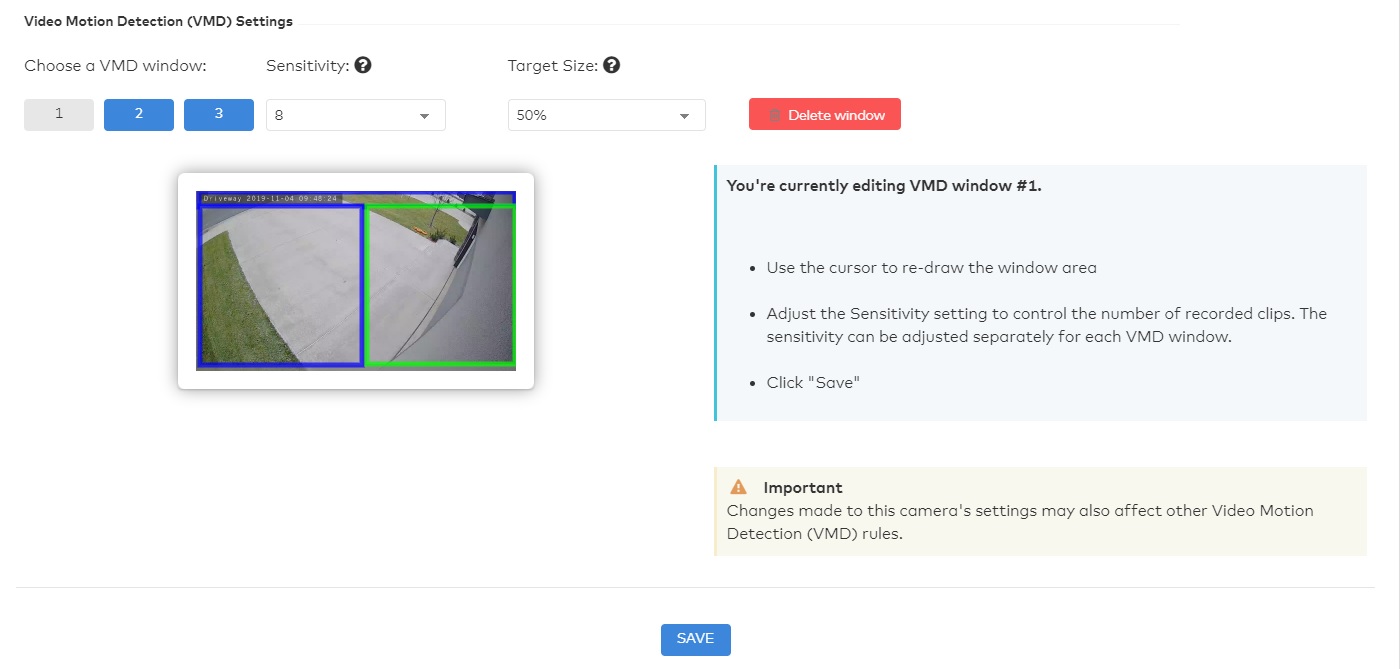
Here is how I’ve set up the VMD for my driveway V723
You’ll see three regions, and these are the settings:
Left bottom square - sensitivity is 8, target size is 50%
Right bottom square - sensitivity is 8, target size is 70%
Top square - sensitivity is 5, target size is 30%
Have any suggestions to improve the VMD performance?
Now it captures snowflakes and not cars driving up the driveway.
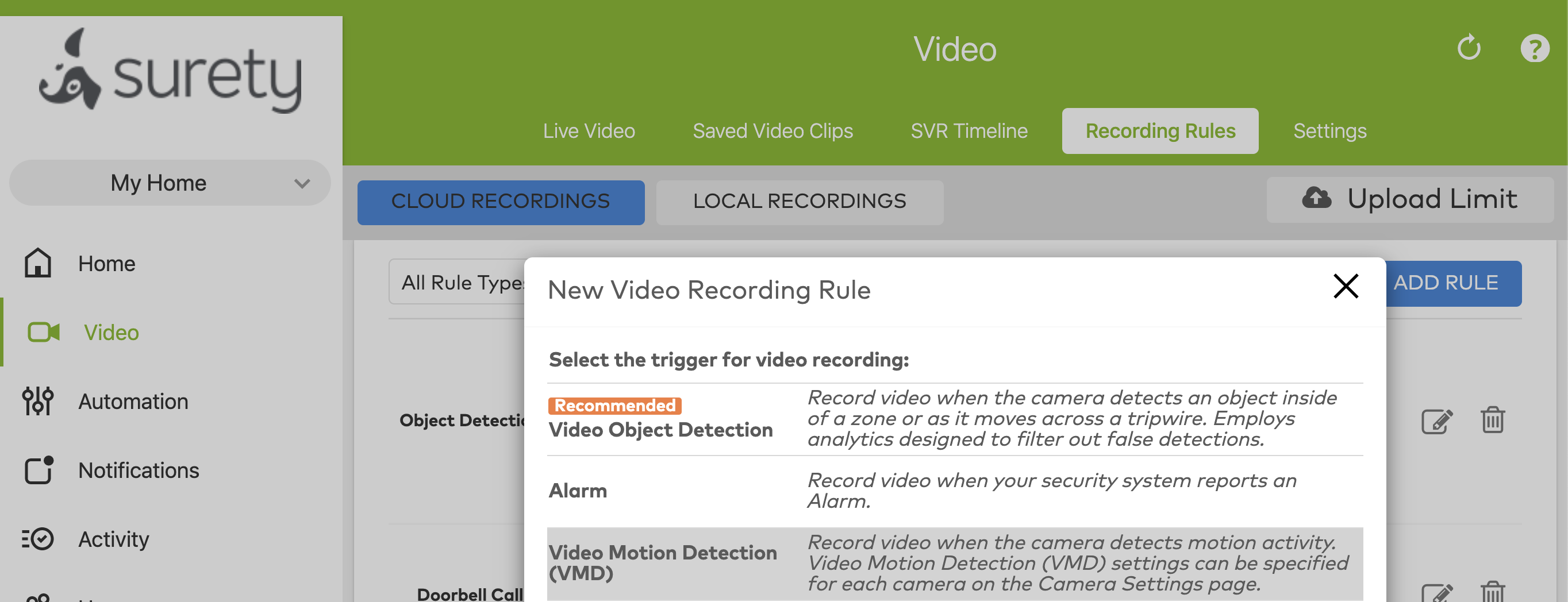
Video motion detection hasn’t improved much. They’ve kind of reached the limit as to what it’s capable of. You need to be using the new video analytics features that use artificial intelligence to see big improvements. When you go to Video → Recording Rule → Add Rule do you see Video Object Detection as one of the options?
oh interesting, I don’t see the VOD. Guess it has to be activated on the dealer back-end?
Also here are some videos. Again, this is default settings, and I think it was compressed when transferred. You’ll see the snowflake trigger in one of these videos.
Just had the advanced analytics turned on, and indeed, like true Artificial Intelligence, I now how have to train the camera by taking some photos of me standing in different locations. Nice feature.
I did have a question, just looking at the setup screens, it seems I can also do the same for my other cameras, 522IR. Then what advantage is there for the V723?
Could you clarify what you mean by advantages regarding the 723 over the 522? The 522 and 723 in general do not cover the same requirements. The 522 is an indoor only camera. The 723 is an outdoor bullet cam.
Alarm.com’s video analytics is compatible with the following models:
I meant in terms of analytics or AI. I remember reading (probably on the box) that the 723 has AI built-in or uses AI with the analytics, etc. but I don’t remember the 522 saying the same thing. Basically, is the 723 smarter than the 522 in terms of detections and/or false dectections?
The 522 is older than analytics being available and the packaging wouldn’t reference analytics.
The 723 came out after analytics options did and references Alarm.com analytics options. Alarm.com video AI is in reference to the Alarm.com Video Analytics service plan feature.
Just wondering if there is an tips you had when setting up the AI analytics and calibrations for the cameras. I.e. should I do it in the daytime, night or at dusk? Should I just stand or should I just make fake actions like try to open the door, etc.
You should be sure to follow the Alarm.com instructions when calibrating, not really any additional tips. The photos should be varying distances from the camera, with your whole body from head to toe visible.
This is calibrating the relative size expected of a human, not shape or specific actions/motions.