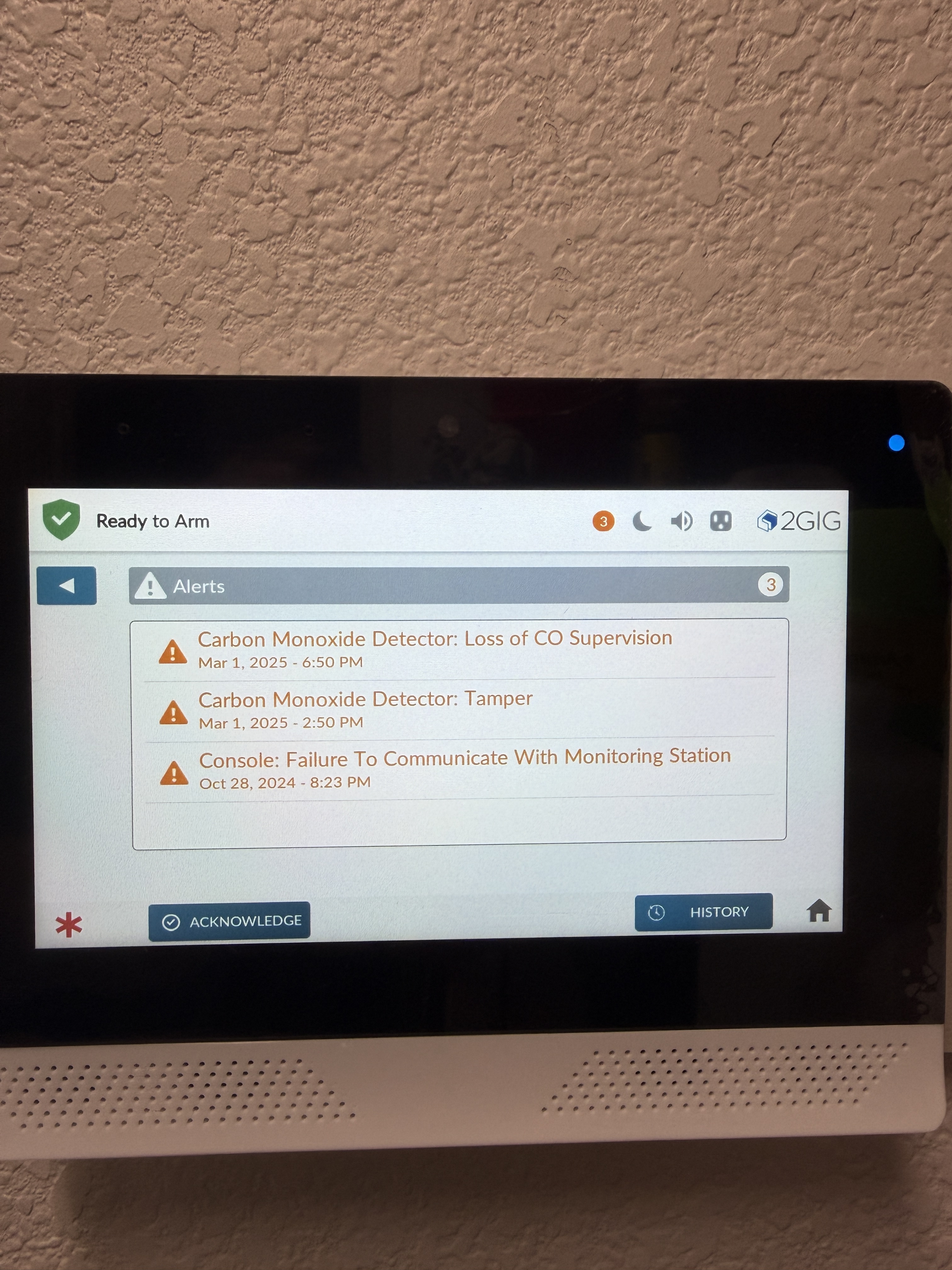
I have a 2Gig Edge panel and multiple times per day, it starts beeping with a carbon monoxide detector tamper alert from March 1, 2025. I acknowledge it and the a few hours later it will be back with that same alert, same date/time. Any ideas how I can get it to stop doing this, it’s quite annoying.
I checked your system. I am not seeing a tamper on the carbon monoxide but I do see the back door touchscreen panel having tamper issues.
The latest tamper on the back door panel was today 4/17/2026 at 8:20:46 am and was in tamper until today 4/17/2026 at 11:15:47 am
Make sure this touchscreen is mounted on the wall correctly. If you are having ghost tamper alerts from the CO detector, I would recommend you perform a power reboot of the panel.
Yes, the back door panel was getting them as well, but those were actually valid. I did a reboot and even disconnected power and battery from the main panel for about 4 hours. I’m still getting old alerts from that co2 detector, see screenshot attached. Any other ideas on getting rid of these permanently?
We can try clearing the console. To do this, select the gear icon on the bottom and enter the installer code > Installer toolbox > Restore default > only console is green and everything else is grayed out then confirm on the bottom.
Yes, only the settings from the panel like entry exit times, dialer delay, and partitions but it looks like you only have one partition so that would not affect you. Sensors will remain the same.
I do see the tamper and malfunction for the CO on alarm.com. Have you tried testing the CO detector?
I did the reset and the co2 alerts immediately went off, all the rest were gone. I think the co2 sensor that is causing the alerts isn’t even in use (no battery in it). Maybe I just need to remove it from the panel? Would that make it go away in alarm.com as well?
After resetting the zone, the tamper alert seems to be resolved. About the same time I started getting those, I was also getting “Broadband Network Failure” and “Radio Modem Failure” alerts but not as often. I’m still getting these several times a day. When I have tested the modem, it has been successful. Any ideas?
Dual-Path Communication Failure - Broadband/Cellular indicates that one of the two has lost communication. When you see Radio Not Responding, this indicates that both of those communication pathways have failed.
In general, troubleshooting for both Radio Not Responding and Dual-Path Failure - Cellular involve performing a full power cycle of the system and leaving it off for 10 minutes. This allows the panel a chance to reconnect to the local cell tower. Steps on how to power cycle the system safely can be found here:
For Dual-Path Communication Failure - Broadband either the router is not connected to the network or the panel is not connecting to the router. Rebooting the router, then removing and re-adding the panel to the network should resolve.
If you have any questions, please let us know.
When troubleshooting, you can place your 24/7 professional monitoring account on Test Mode during troubleshooting to avoid any false dispatches.
You can do this by calling monitoring operators directly at 855-348-0367 or from the Test My System tab in the System Manager section of your Surety account.