Another false alarm today while I was away, same zone, 1:19pm (10 minutes apart from the previous false alarm). Of course I had to just assume it was a false alarm which is a crappy call to make, particularly since I installed the system specifically because there have been a lot of recent break-ins near my house. Assuming it’s a false alarm defeats the point of the system.
Got home about an hour later (FWIW) and resistance on the zone is stable at 3k.
Just want to report that I’ve also had false alarms from zones on my hardwire 16 as well. Hasn’t happened in a while. It was an upstairs window and it might be wired in series with one other upstairs window.
Thank you for the follow up. I will be sending all follow up accounts of issues to Qolsys directly.
I have not noticed this with our own HW16. If you notice a false alarm, verify a few things:
What all sensors are on that circuit?
Check the sensors to make sure that they and the magnets are not loose. (Some window sensors, if recessed, use thin strip magnets adhered to the window which can come loose over time.) A quick check to make sure that sensors and magnets are all physically sound.
Open and close a sensor on that circuit. Does the panel respond as you would expect? Note anything strange (panel reports tamper/significant delay to close signal/etc.)
If no explanation of the false alarm exists, let us know when it happened and what types and how many sensors are on the zone that false alarmed.
I’ll be putting together a few test zones of different sensors at a few different resistance values to further test.
Haven’t had a chance to check out the sensors again, but just had another false activation - this one at 1:37pm, again within 10 minutes of the other false activations!
I ran over and put the multimeter on the wiring and at the 200k setting I’m not getting a reading at all. Sanity checked against some other zones and I’m getting 3.0 as expected. It’s been ~10 minutes - no reading on the zone that false activated. Any pointers on how to investigate further?
When this has happened previously, I think that the zone/sensors eventually go back to normal on their own.
Interesting, by no reading, do you mean your multimeter reports what it does when you simply set it to test resistance and hold up the leads without them touching anything?
1.Disconnect one wire and activate the sensor.
2.Set the multimeter on RX1 (resistance times 1) scale (resistance in ohms), touch the probe to the sensor’s terminal screws, and note the reading.
3.Deactivate the sensor and run the test again. If the sensor is okay, one reading will be zero (no resistance) and the other infinity (no circuit).
Replace the sensor if both readings are zero or infinity
With multiple sensors you would need to test each one, which is a good idea.
What is interesting is based on your description, it sounds like the zone opened and remained open for at least that ten minutes. That certainly suggests a physical issue, but we would want to determine where.
Can you check for voltage between the sensor zone pins on the HW16?
When a zone shows open when it shouldn’t, check the voltage on that zone’s pins, and check voltage on a closed zone’s pins. Any difference? (Voltage will be very small, not actually powering anything)
I also just installed a 16 channel hardwire Upgrading from the 8 channel translator which has been working perfectly for the last year. I transferred all sensors with resistors to the 16 channel. Qolsys panel recognized the translator and upon adding each sensor is where the issues started.
I added a single door sensor, it will report open and upon closing a Tamper alarm is reported. Then the door does not report closed. If its a single sensor or multiple sensors no such luck on them working. This has me confused since it worked before.
I was going to get new 3K ohm resistors and see if that solves this problem. Is this a reasonable place to start? The install manual states 1K- 10K resistors will work.
I added a single door sensor, it will report open and upon closing a Tamper alarm is reported. Then the door does not report closed. If its a single sensor or multiple sensors no such luck on them working. This has me confused since it worked before.
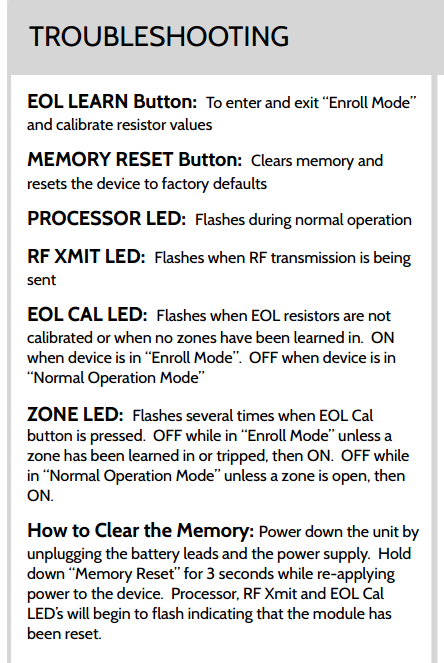
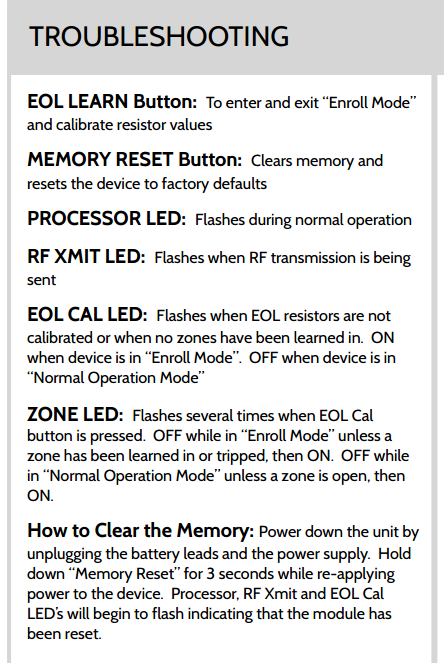
That actually sounds like the HW16 may need defaulted if you are getting a tamper when a zone closes. If you added zones prior or if you noticed that from the start it may indicate that prior zones were learned into that physical zone on the hardwire 16 (setting a specific resistance tolerance). Refer to how to clear memory
What I meant by no reading was that with the multi-meter set at 200k, the meter doesn’t change at all when I tried my problem zone whereas with other zones it reads 3.0. Later in the day the zone went back to normal, the IQ panel showed it as “closed” and the meter read 3.0 again.
What I meant by no reading was that with the multi-meter set at 200k, the meter doesn’t change at all when I tried my problem zone whereas with other zones it reads 3.0. Later in the day the zone went back to normal, the IQ panel showed it as “closed” and the meter read 3.0 again.
This would indicate that the zone was physically open (infinite resistance) during that time period. It rules out reporting errors.
Did you check any of the individual sensors on that zone as suggested above? you will want to determine where the failure is occurring.
I was away for a few days. Just got home, just had a false activation - similar time of day as usual. The zone in question covers 2 doors and 1 window in my garage. I disconnected and tested all the wiring and I observed no reading on the south facing door. Here’s a picture of the magnets set in the top of the door and the sensor in the door frame:
So thinking about what on earth can be causing this fault around the same time of day on numerous days, my wild guess is that it’s the sun. Perhaps the sun is heating up the sensor inside the door frame, or maybe just heating up the door, causing it to flex just enough that the magnets and the sensor are too far apart. Here’s another picture the magnets and the sensor with the door closed:
Because of the weather stripping in the door, it doesn’t quite close far enough to center the magnets right below the sensor, so perhaps just a little more movement or flex when it’s hot out is enough to open the circuit. Seems possible?
I don’t really know what these hardwired sensors look like. I’ve seen the flat ends of them in door/window frames and I can see the wiring in the attic, but I have no idea how to relocate one. It looks like the sensor in that picture above needs to be moved a bit inward on the door frame. Any ideas how to do that?
You wouldn’t need to move the sensor in this case. You really only want one magnet as well. Two magnets right next to each other will change their magnetic field, depending on orientation, may even weaken it considerably in spots.
I would recommend realigning one magnet centered with the sensor as much as possible. Does not need to be absolutely perfect, but that’s some good detective work because I would expect issues looking at that.
The only other zone I had problems with was a single window that threw a tamper a few months back, not a false activation (FWIW). I believe I deleted and re-registered the zone and it’s been fine since then.
For some reason they used 2 magnets in a few of the doors in my house. The windows are all 1 magnet. The reason I was wondering about moving the sensor instead of the magnet is because it’s a metal door, and the magnet is already positioned near the edge of the door so I probably can’t move it that much whereas the sensor seems off center in the door frame. What do you think?
Well, you certainly can move the sensor instead, but it will be a bit harder.
Is there enough slack to pull the sensor out and reveal wire? The problem generally will be needing to re-drill and being careful not to snag the bit on the existing wire.
Ideally, you will want to be able to pull the sensor down, remove the wires, access the wire in the attic, and pull it up and out of the way, re-drill, fish wire down new hole, connect to sensor, remount sensor.
It’s definitely more of a task moving recessed sensors rather than surface mounted ones, but it can be done.
As an update to the new hardwire 16 here is where I stand on getting it up and running.
Panel has been reset per instructions given. All lights acted accordingly to his procedure and panel seems to be reset.
The hardwire 16 translator was successfully added as a "hardwire device" and seems to communicate just fine to the Qolsys panel.-Note Hardwire 16 is not mounted in an obstructed area such a metal can, etc.
Upon adding any sensor such as a window or a door the sensor will be recognized in the auto learn mode but this time does not report a tamper before eol is exited on the translator. Instead once eol is exited and out of device learning mode a door opened notification then a door tampered notification occurs. Once this happens the door/window, etc does not report any other activity it if is opened/closed.

Now I did however add a motion sensor. This motion sensor was existing and hardwired into the house. So far this sensor is functioning correctly. The only thing to note is that when adding other sensors it would randomly report a tamper alarm. Once any of the tamper alarms occur the Qolsys alarm panel will stay yellow at the top and under sensor status "open" is reported.
Thinking this was a case of possible corrosion or bad contact I double checked all wires and sensors. Everything is operating per normal. Re-connecting the front door sensor back to my old 8ch translator everything works perfectly. I am certain that all my physical wiring is fine along with resistors and sensors.
What is being missed on this hardwire 16 that is causing it to only read a door/window openings once an then not report devices opening/closing. I have made sure the hardwire 16 is out of eol mode, rebooted the panel and tested multiple sensors.
What is being missed on this hardwire 16 that is causing it to only read a door/window openings once an then not report devices opening/closing. I have made sure the hardwire 16 is out of eol mode, rebooted the panel and tested multiple sensors.
Earlier in this thread we had asked original posters about RFPIC, but I don’t see if it was checked in this case. Can you check the RFPIC of your IQ panel? This will be found under Settings - About, and scroll down.
Found the RFPIC is 1.0-G. After doing some reading the 1.0G basically tells me that this panel is useless unless with the hardwire 16 until it is replaced with a newer Qolsys panel. Is that correct?
Unfortunately the Hardwire 16 requires a minimum of RFPIC 7, yes. Early versions of the Qolsys panel have RFPIC versions that are not upgradeable. The first user-upgradeable RFPIC is 8.2.